

Modern outbound is changing fast. Spray-and-pray messaging is dead. Generic cold emails are ignored. And every SDR team is fighting over the same prospects on LinkedIn.
What works now is a combination of intent-based targeting, AI-driven personalization, and highly relevant, personalized landing pages. This is exactly why we built GenPage - an AI sales collateral generator that creates on-brand, hyper-personalized sales pages for every lead in seconds.
My name is Samy, and I’m the co-founder and CEO of GenPage. Before building GenPage, I was Head of Growth at a B2B SaaS company running high-volume outbound campaigns. We struggled with the same problems every team faces: low reply rates, inconsistent personalization, and tools that were too slow, too enterprise-focused, or too expensive.
There was no modern, AI-native tool that helped SMB and mid-market sales tems create personalized landing pages at scale. Nothing lightweight, nothing accessible, nothing that integrated cleanly with tools like HeyReach, Clay, Instantly, or LinkedIn workflows. So we built it.
Today, GenPage is used by more than 2,500 B2B teams to generate personalized sales pages, ABM landing pages, and AI-powered outreach collateral. We've generated 120,000+ GenPages, formed native integrations with outbound platforms like HeyReach, and consistently achieve reply rates above 60% using the exact workflow described in this guide.
This playbook is a complete, transparent, SEO-optimized guide to modern B2B outbound personalization. It covers:
• LinkedIn intent-based targeting
• How to build personalized landing pages in GenPage
• How to use HeyReach + GenPage for scalable outbound
• AI personalization strategies for ABM and cold outreach
• High-converting LinkedIn message templates
• A 64% reply-rate sequence
• Best practices for reply handling and conversions
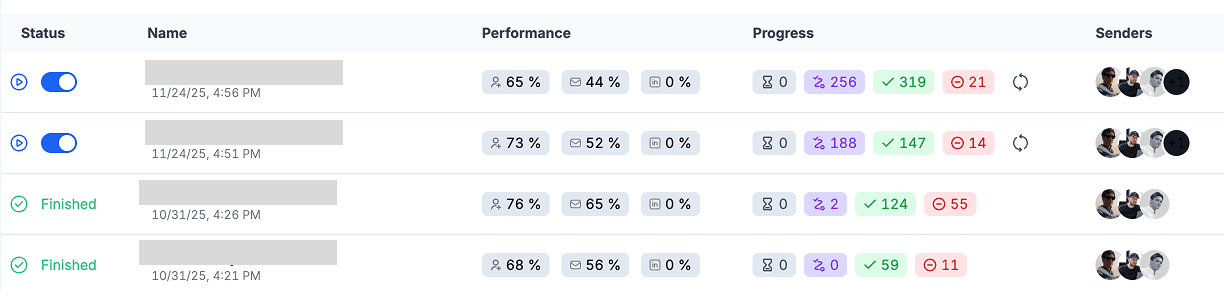
Our repeatable playbook for achieving high converting LinkedIn outreach campaigns
If your goal is to run modern, personal, AI-powered outbound that gets 2–3x more replies, this guide will give you the full system.
Chapter 1: Targeting (LinkedIn Intent-Based Lead Generation Strategy)
The most important part of outbound sales is targeting - not messaging, not tools, not sequencing. Your targeting determines 80–90% of whether your personalized landing pages will convert and whether your LinkedIn outreach will get replies.
If you target the wrong leads, even the best personalized ABM page, the best AI-generated copy, and the best outbound sequence will underperform.
This chapter focuses on how we use LinkedIn intent signals, HeyReach scrapers, and personalization workflows to build extremely high-quality outbound lead lists for GenPage campaigns.
Why Intent-Based Targeting Beats Traditional Lead Lists
Traditional cold outreach relies on static filters like job title, industry, or company size. These lists are technically “qualified,” but not actually interested.
Intent signals - especially behavioral intent - are far more powerful. They highlight prospects who have recently:
• Engaged with content about personalization
• Liked posts about ABM
• Commented on cold outreach frameworks
• Followed creators who teach modern outbound
• Discussed landing page personalization
• Expressed interest in workflow automation
• Mentioned workflows like Clay, HeyReach, N8N, Instantly, Smartlead, or Flowla
These prospects are not only relevant, they’ve already shown real buying behavior.
This is why LinkedIn intent scraping is the core of the GenPage outbound workflow.
Using LinkedIn Behavior as the #1 Intent Source
LinkedIn activity is the strongest real-time signal in outbound sales. We specifically target:
• People who engage with posts about personalized landing pages
• People discussing executable ABM personalization strategies
• Prospects commenting on cold outreach tips
• Buyers reacting to sales automation workflows
• Founders exploring personalization tools
• SDR leaders reacting to outbound case studies
Every time someone likes, comments, or shares a post on any of these topics, it sends a direct signal that they might benefit from a personalized landing page workflow.
Priming Your LinkedIn Feed for High-Intent Leads
To consistently surface high-intent posts, we “prime” the LinkedIn feed by following creators and companies in outbound, ABM, AI-sales tooling, and personalization.
This is a crucial SEO concept for the algorithm - it trains your feed to display content that your ideal persona engages with.
Follow:
• Outbound automation tools (HeyReach, Clay, LaGrowthMachine, Instantly, Smartlead)
• Personalization platforms (Flowla, Mutiny, Distribute, Userled)
• AI outbound platforms
• Sales influencers and ABM creators
• Competitors and similar-category startups
This turns LinkedIn into a daily stream of high-intent opportunities.
Targeting Users of Tools That Integrate Well With GenPage
One of the most overlooked strategies is targeting users of complementary tools. For example:
• HeyReach users doing LinkedIn automation
• Clay users running enrichment workflows
• LaGrowthMachine or Aimfox users
• Smartlead and Instantly email automation users
• N8N users building custom outreach automations
These users already care about personalization, automation, and efficiency - exactly the people most likely to benefit from GenPage’s personalized sales pages.
This is why GenPage performs so well when positioned alongside these tools.
Finding High-Engagement Posts With Search Operators
A simple but effective tactic is using Google search operators to uncover high-engagement LinkedIn posts that your ICP interacts with:
site:linkedin.com “personalized landing pages”
site:linkedin.com “cold outreach”
site:linkedin.com “ABM”
site:linkedin.com “outbound personalization”
site:linkedin.com “AI sales tools”
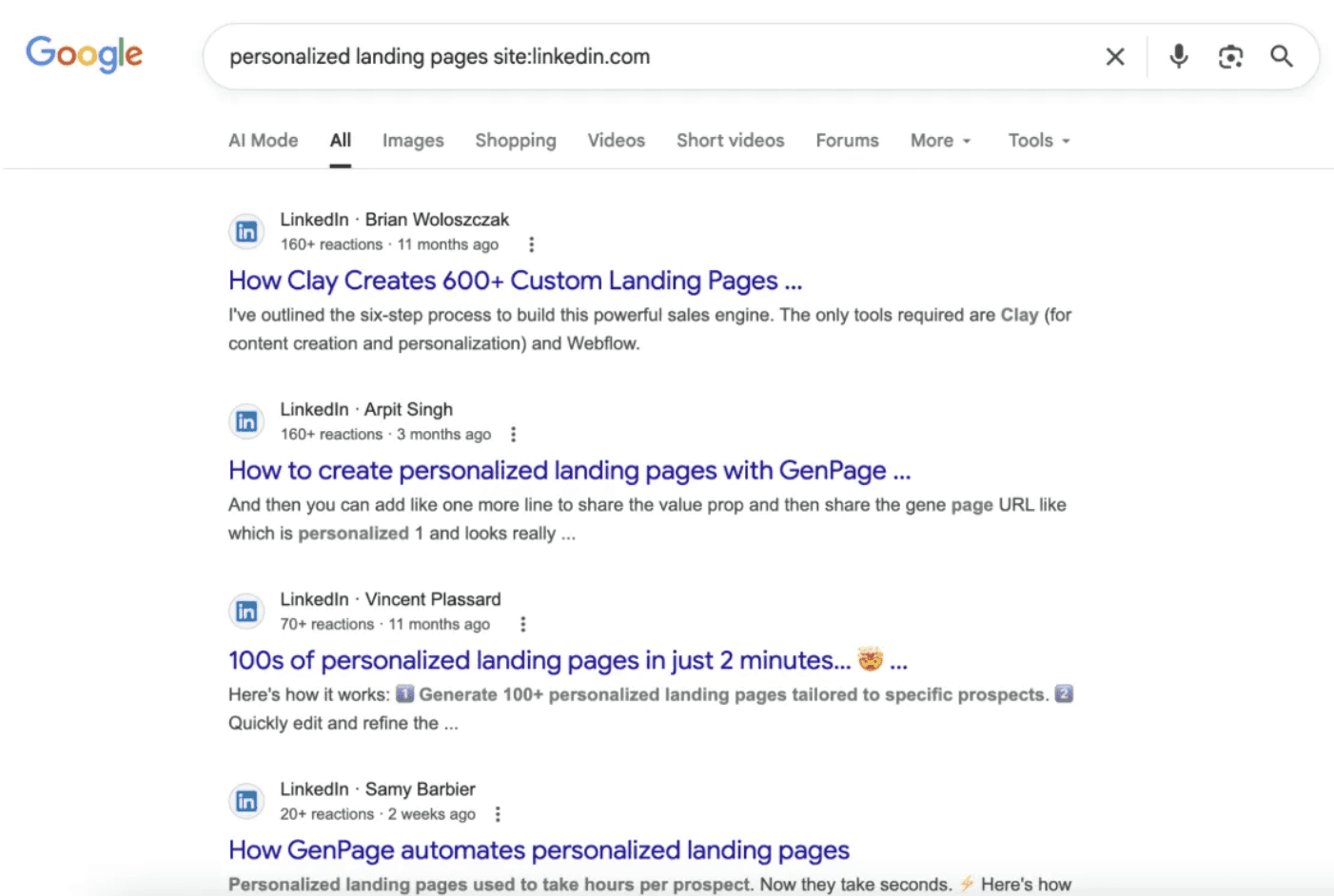
Using Google Search Operators to find relevant LinkedIn content
These posts often have hundreds of comments, making them perfect for scraping.
Scraping LinkedIn Reactors and Commenters for High-Intent Lead Lists
Once you find a relevant LinkedIn post, scrape:
1. Reactors → using HeyReach’s native scraper
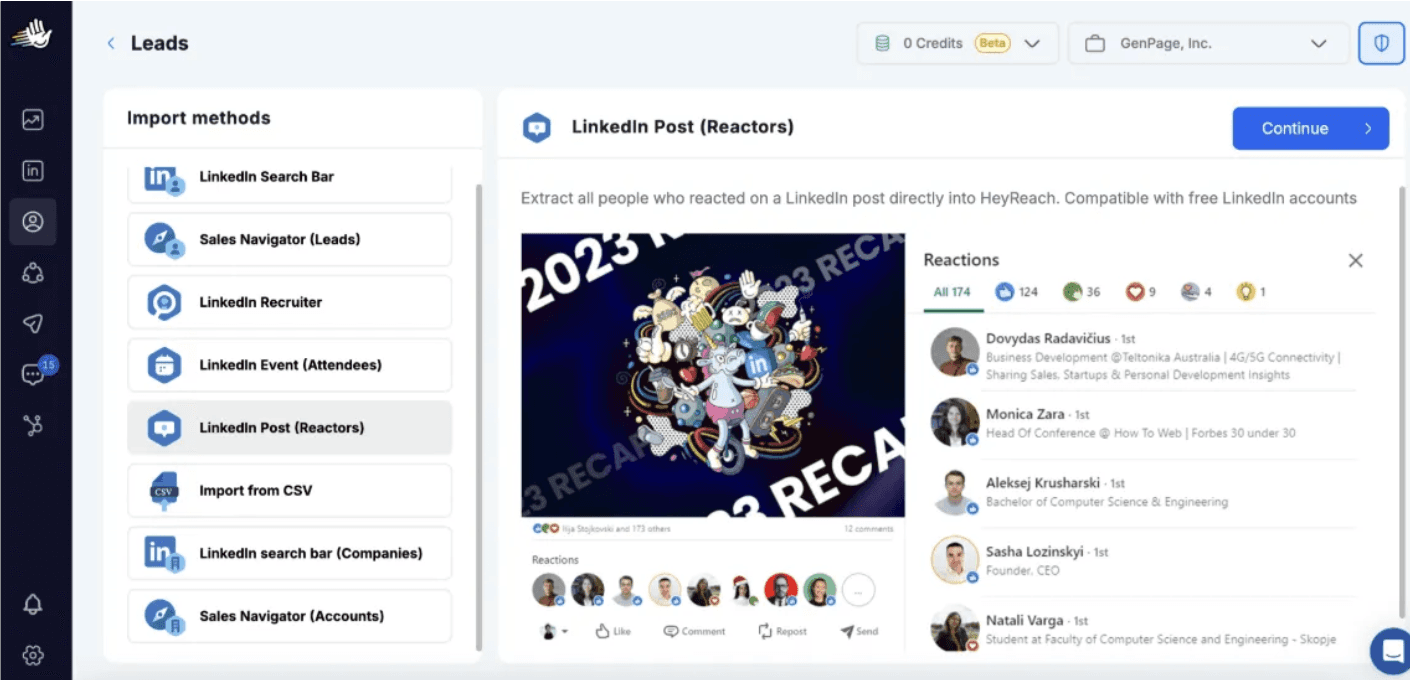
Scraping LinkedIn Post Reactors With HeyReach
2. Commenters → using this Apify LinkedIn Comment Scraper
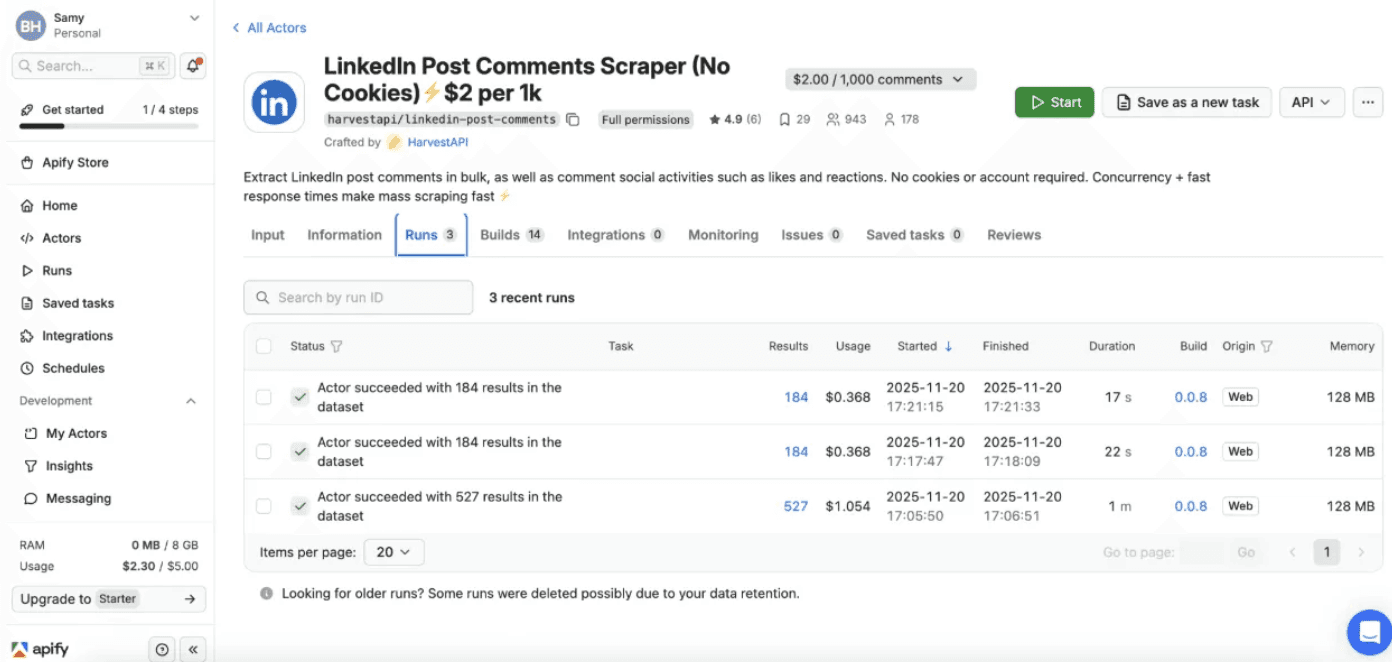
Scraping LinkedIn Post Commenters with Apify
You get $5 in free credits when signing up to Apify, so you can test this for free.
Note: Commenters are useful for scraping lead magnet posts where comment counts are high.
Steps:
• Create a HeyReach lead list
• Import reactors directly
• Scrape commenters with Apify
• Export CSV
• Upload to HeyReach
This produces a clean, real-time, intent-qualified list - exactly the type of list that performs best when paired with GenPage personalized landing pages.
These leads consistently generate 2–3x higher reply rates because they match both:
• Topic-level intent
• Behavioral interest
This is the core foundation of the GenPage outbound framework.
For teams who want to close the loop between signal detection and LinkedIn message delivery automatically, signal-based LinkedIn outreach platforms like Valley take this one step further; instead of manually building a list from scraped reactors, you can:
Detect who’s already engaging with your LinkedIn posts
Visiting your profile
Browsing your site in real time
And generate personalized LinkedIn messages in the sender’s voice triggered by those signals. Paired with a GenPage personalized landing page as the CTA destination, this creates a fully automated, intent-to-conversation pipeline.
Chapter 2: Creating High-Converting Personalized Landing Pages in GenPage
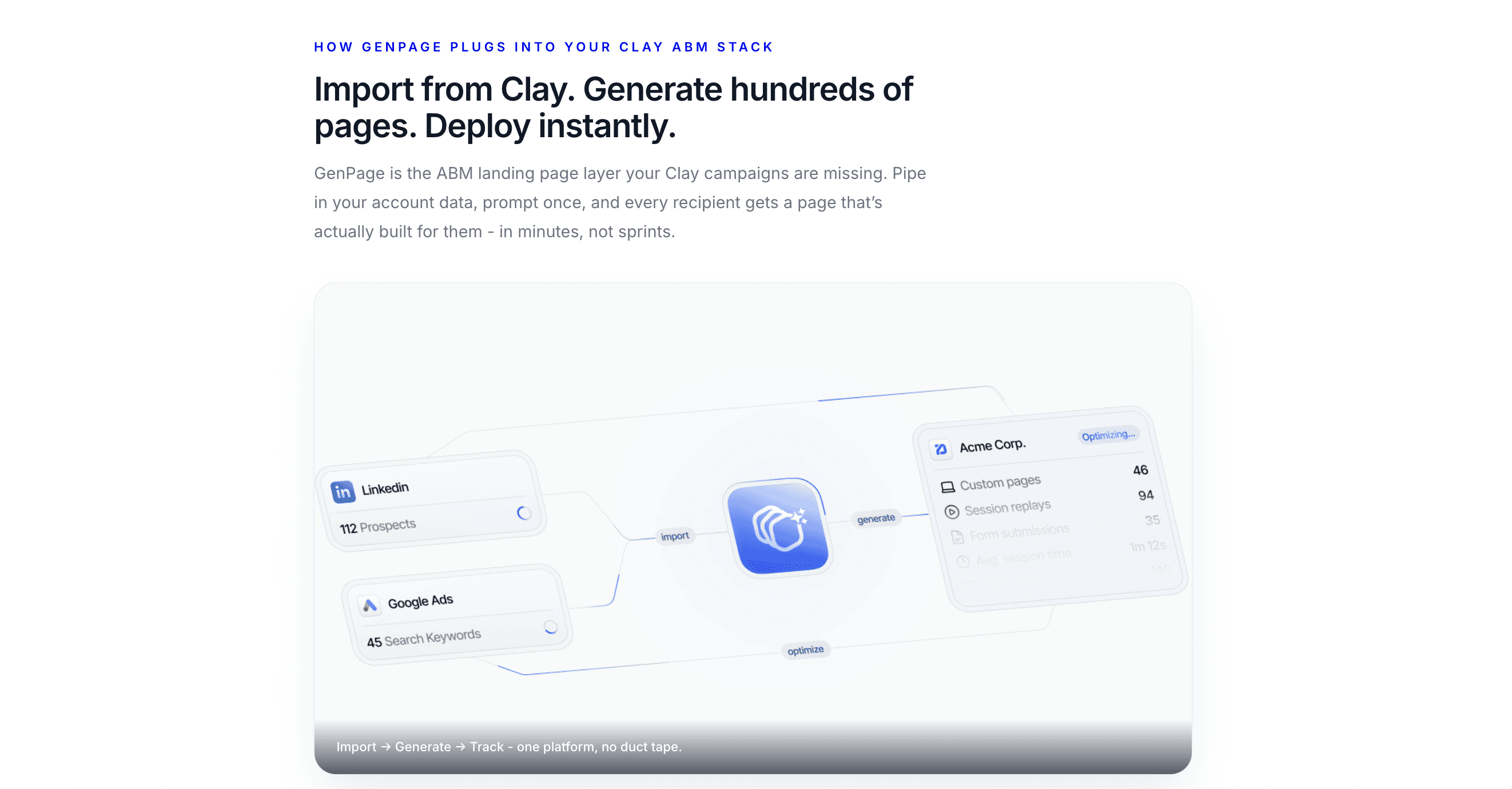
Personalized landing pages are the core multiplier in modern outbound. They break patterns, increase curiosity, and help prospects understand your value instantly. GenPage allows you to create these personalized sales pages at scale using AI-driven content generation, variable-based personalization, and built-in data enrichment.
In this chapter, you’ll learn how to build a high-converting personalized landing page for outbound, how to structure your content for maximum impact, and how GenPage automates the personalization process for every lead.
Why Personalized Landing Pages Convert Better Than Messages Alone
The biggest challenge in cold outbound is capturing attention. Prospects receive hundreds of text-only messages across LinkedIn, email, and Slack. A visual, dynamic, personalized landing page immediately stands out because it:
• Disrupts the standard LinkedIn inbox preview
• Shows tailored value at a glance
• Demonstrates effort and relevance
• Reduces cognitive load compared to reading long messages
• Makes your offer more concrete and more personalized
• Creates instant trust through visual branding
This is why personalized landing pages consistently outperform both traditional messaging and generic outreach tools.
Start With the Offer Before Building a GenPage
Before opening GenPage or writing a single line of copy, define your offer. A strong, clear offer is the foundation of any effective outbound campaign.
Examples of high-performing outbound offers:
• Free SEO or security audit
• Personalized product demo
• Private beta access
• A done-for-you landing page template
• A workflow audit for outbound automation
• Personalized roadmap suggestions
• Quick teardown or consultation
Ask yourself:
• Is the offer relevant to your exact ICP?
• Is it valuable enough to justify attention?
• Is it easy to understand quickly?
• Is it low-friction and easy to say yes to?
• Does it connect clearly to your product’s value?
Once your offer is clear, you can build a landing page designed to showcase that value.
Creating Your Personalized Page in GenPage
Building a personalized landing page in GenPage is fast, flexible, and designed for scale. Start by creating a new campaign, then choose how you want to generate your template.
You can create a template from:
• A prompt
• An existing website URL
• A PDF or document
• An uploaded design
• An image or screenshot
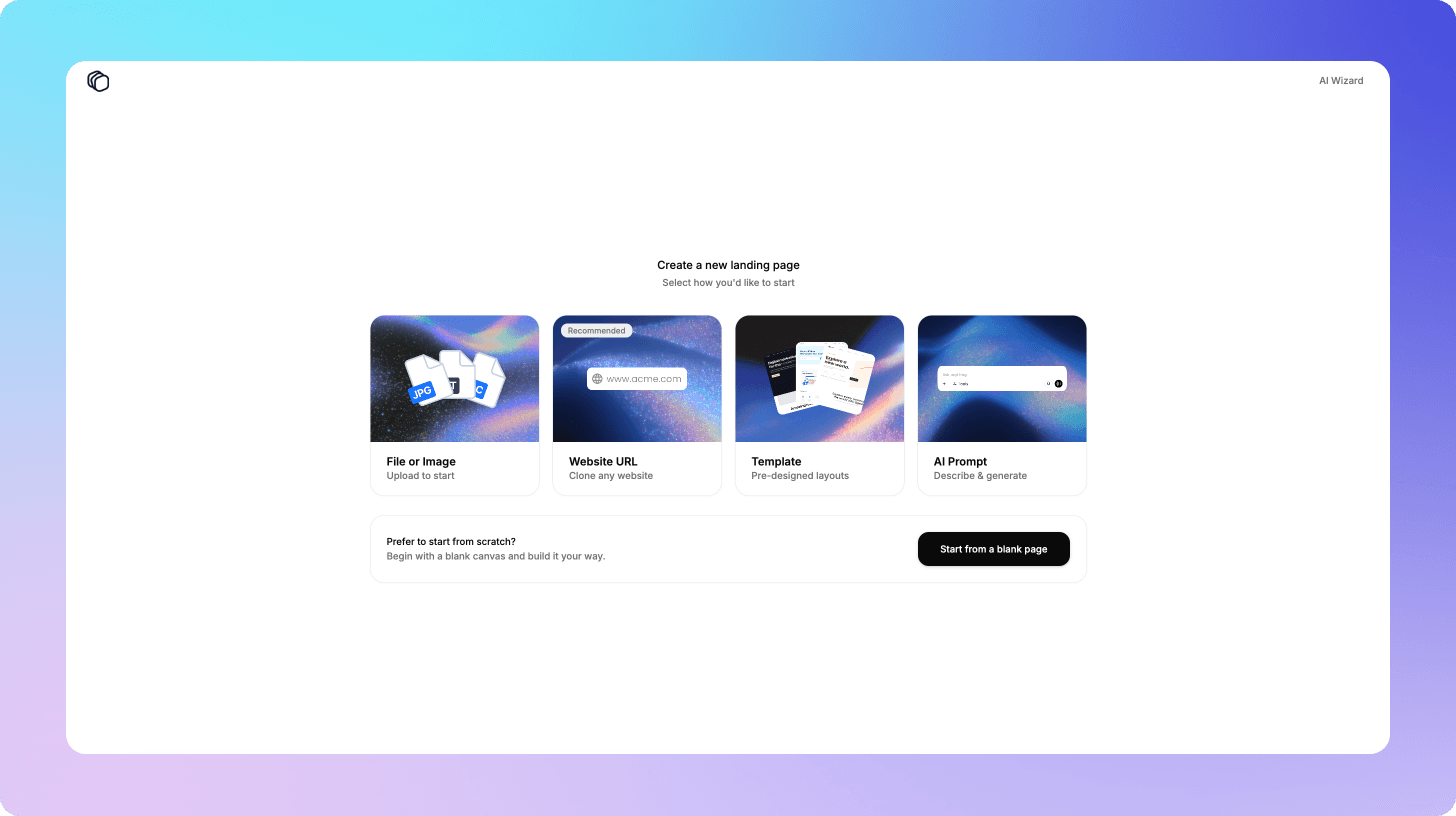
Flexible starting options to start building personalized landing pages in GenPage
The AI builder understands structure, layout, and design patterns, allowing it to create high-quality, responsive landing pages that feel intentional rather than generic.
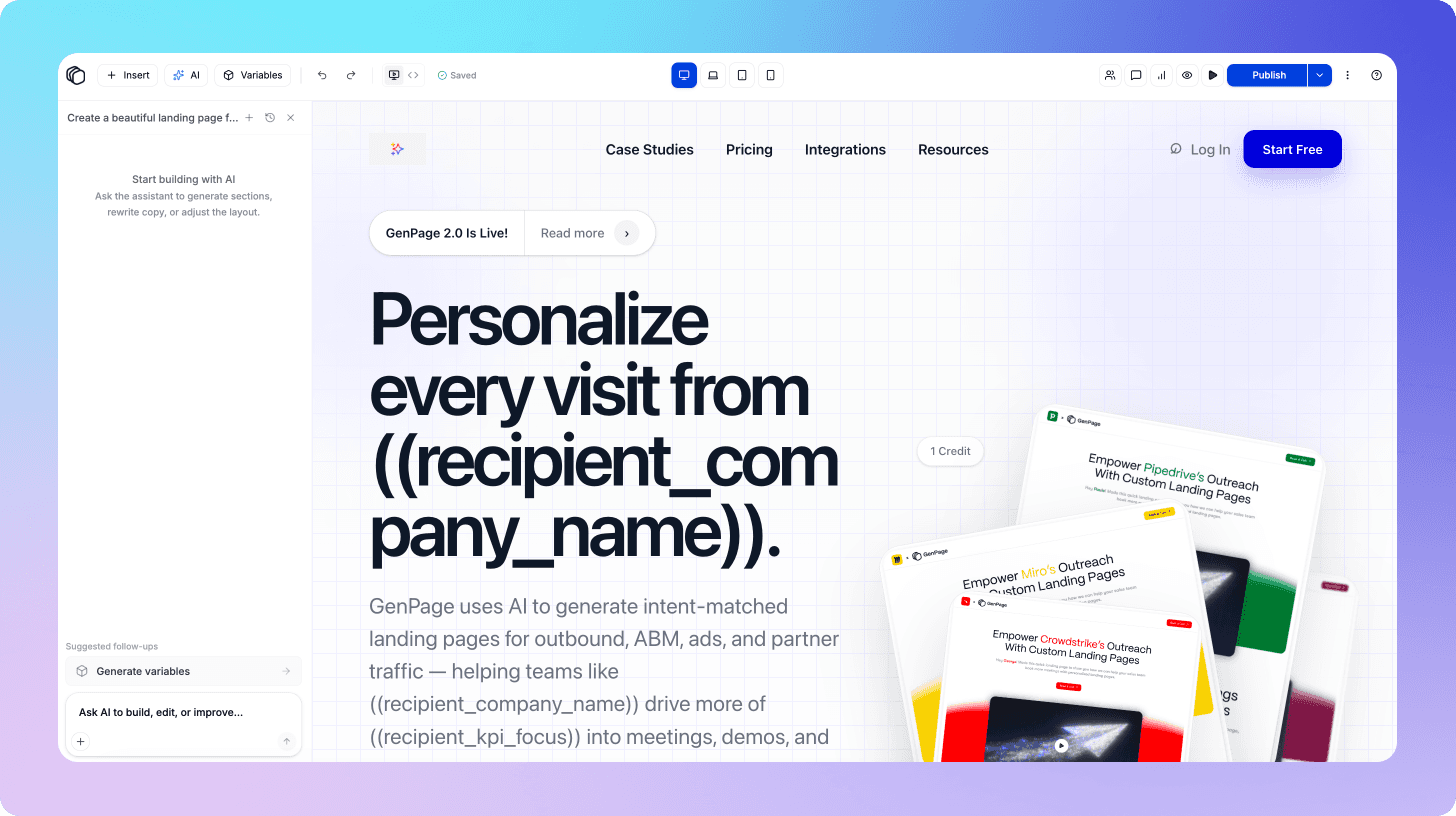
Our AI Landing Page Builder: Just Chat to Build
Adding Personalization Variables
Variables make personalized landing pages truly dynamic. Every lead sees a version of the page tailored specifically to them.
There are several types of variables you can add in GenPage:
Static Variables from Lead Lists
• first name
• company name
• job title
• industry
• website URL
These values come directly from your lead list.
AI-Generated Variables for Deep Personalization
Using GenPage’s variable center, you can create dynamic text based on:
• value propositions
• personalized icebreakers
• objection-related copy
• closing statements
• company-specific pitches
• industry-tailored messaging
These variables use GenPage’s built-in lead and brand enrichment to generate extremely personalized content for each viewer.
Image Variables
• company logo
• LinkedIn profile picture
• dynamic hero visuals
• personalized charts or thumbnails
These images help create immediate familiarity and trust.
Advanced Variable Options
• personalized Loom videos
• embedded demos
• custom scripts or code blocks
• interactive product tours
This level of personalization is impossible with traditional outreach tools but dramatically increases conversion rates when combined with a strong offer.
You can add variables to your landing page template simply by highlighting a section and hitting the variable button:
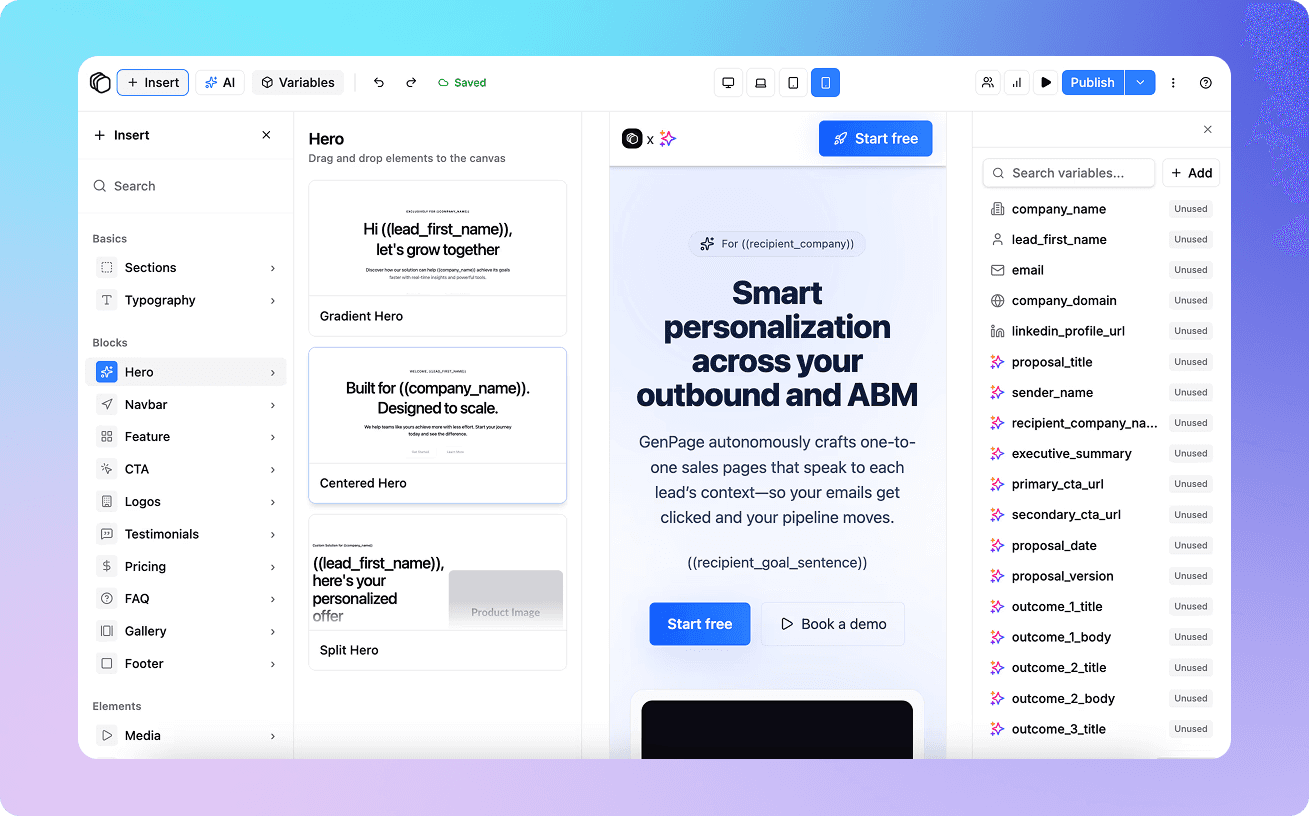
Adding variables to your landing page template to personalize content at scale
Built-In Data Enrichment
GenPage automatically enriches:
• Your brand (features, value propositions, use cases, ICP details)
• Every lead (company info, tech stack, industry, LinkedIn data, website data)
The AI uses both sources to customize the landing page content in real time. You can let the AI auto-generate all variables or create your own prompts within the variable center:
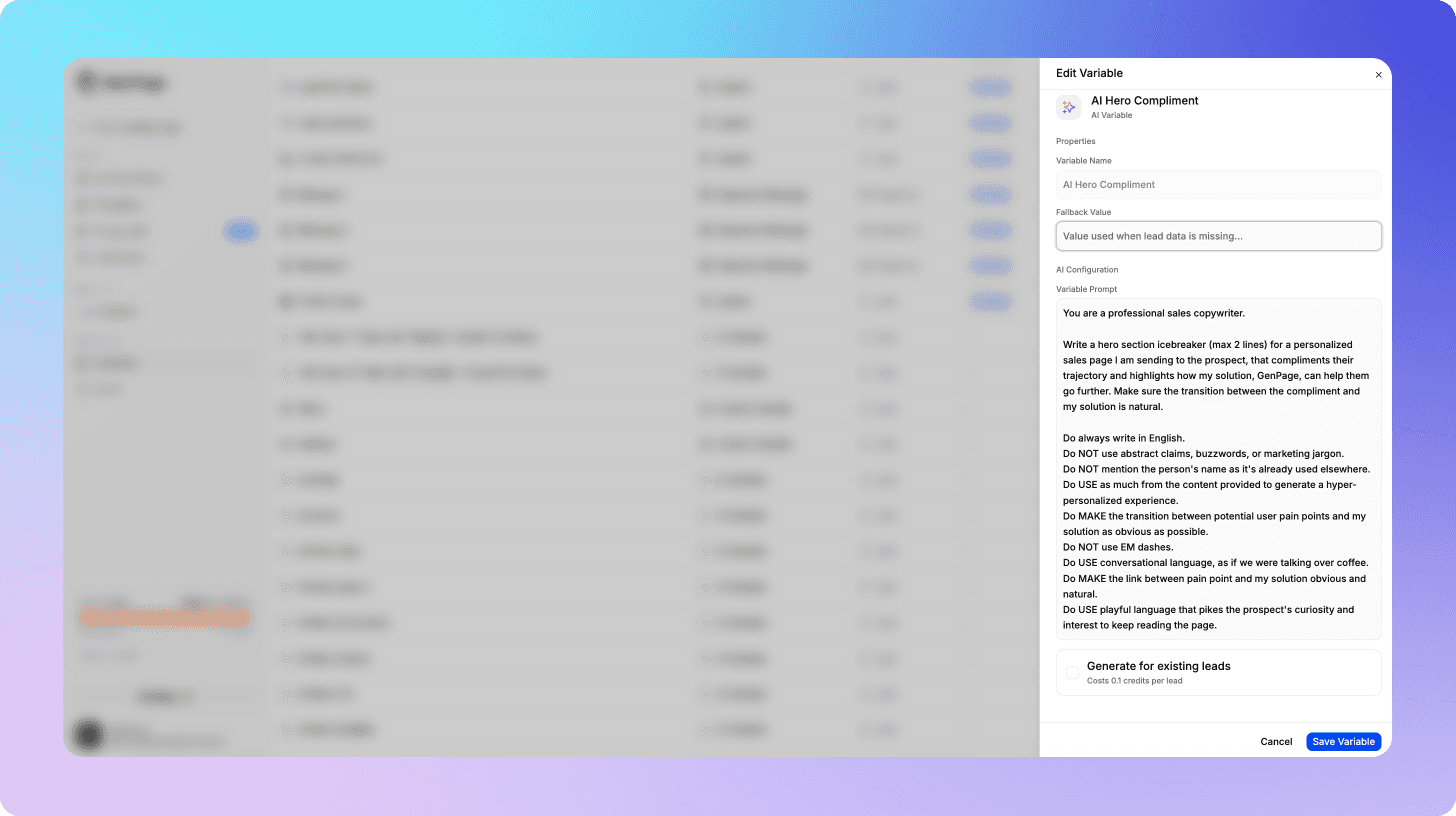
Creating AI variables in GenPage
Example variables include:
• personalized hero icebreaker
• tailored pain point description
• relevant industry challenge
• unique value proposition
• contextual CTA messaging
This enrichment is what allows GenPage to produce extremely relevant and specific pages at scale.
The GenPage Personalized Landing Page Template Structure
A personalized landing page works best when it is simple, visual, and value-focused. Over-engineering the page reduces clarity and distracts the prospect. We keep our structure minimal and conversion-oriented.
Below is the exact structure our team uses to achieve high reply rates.
Hero Section
The hero section is the scroll-stopper. This is where the prospect instantly recognizes that the page is personalized specifically for them.
GenPage Template Hero Section
The hero includes:
• your logo
• the prospect’s logo
• personalized branding colors
• prospect name and job title
• prospect’s LinkedIn profile photo
• one clear, concise hook
• a single primary CTA
• a personalized icebreaker generated by AI
The hero text is one of the strongest personalization elements. It analyzes all relevant context to produce a conversational introduction that feels handcrafted.
This immediately builds trust and curiosity. Here's the prompt we use (feel free to steal it and tweak it!):Prompt: Hero Section
“You are a professional sales copywriter.
Write a hero section subtext (max 2 lines) for a personalized sales page I am sending to the prospect, that highlights the benefits of my solution GenPage compared to a custom Webflow + Clay implementation.
Do always write in English.
Do NOT use abstract claims, buzzwords, or marketing jargon.
Do mention the person's name and company.
Do USE as much from the content provided to generate a hyper-personalized experience.
Do MAKE the transition between potential user pain points and my solution as obvious as possible.
Do NOT use EM dashes.
Do USE conversational language, as if we were talking over coffee.
Do MAKE the link between pain point and my solution obvious and natural.
Do USE playful language that pikes the prospect's curiosity and interest to keep reading the page.”
Below the Fold: Value Presentation
Embedding custom videos in your custom landing pages for higher conversions
Once the prospect scrolls past the hero, they should see a clear explanation of value. We typically include:
• a short Loom video showcasing the product
• a quick walkthrough of the workflow
• 3–5 outcome-driven metrics
• proof points that build credibility
Authentic videos perform better than polished videos because they feel personal and real.
Feature Breakdown
Next, we keep a concise feature section outlining key features that directly support the offer.
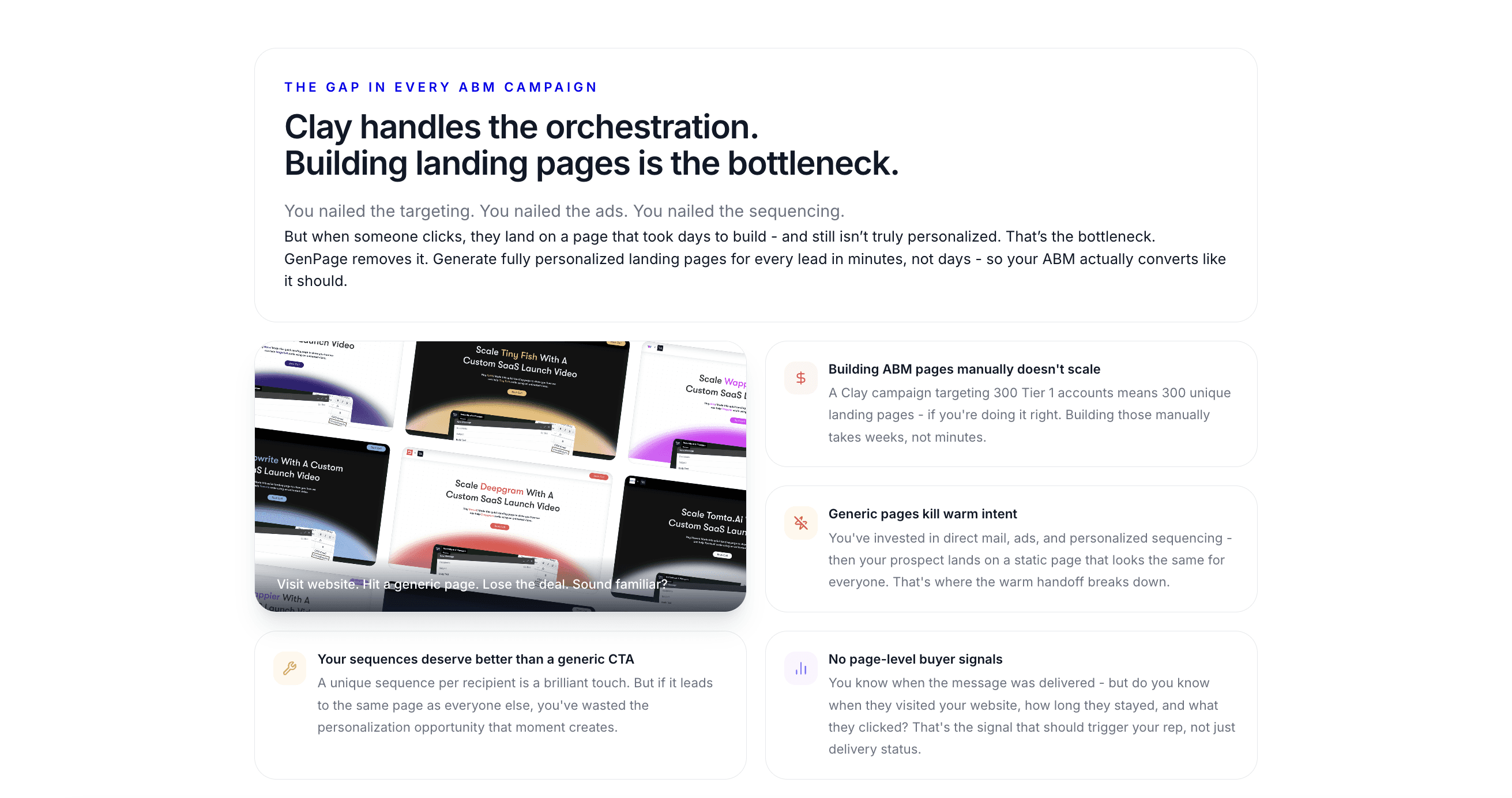
Add a quick feature breakdown to your pages for viewers that have made it this far
Examples:
• AI-generated personalized landing pages
• automatic lead enrichment
• on-brand sales collateral generation
• integrations with tools like HeyReach, Zapier, or Clay
• analytics and engagement tracking
This section should be easy to skim. At this point, the viewer already understands the value.
Before and After Comparison
The before-and-after section is one of the highest-performing conversion elements. It visually highlights the transformation your product creates.
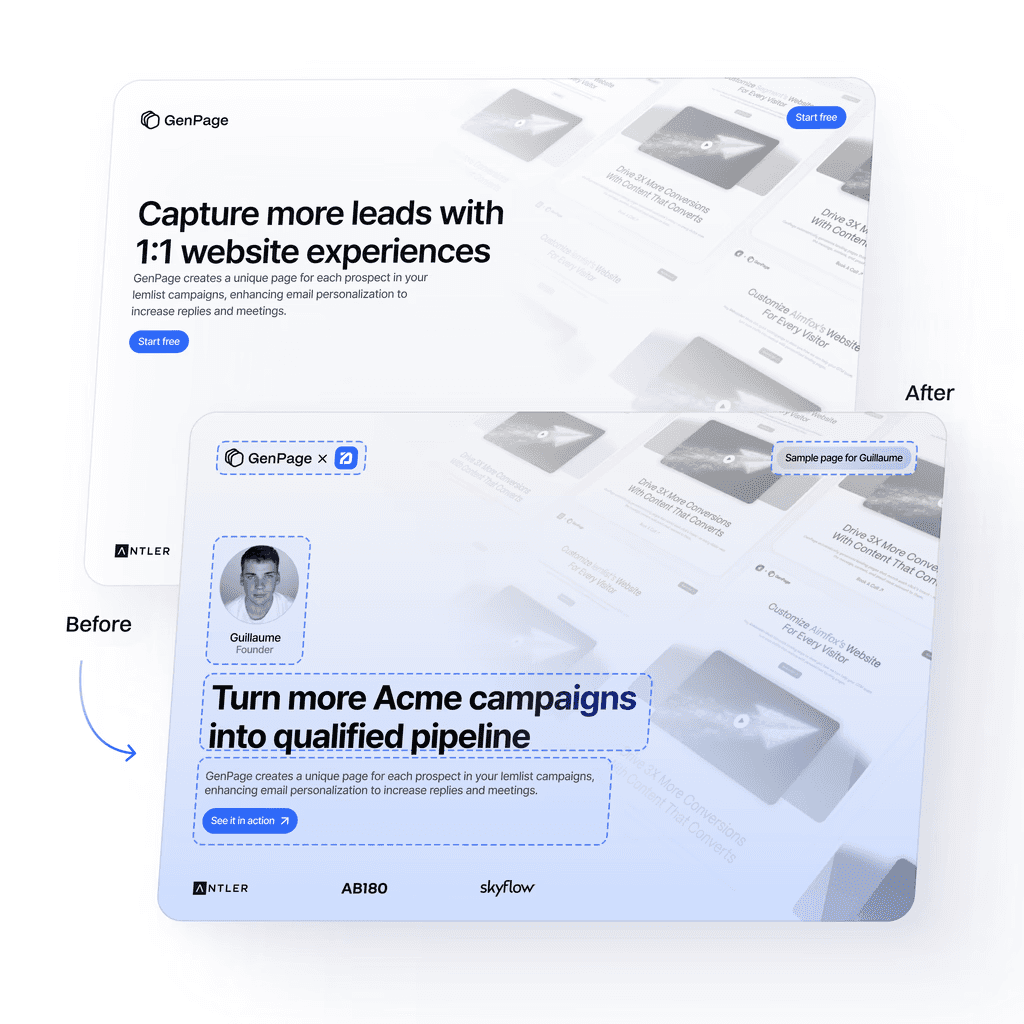
Before GenPage: Generic landing page. After GenPage: Beautifully accurate outreach + personalized landing pages with storytelling visuals
Typical structure:
• Before: generic outreach screenshot
• After: a personalized landing page screenshot
• Short explanation of the outcome
This helps the prospect imagine their own outreach improving dramatically.
Testimonials and Social Proof
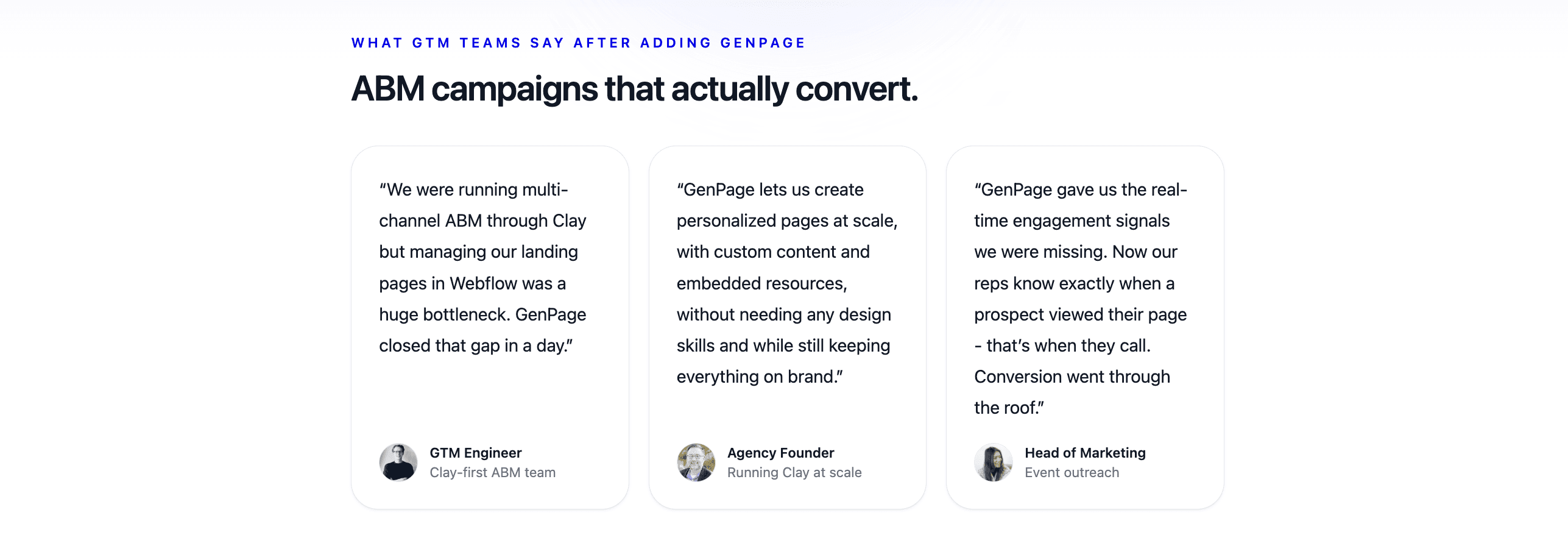
Letting your customers do the selling for you with testimonials
Real customer testimonials provide trust and reduce friction. We include quotes from:
• B2B founders
• SDR leaders
• sales teams
• outbound agencies
Anyone still scrolling this far is seriously evaluating your product. We often use a CTA like:
Get expert onboarding to set up your first personalized outbound campaign.
Embedding a scheduling tool removes the last layer of friction.
Closing Section and Final CTA
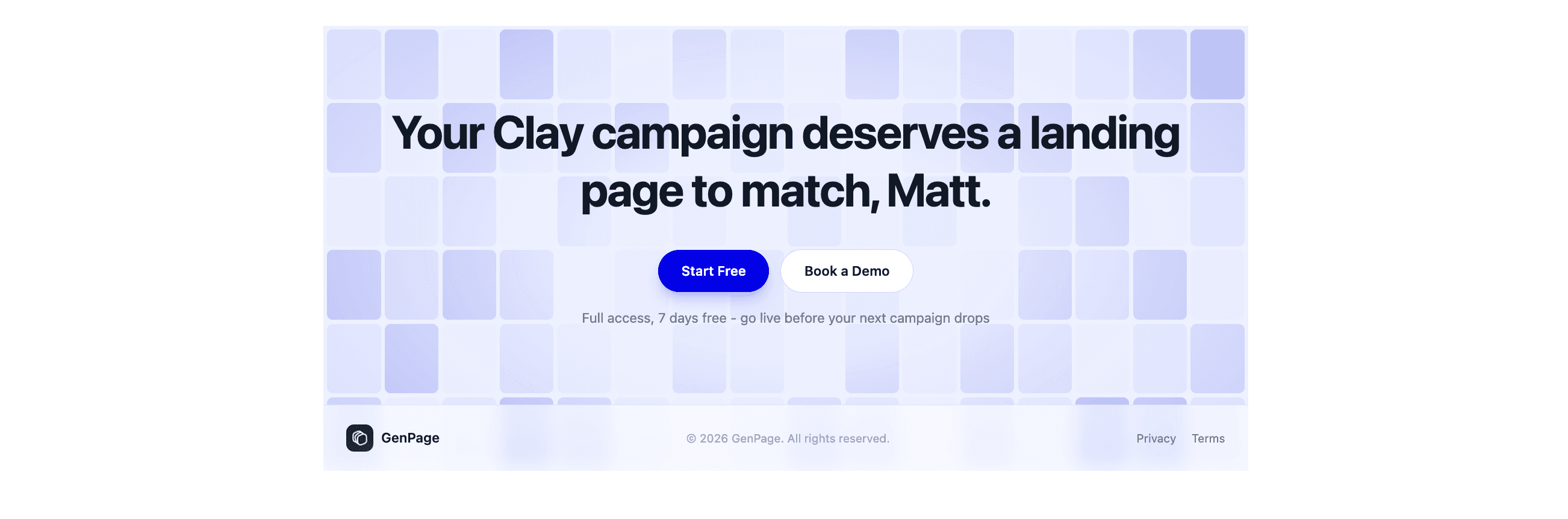
You can easily embed your calendar with tools like Calendly or HubSpot for on-page conversion, like we did in the Hero section. Feel free to switch up the location of your calendar!
The closing section should include:
• a short summary of value
• a clear CTA
• an embedded calendar or form if not added elsewhere
Booking directly on the page makes it ridiculously simple for prospects to take action.
You can embed anything you want here - we’ve experimented with:
• Arcade product tours
• Interactive demos
• Chat widgets
GenPage supports all of it.
Here’s a link to the template if you’d like to check it out: GenPage Template
Automatic HeyReach Sync
Once you’re satisfied with the layout of your sales page template and its variables, you can import your leads in just a couple of clicks thanks to our native HeyReach integration. The process is the same with any other Linkedin or Email outreach tool, so we will simply use HeyReach for this example.
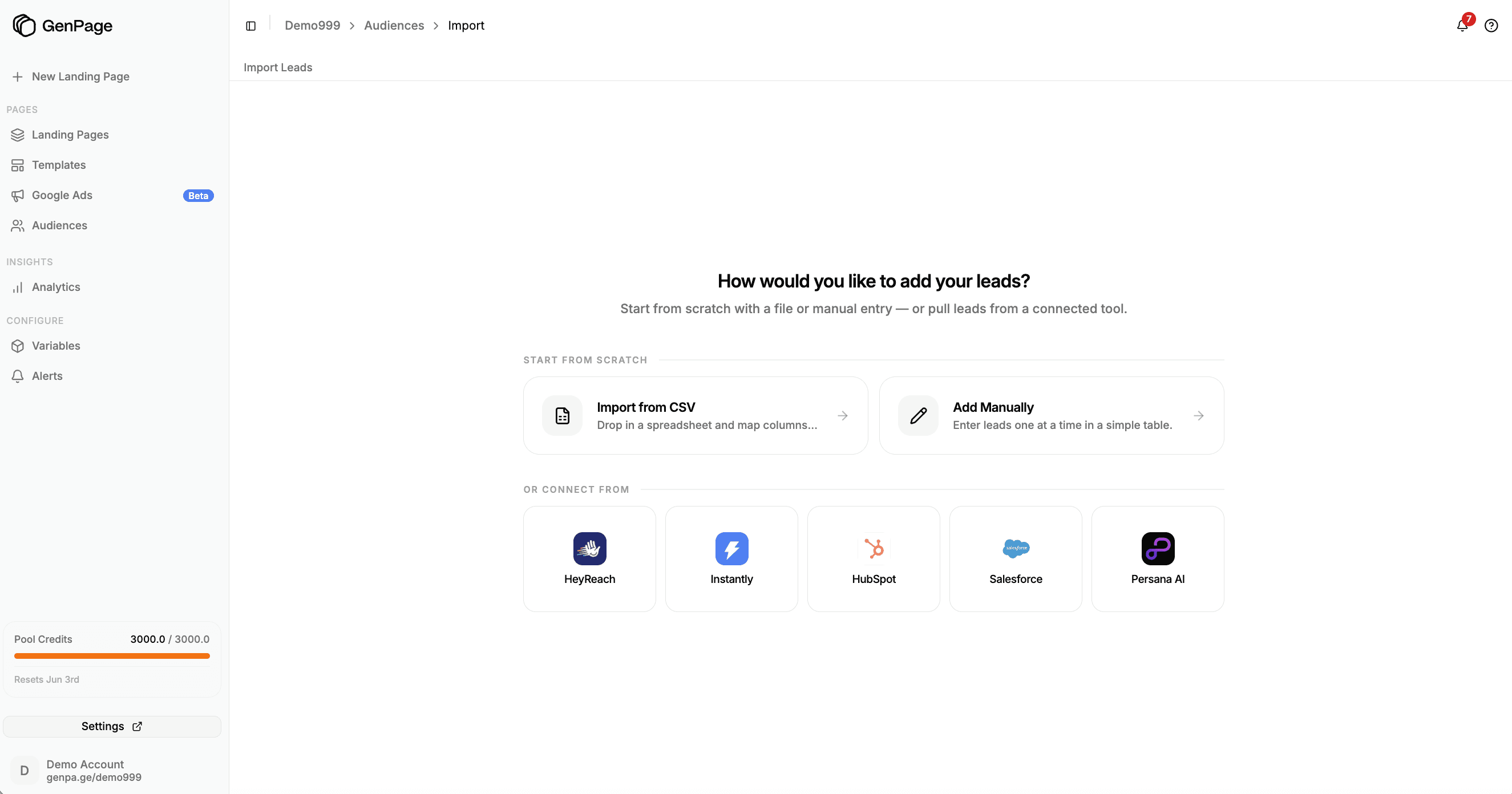
Import an audience of leads to GenPage via CSV or our network of integrations to create your personalized landing pages
Through this integration:
• GenPage fetches your HeyReach lead lists
• Generates all GenPages
• Sends unique page URLs back to HeyReach as variables
No copy/paste.
No manual work.
Your GenPage links are instantly ready to use for HeyReach’s sequence builder.
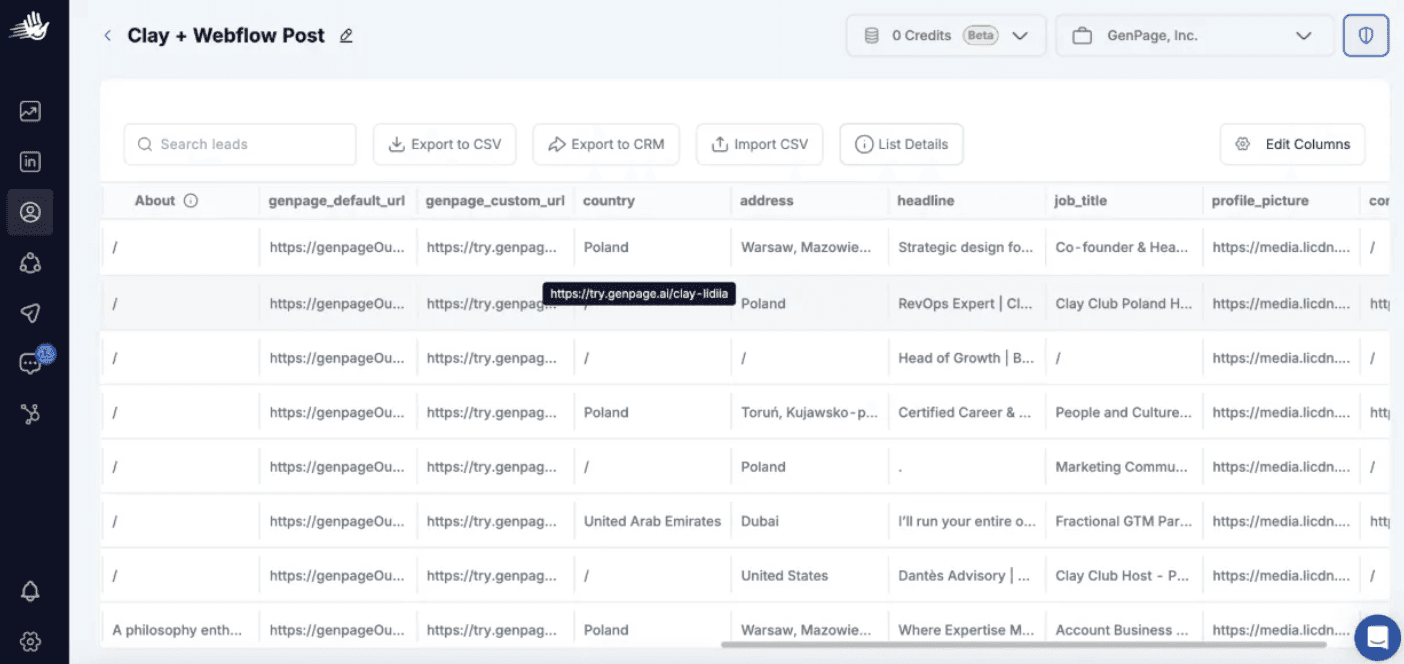
Finding your GenPage landing page links in HeyReach's lead lists
For a full tutorial on how to set up your HeyReach integration, you can read this guide.
Chapter 3: High-Converting Messaging for Personalized Outbound
Messaging is the bridge between your targeting and your personalized landing pages. Even with the best intent-based lead list and the most engaging personalized page, poor messaging can bottleneck your results. Modern outbound messaging must be short, conversational, and crafted to create curiosity.
In this chapter, we cover the complete messaging strategy we use at GenPage to consistently achieve reply rates above 60 percent with LinkedIn outreach. This includes mobile-native formatting, pattern-disruptor hooks, personalized landing page CTAs, and a sequence structure that maximizes engagement without overwhelming your prospects.
Why Modern Outbound Messaging Must Be Short and Direct
Most B2B buyers read LinkedIn messages on their phones. If your message looks like a pitch, feels automated, or requires too much reading, it will be ignored.
High-performing messaging uses:
• short sentences
• simple vocabulary
• a casual, texting-style tone
• curiosity-building hooks
• low-friction CTAs
• references to the prospect’s intent signal
• a personalized landing page link to do the selling
This format aligns naturally with how people consume LinkedIn messages.
GenPage helps these messages perform even better by generating personalized landing pages that preview visually inside LinkedIn inboxes, instantly differentiating your outreach.
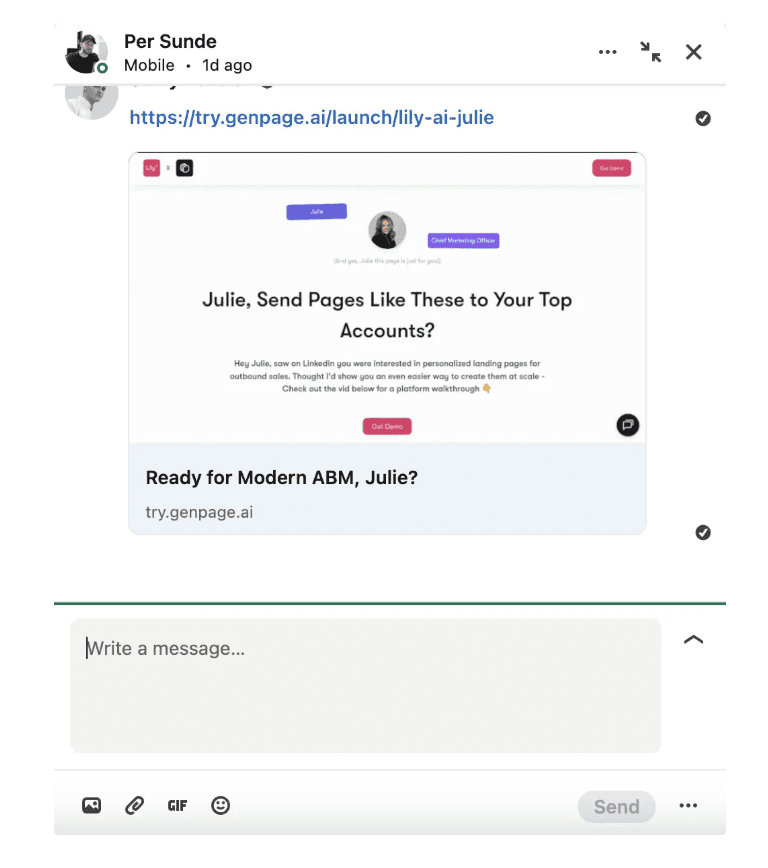
GenPages show rich previews in the LinkedIn inbox to grab attention and drive more clicks
The Role of Personalized Landing Pages in Messaging
Personalized messages are good. Personalized pages are better. When you send a custom landing page URL:
• LinkedIn shows a rich link preview
• the visual differentiates your message from automated outreach
• the curiosity factor increases open and reply rates
• prospects explore your value on their own
• the CTA becomes more natural and less salesy
• the message can stay short because the page explains everything
Your messaging exists to open the door. Your personalized landing page does most of the persuading.
Rules for High-Performing LinkedIn Outbound Messaging
Keep messages short
Short messages increase readability and reduce friction.
Write like you are texting
The tone should be human, relaxed, and direct.
Reference an intent signal
Mentioning a post or workflow the prospect engaged with increases relevance.
Use soft CTAs
Instead of asking for a call immediately, offer something easy to say yes to.
Let the personalized landing page carry the heavy lifting
The GenPage URL becomes the centerpiece of your messaging strategy.
How Personalized Pages Improve LinkedIn Inbox Preview Click-Through Rates
When sending a GenPage link through LinkedIn:
• the link preview displays a personalized thumbnail
• prospects see their company logo, name, or profile photo
• the visual curiosity creates a pattern interrupt
• the preview makes the outreach feel handcrafted
• click-through rates increase significantly
This preview effect is a major advantage over traditional LinkedIn messages.
Our Exact LinkedIn Outbound Sequence (High-Conversion Templates)
Below are the templates we use inside HeyReach when running LinkedIn automation campaigns that attach GenPage personalized landing pages.
These templates are structured to maximize replies, minimize friction, and leverage personalization at every step.
Message 1: Context-Based Pattern Interrupt
Hey {first_name},

Saw you checking out that workflow on personalized landing pages and outbound automation.

We’re building a leaner, AI-powered version of that idea that makes personalization much easier at scale.

I made a quick personalized page for you - want to see it?
Why this works:
• references a real intent signal
• conversational tone
• simple yes/no CTA
• creates curiosity
• sets up the personalized landing page as the next step
Message 2: Curiosity and Link Delivery
Alright, here’s the page anyways 😆
{GenPage_URL}
It takes a few seconds to check out and fits naturally into any outbound workflow. If you want, I can show you how other teams are doubling reply rates with this approach.
Why this works:
• humor lowers friction
• link preview increases curiosity
• early social proof creates trust
• message stays short and approachable
Message 3: Results-Based Credibility
By the way, we recently published a case study with HeyReach showing how personalized landing pages can 2x or 3x reply rates. Thought you might find it useful:

https://www.heyreach.io/playbook/genpage-campaign
Why this works:
• high-authority social proof
• shifts conversation toward outcomes
• offers value with no ask
Message 4: Breakup Message
{first_name},

Last message from me. No worries at all if the timing isn’t right.

If you ever want to try a personalized page for your outbound flow, this one is quick to test. Worst case, you leave with a few ideas for your next campaign.

Either way, wishing you strong conversions.
Why this works:
• respectful tone
• reduces pressure
• creates a natural exit
• keeps the door open
Chapter 4: Building an Effective Outbound Sequence for Personalized Campaigns
Sequencing is the final layer of modern outbound. While it matters less than targeting, offer, and messaging, a solid outbound sequence ensures your prospects see your messages at the right moment and receive your personalized landing page when they are most receptive.
This chapter outlines the exact outbound sequence we use at GenPage when combining intent-based targeting, personalized landing pages, and LinkedIn automation tools like HeyReach. The sequence is simple, lightweight, and optimized for how prospects actually behave on LinkedIn today.
Why Sequencing Matters Less Than Targeting and Personalization
Many teams over-optimize their outreach sequences, testing dozens of variations without addressing the real problem: the lead list or the offer is weak. Sequencing only accounts for a small percentage of your outbound performance.
Your conversion stack should be prioritized as follows:
Targeting (intent-based, high-signal prospects)
Offer (valuable, relevant, easy to say yes to)
Personalized landing page (GenPage)
Short, conversational LinkedIn messages
Sequence timing and structure
When the first four layers are strong, your sequence only needs to be simple, human, and non-intrusive.
How Sequencing Supports Personalized Landing Pages
A well-timed sequence increases:
• link preview visibility in the prospect’s inbox
• curiosity and click-through to your personalized page
• the likelihood your message enters their active window
• the number of touches without overwhelming the lead
The sequence is not designed to pressure the prospect. Its purpose is to ensure they see the personalized landing page when they are open to engaging.
The GenPage + HeyReach Sequence Structure
Below is the exact structure we use for LinkedIn outreach when syncing personalized landing pages into HeyReach.
This structure is intentionally minimal, designed to:
• feel organic
• avoid inbox fatigue
• highlight the personalized page at the right moment
• maintain a natural pacing that aligns with typical LinkedIn behavior
Step 1: Send the Connection Request
Send a clean, neutral connection request with no pitch attached.
If the request is not accepted:
• wait 2 days
• like a recent post
• wait 2 more days
• like another post
These micro-touches can warm up your lead and subtly increase acceptance rates.
If the request is accepted:
• wait 3 hours
• send the first message in your sequence
The 3-hour delay makes the interaction feel manual and intentional.
Step 2: Message 1 (Example in Chapter 3)
Time delay: 3 hours after acceptance
The purpose of Message 1 is simply to acknowledge the prospect’s activity (your intent signal) and introduce your offer without pressure.
Step 3: Message 2 (Example in Chapter 3)
Time delay: 3 days after Message 1
This is where you share the personalized landing page link, allowing LinkedIn’s link preview to work as your pattern disruptor.
Step 4: Message 3 (Example in Chapter 3)
Time delay: 3 days after Message 2
This message provides social proof or a case study. It reinforces credibility without asking for anything.
Step 5: Message 4 (Example in Chapter 3)
Time delay: 4 days after Message 3
This is your soft breakup message. It closes out the sequence politely while keeping the door open.
Full Timeline Summary
Here is the complete outbound timeline in a simple format:
Connection request
Once accepted → wait 3 hours, send Message 1
Wait 3 days → Message 2
Wait 3 days → Message 3
Wait 4 days → Message 4
If not accepted:
• light post interactions every few days
This pacing mirrors organic human behavior on LinkedIn.
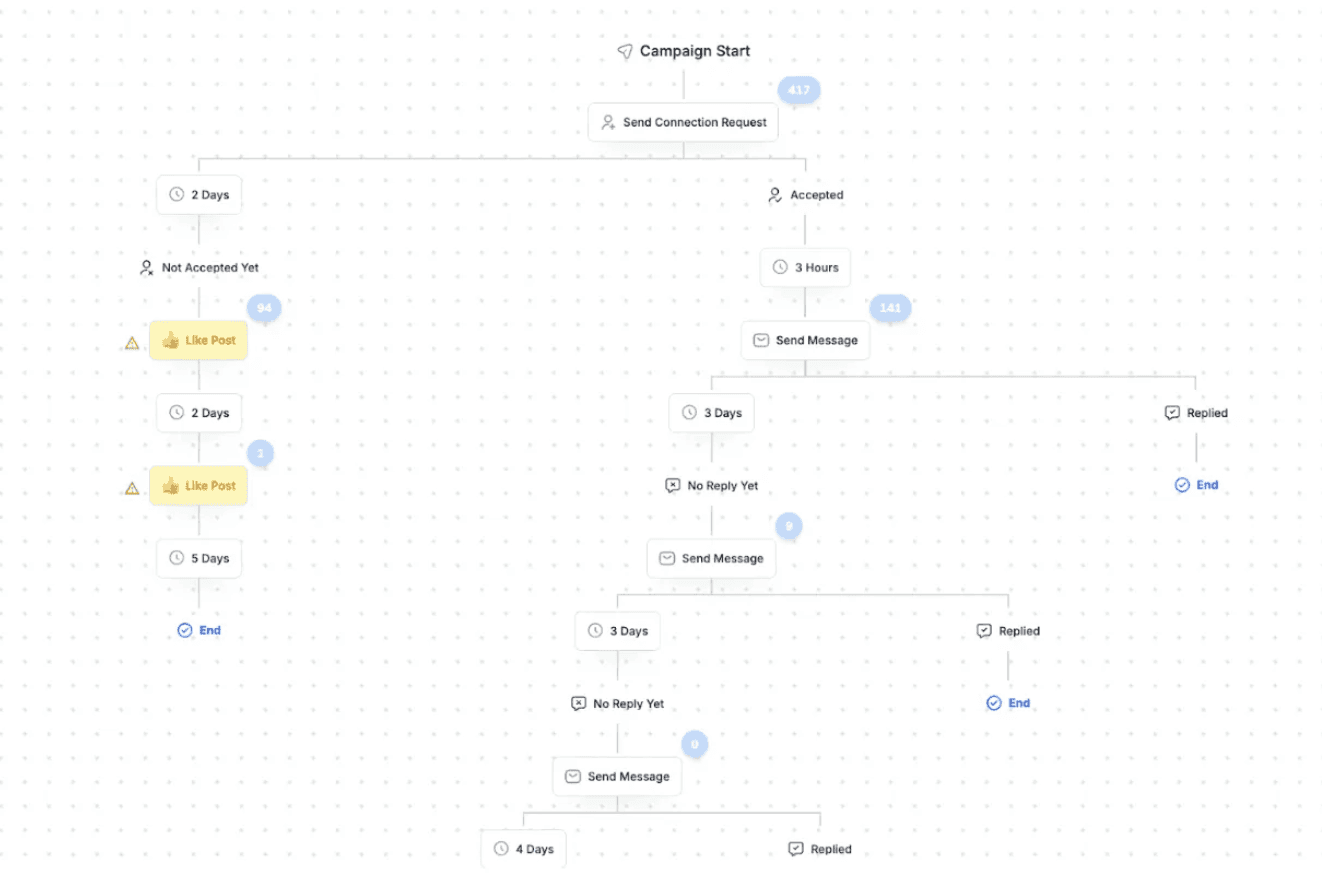
The GenPage + Heyreach Sequence Setup For Personalized LinkedIn Outreach
Automating the Sequence With HeyReach
GenPage automatically syncs personalized URLs directly into HeyReach. To use them:
Open your sequence in HeyReach
Choose a message step
Open the variable list
Insert the GenPage custom URL variable
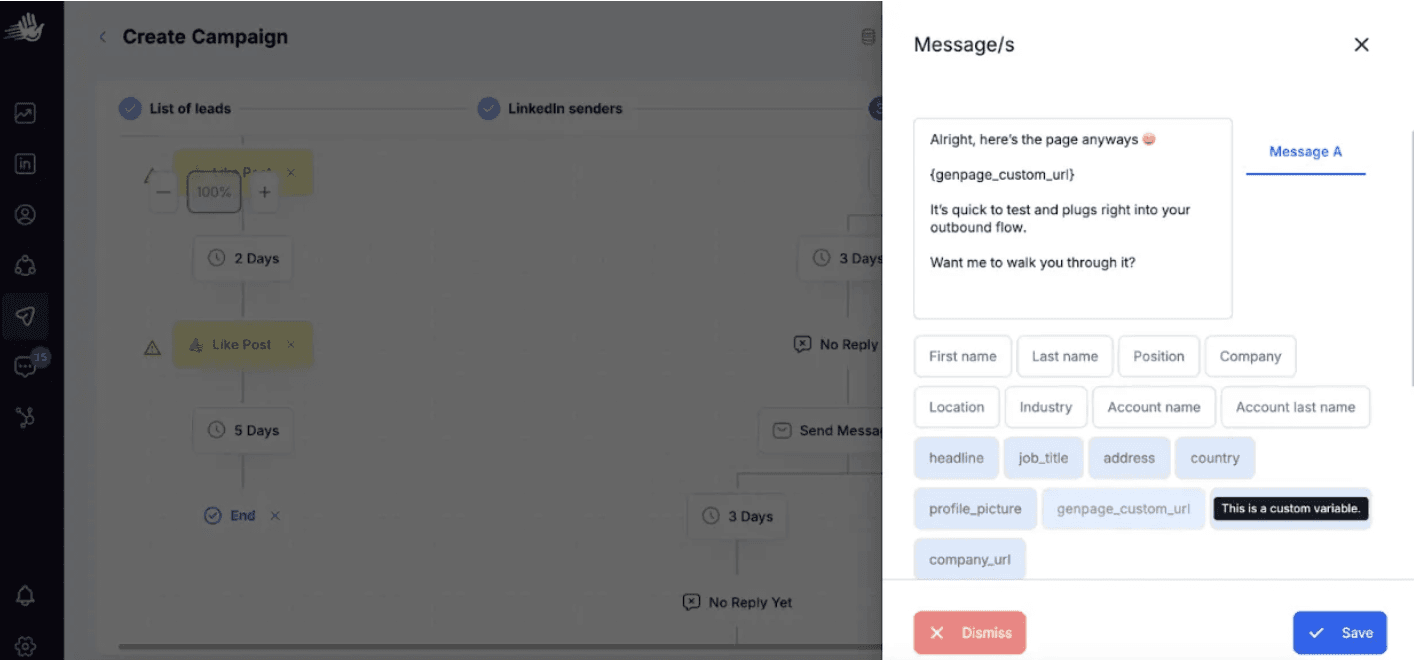
Adding GenPage variables to your LinkedIn outreach sequence in HeyReach
HeyReach automatically sends each prospect their own personalized landing page.
This avoids manual work and ensures every touch remains personalized at scale.
Why This Sequence Works So Well With Personalized Landing Pages
This structure works because it aligns with modern outbound psychology:
• timing feels natural instead of automated
• each touch adds value without pressure
• the personalized landing page delivers the core pitch
• curiosity builds across the sequence, increasing clicks
• social proof arrives at the right moment
• the breakup message reduces friction, not increases it
With strong targeting and a compelling personalized page, this simple sequence consistently outperforms far more complex ones.
Chapter 5: Managing Replies and Outbound Best Practices
Once your personalized landing pages and messaging sequence start generating replies, the real work begins. Managing responses effectively is where interest becomes pipeline. Even the best outbound system underperforms if replies are not handled quickly, professionally, and with the right mindset.
This chapter outlines the reply-handling principles we use at GenPage to convert high reply rates into meetings, demos, and revenue. The goal is to help prospects feel understood, not sold to, while making the next step frictionless.
Why Reply Management Is a Critical Part of Personalized Outbound
You can have excellent targeting, a strong offer, and high-performing personalized landing pages, but without proper reply handling:
• leads go cold
• conversations stall
• meetings don’t convert
• interest fades quickly
Modern outbound depends on responsiveness, clarity, and a consultative tone. Prospects today expect someone who can guide them, not pressure them.
Centralizing Replies With HeyReach Unibox
If you’re running outbound from multiple LinkedIn accounts—or operating several parallel campaigns—reply management becomes chaotic without a central inbox.
HeyReach Unibox solves this by:
• consolidating all replies from all accounts
• giving you a unified conversation view
• allowing faster response times
• reducing missed messages
Centralization alone increases conversion rates because it eliminates dropped conversations.
Respond Quickly and Professionally
Speed matters. A fast response communicates reliability and professionalism. Prospects who reply to personalized landing pages are already showing high intent—delaying your response directly lowers conversion rates.
Whenever possible:
• reply within minutes
• use short, clear messages
• match the tone of the prospect
• avoid long paragraphs
• provide direct next steps
Fast responses dramatically improve booked meetings.
Act Like a Consultant, Not a Salesperson
The most effective way to convert inbound interest from personalized outbound is to adopt a consultant mindset.
A consultant:
• asks questions
• diagnoses the situation
• proposes ideas
• offers value freely
• avoids pushy closing tactics
A salesperson pushes. A consultant guides. Prospects choose guidance.
When someone replies to your GenPage, respond as if you’re analyzing their situation rather than trying to sell your product.
Example tone:
• “Happy to help you think through your workflow.”
• “Here’s what I’ve seen other teams in your space do.”
• “If you want, I can share a couple examples tailored to your use case.”
This reframing significantly increases trust.
Scale Volume With Additional LinkedIn Profiles
LinkedIn has strict action limits. If you want to run multiple outbound campaigns or scale to higher volumes, additional profiles help.
Many companies rent verified LinkedIn accounts for a low monthly fee. These extra profiles:
• increase outreach volume
• reduce risk of account limitations
• allow multichannel or multi-ICP strategies
• create redundancy in outbound operations
This enables teams to scale intent-based targeting far beyond what one profile can support.
Refresh Your Offer and Messaging Regularly
Even with personalized landing pages, offers fatigue over time. To maintain high engagement:
• update your offer every two to four weeks
• test different angles based on trending topics
• borrow hooks from viral LinkedIn posts
• refresh the hero section of your GenPage template
These updates keep your outbound aligned with current buyer psychology.
Personalize High-Value Leads Manually
Not all leads are equal. For high-value ICP targets:
• review their profile manually
• modify the GenPage variables
• adjust the hero section
• update the icebreaker prompt
• reference their latest post in your message
A few minutes of manual personalization can significantly boost the chances of booking a call.
Use GenPage Analytics to Prioritize Follow-Up
GenPage analytics helps you identify:
• who viewed their personalized page
• how much time they spent on it
• which sections they engaged with
• repeated visits
• drop-off points
This data makes it easy to identify warm leads and follow up at the perfect moment. Someone who engaged with your page deeply is far more likely to book a call than someone who ignored it.
Enable GenPage Alerts for Real-Time Engagement Notifications
Real-time alerts notify you when:
• a prospect first opens their page
• they return to it later
• they engage with specific sections
• they click key CTAs
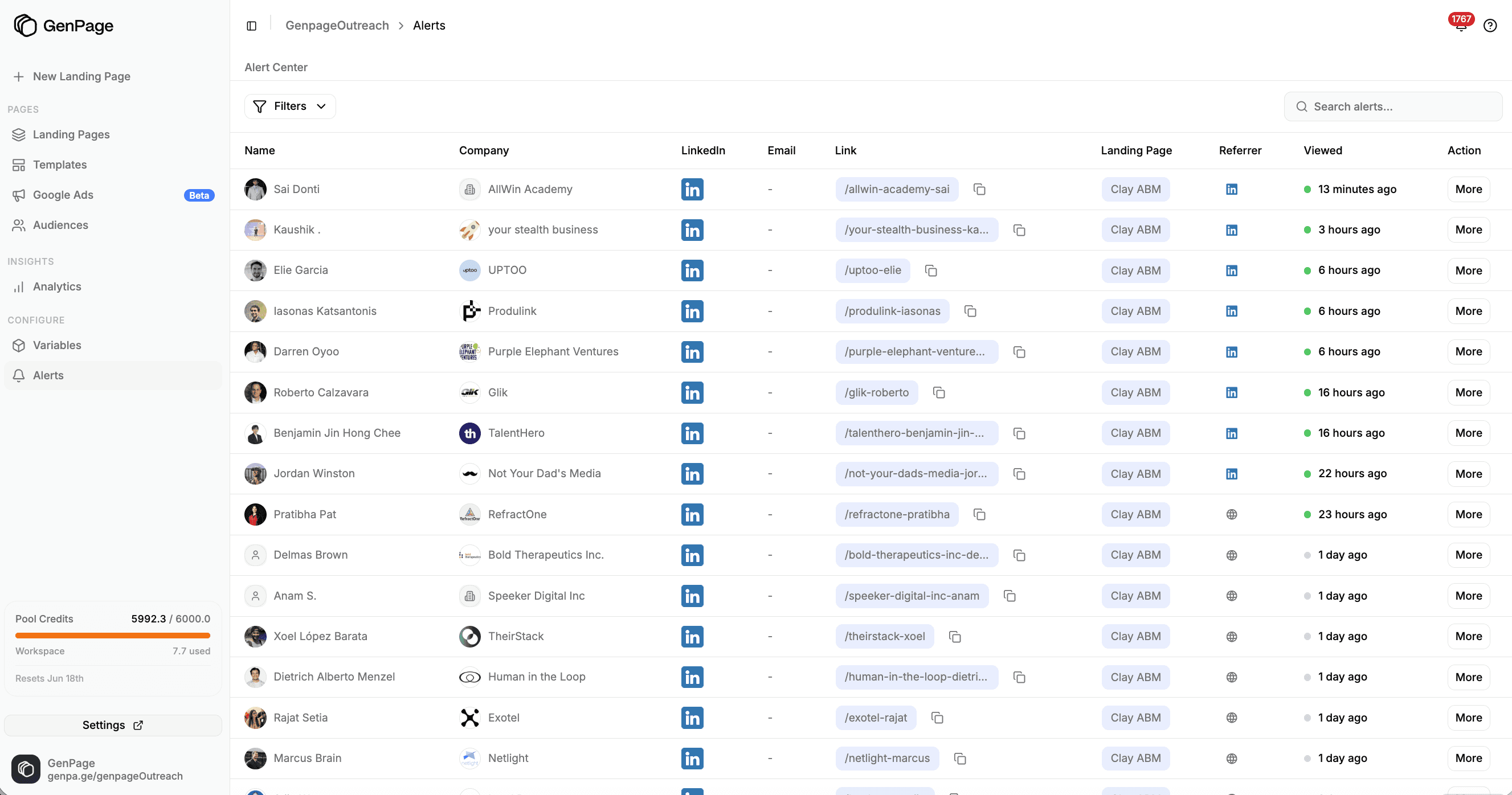
Get real-time alerts when leads engage with your personalized landing pages
Follow-up is most effective within minutes of a page visit. Alerts allow you to respond exactly when interest peaks, which naturally increases conversions.
Additional Best Practices for Personalized Outbound
To keep your outbound engine healthy and performing at a high level:
• avoid overly-automated tone in your messages
• keep messages simple and human
• test multiple hooks throughout each month
• maintain clean lead lists and remove stale accounts
• match your messaging tone to your ICP
• never over-optimize sequences - focus on offer quality instead
These small adjustments compound over time and help maintain high reply rates.
The Goal: Combine Speed, Personalization, and Value
Managing replies well is about maintaining momentum. High reply rates from personalized landing pages give you a strong starting point. Your responsiveness, clarity, and value-driven approach determine whether those replies turn into booked meetings and closed deals.
When executed properly, reply management becomes a competitive advantage that compounds the effectiveness of your entire outbound engine.
Conclusion
Modern outbound is no longer about volume. It’s about relevance, personalization, and creating a clear signal in a noisy environment. With intent-based targeting, personalized landing pages, and short conversational messaging, any B2B team can build a high-performing outbound engine without relying on aggressive automation or bloated enterprise tools.
The GenPage workflow is built around a simple formula:
• precise targeting using LinkedIn intent signals
• a valuable, easy-to-understand offer
• a personalized landing page for every lead
• short, mobile-native LinkedIn messages
• a simple, natural sequencing structure
• fast, value-led reply management
When these elements combine, reply rates increase, meetings become easier to book, and conversations feel more human. Personalized landing pages do the heavy lifting by showing prospects that you understand their goals, their role, and their context. The rest of the workflow exists to deliver that experience at the perfect moment.
This playbook is the exact system we use at GenPage to consistently achieve reply rates above 60 percent. It works across industries, company sizes, and outbound channels because it’s anchored in personalization and buyer psychology, not automation tricks.
If you want help building your own personalized outbound engine or want feedback on your targeting, offer, or GenPage setup, feel free to grab a call with us anytime.
We’re always happy to help you create a modern, AI-powered outbound motion that actually converts.
With 💜,
Sam & the GenPage Team