

The segmentation paradox hiding in most Google Ads accounts
Most performance marketers running Google Ads are meticulous about keyword segmentation. Exact match vs. broad match. Branded vs. non-branded. Category keywords vs. competitor keywords vs. use case keywords. Tightly themed ad groups, carefully written ad copy matched to each cluster, negative keyword lists maintained to prevent bleed.
All of that work - the hours spent in the Ads interface building a clean, well-structured account - is designed to ensure the right ad reaches the right person at the right moment.
And then every single one of those carefully segmented visitors lands on the same page.
This is the segmentation paradox. The ad side of your account reflects sophisticated intent matching. The landing page side ignores it entirely. You've built a precision targeting system that routes traffic into a single generic destination, and you're measuring the results and wondering why conversion rates are flat.
The fix isn't complicated in principle. It requires applying the same segmentation logic you already use for keywords and ads to your landing pages - ensuring that the experience a visitor lands on is as specifically matched to their intent as the ad that got them to click.
What's complicated is the operational side: how do you build and maintain a keyword-to-page mapping system at scale, without turning your marketing team into a landing page production agency and without a permanent dev queue?
That's what this post is about.
Why keyword intent diversity makes one page structurally inadequate
Let's be precise about what "one page for all keywords" actually means in practice, because the problem is more severe than most teams realize.
A mid-market SaaS company running a reasonably mature Google Ads account might have campaigns across several distinct intent categories:
Awareness keywords: broad category searches from buyers who are still defining their problem. "Landing page tools," "how to improve conversion rate," "A/B testing platforms." These visitors are early in the funnel. They need education and proof of concept before they're ready to evaluate a specific solution.
Use case keywords: searches that indicate the visitor knows their problem and is looking for a solution to a specific application. "Landing page personalization for Google Ads," "dynamic landing pages for B2B outreach," "personalized pages for ABM campaigns." These visitors know what they need. They're evaluating whether your product does it.
Competitor keywords: searches that include a competitor's brand name or a direct comparison query. "Mutiny alternative," "Unbounce vs Instapage," "best Optimizely alternative." These visitors have already identified their category. They're comparing specific options. The page they land on needs to make a direct, differentiated case for why you're the better choice - not explain what landing page personalization is.
ICP-specific keywords: searches that indicate a specific role, industry, or company type. "Landing page personalization for SaaS," "conversion optimization for ecommerce," "personalized landing pages for agencies." These visitors want to see themselves in the product. Generic positioning doesn't land - they need to see their industry, their use case, their specific pain addressed directly.
Bottom-funnel keywords: high-intent transactional searches. "GenPage pricing," "GenPage free trial," "sign up for landing page personalization tool." These visitors have already decided they want a solution. They're looking for a reason to commit or a reason not to. The page they land on needs to reduce friction and handle final objections - not introduce the product from scratch.
These are five completely different mental states, five different levels of product familiarity, five different objection profiles, and five different conversion triggers. A page optimized for one of them will be actively wrong for the others.
A page that tries to serve all of them simultaneously will be right for none of them.
At my previous company, running Google Ads at ~$40K/month, we estimated that roughly 60–70% of our keyword portfolio was sending traffic to pages with minimal intent matching. The majority of our budget was effectively paying for clicks that landed on a page built for no visitor in particular.
What happens to your metrics when you ignore this
The impact of keyword-to-page mismatch shows up in three places - and they compound each other in a way that makes the true cost easy to underestimate.
Conversion rate by keyword tells the real story
Most Google Ads accounts report conversion rate at the campaign or ad group level at best. Few teams regularly pull conversion rate by individual keyword and cross-reference it with the landing page destination.
When you do this audit, a consistent pattern emerges: keywords with strong intent alignment to the destination page convert at a significantly higher rate than the keywords that are mismatched.
In our own campaigns, moving from a generic headline to an intent-matched one produced double-digit conversion rate lifts - from the same traffic, the same keywords, the same spend.
The mismatched keywords look fine in aggregate - they're generating conversions - but they're dramatically underperforming what they could achieve with a matched page.
The keywords you're tempted to pause because of low conversion rate are often not bad keywords. They're good keywords sending traffic to the wrong page.
Quality Score penalizes the mismatch at scale
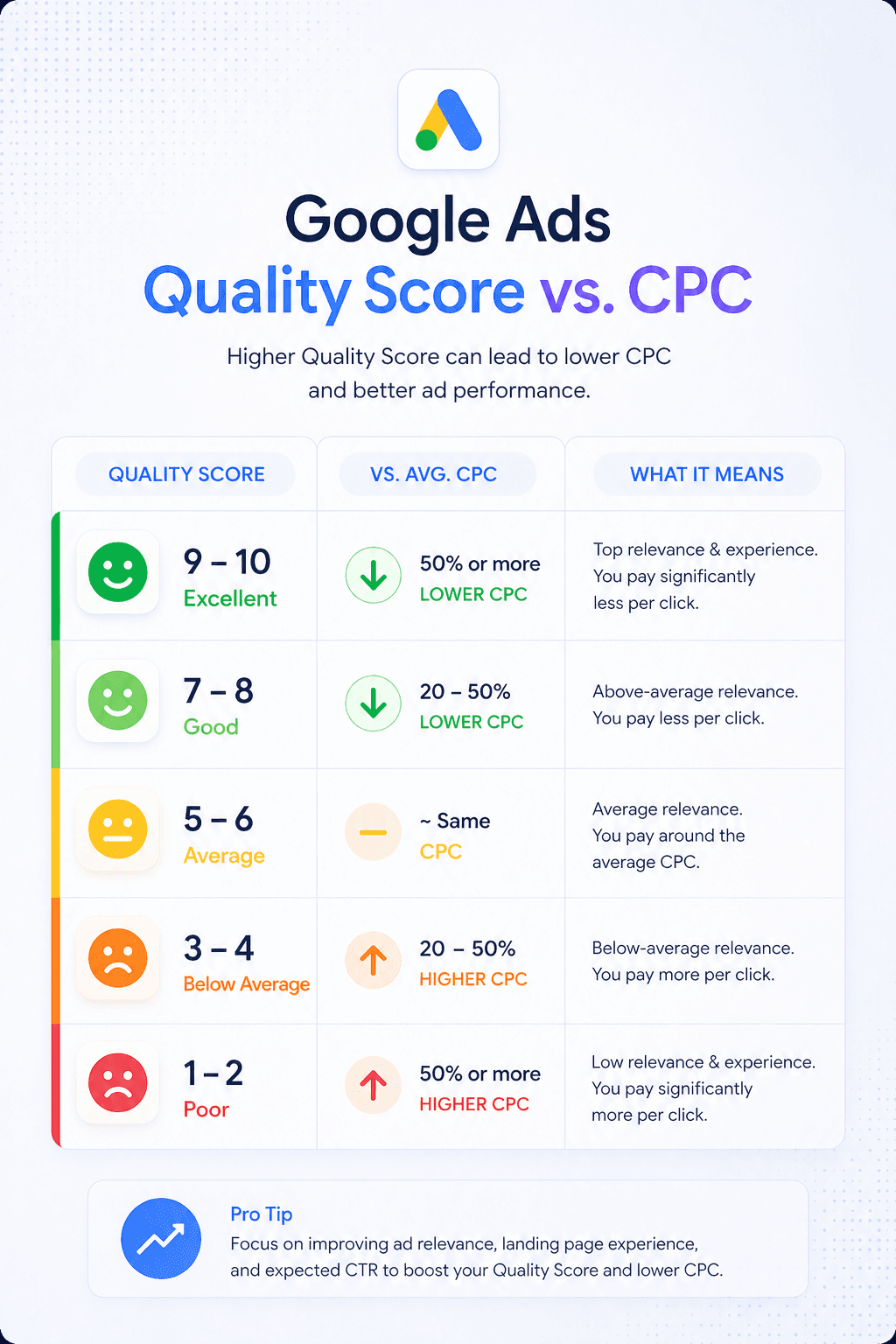
Google's Quality Score algorithm evaluates landing page experience per keyword - not per campaign. This means every keyword in your account that points to a mismatched page is accumulating its own below-average landing page experience score, which drives up its individual CPC and suppresses its impression share.
A Quality Score of 4 on a keyword carries a roughly 25% CPC premium over the benchmark. A score of 3 adds a 67% premium. Across an account with hundreds of keywords sending traffic to generic pages, this CPC tax compounds into a significant portion of wasted monthly spend.
Bounce rate and engagement signals create a feedback loop
When a visitor lands on a page that doesn't match their intent, they leave quickly. Google reads this as a negative engagement signal, which feeds back into landing page experience scores, which suppresses Quality Score further, which raises CPC, which makes every subsequent click on that keyword more expensive.
The feedback loop runs in the opposite direction too. Improving page relevance improves engagement signals, which improves landing page experience scores, which improves Quality Score, which reduces CPC. The compounding return on fixing this is one of the strongest ROI levers in paid search - but it requires addressing the page side, not just the ad side.
The gap between knowing and doing
If you've worked in performance marketing for more than a year, none of this is new information. The principle that landing pages should match keyword intent is basic conversion rate optimization doctrine.
The reason most accounts still have this problem isn't ignorance - it's operational constraint.
Building a landing page in a traditional CMS workflow - Webflow, WordPress, Contentful, custom-built - requires a wireframe, a designer, and a developer. At a normal agency or in-house team velocity, a single landing page can take one to three weeks from brief to live. At that pace, building pages for even the top ten keyword clusters is a multi-month project. Building pages for hundreds of keywords is effectively impossible.
I ran into this exact wall at my previous company. When we started scaling Google Ads, we sent everything to the homepage - not because we didn't know better, but because we didn't have the resources to build alternatives. After our Series B gave us more budget, we built out use case pages, competitor comparison pages, and a template directory. We routed paid traffic to more targeted destinations and saw meaningful Quality Score and conversion rate improvements.
But even then, we were only covering our top ten keywords. Everything else - the long tail, the use case variants, the industry-specific searches - still landed on generic pages. We were spending $40K a month on ads and personalizing the destination for maybe 25% of that spend.
The workaround we eventually built was a custom script that read UTM parameters and dynamically updated the hero headline on the landing page based on the keyword. It was fragile, required ongoing engineering support, only affected the headline, and still left the rest of the page generic. But even that partial fix produced significant conversion rate lifts on the campaigns where we deployed it.
What that experiment proved - and what the data consistently shows - is that intent-matching works. The constraint isn't the strategy. It's the production workflow.
How to build a keyword-to-page mapping system
The solution has two components: a strategic mapping layer that defines what each keyword segment should see, and an operational layer that makes producing and maintaining those experiences scalable. Here's how to build both.
Phase 1: Segment your keywords by intent, not by topic
The first step is reframing how you think about keyword grouping. Most Google Ads accounts group keywords by topic or product area - all keywords related to "landing pages" in one campaign, all keywords related to "conversion rate" in another. This structure is fine for ad management, but it doesn't map to the intent-based segmentation that landing pages need.
For landing page purposes, group your keywords by the underlying job-to-be-done: what is this person actually trying to figure out or accomplish, and where are they in their buying process?
The segmentation categories that matter most for landing page strategy:
Intent stage - is this person in discovery (defining the problem), evaluation (comparing solutions), or decision (ready to buy)? Each stage warrants a fundamentally different page framing. Discovery visitors need education and proof of concept. Evaluation visitors need specific feature comparison and differentiation. Decision visitors need friction reduction and final objection handling.
Use case specificity - is this keyword generic ("landing page software") or specific ("landing page personalization for LinkedIn ads")? More specific keywords indicate a visitor with a clearer picture of what they need — and warrant a more specific page that addresses exactly that use case, not the broader category.
Persona signal - does the keyword indicate a specific role or industry? "Landing page optimization for ecommerce" tells you something specific about the visitor that generic copy can't address. Industry-specific pages with industry-specific social proof consistently outperform generic ones for these searches.
Competitive context - is this keyword branded (yours or a competitor's), comparison-focused, or category-generic? Branded and competitor keywords warrant pages with a completely different tone and content strategy than category keywords — they're talking to buyers who already know the space.
Build a simple keyword segmentation matrix: for each keyword or keyword cluster in your account, assign an intent stage, a use case category, a persona signal where determinable, and a competitive context flag. This matrix becomes the foundation of your page mapping.
Phase 2: Define the page experience for each segment
Once your keywords are segmented, define what a visitor from each segment should experience. You don't need to design a full page for each segment at this stage — you need to define the key elements that differentiate the experience.
For each segment, specify:
The primary message - what is the single most relevant thing to say to this visitor in the first five seconds? This becomes the headline. It should speak directly to their intent, not to your product's general value proposition.
The supporting framing - what context makes the primary message land? For a use case keyword, this might be a specific workflow or outcome. For a competitor keyword, this might be a direct comparison point. For a persona keyword, this might be an industry-specific result or challenge.
The most relevant social proof - which customer story, testimonial, or result is most credible to this specific visitor? A Series B SaaS company evaluating your product should see results from similar-stage SaaS companies. An agency visitor should see agency results. Showing the wrong social proof isn't neutral - it actively signals that you don't know your audience.
The conversion objective - what specific action are you asking this visitor to take, and how should it be framed? "Start free trial" is appropriate for a decision-stage visitor. "See how it works for [use case]" is better for an evaluation-stage visitor. The CTA should match the commitment level appropriate to where the visitor is in their journey.
The objection to preempt - what is the most likely reason this specific visitor doesn't convert, and how does the page address it? For awareness-stage visitors, the objection is "I don't understand why I need this." For decision-stage visitors, it's "I'm not sure this is worth the switching cost." Different segments have different primary objections; the page should address the right one.
Document this for each segment. You now have a content brief for every page variant you need, without having designed a single page yet.
Phase 3: Build a base page architecture that scales
Rather than building completely separate pages for each keyword segment from scratch, architect a base page system that can be personalized efficiently.
The most scalable approach is a single strong base page - your best generic version, optimized for structure, flow, and conversion mechanics - with dynamic content layers applied at the element level for each segment.
The elements worth making dynamic, in order of impact:
Headline and subheading: the highest-leverage personalization. The headline is the first thing every visitor reads and the primary relevance signal. A segment-matched headline alone can produce significant conversion lifts - we saw double-digit improvements from headline personalization alone, even when the rest of the page stayed generic.
Hero copy and value proposition framing: the two to three sentences below the subheading that explain what the product does and why it matters. This should use the language of the visitor's role and use case, not generic product marketing copy.
Social proof selection: showing the case study or testimonial most relevant to this visitor's industry, company stage, or use case. This doesn't require building new content - it requires surfacing the right existing content to the right visitor.
CTA copy and framing: matching the commitment level and specificity of the CTA to the visitor's intent stage. "See how this works for [use case]" is more specific and lower-friction than "Book a Demo" for mid-funnel visitors.
Supporting body copy: for high-traffic segments, customizing the problem framing and solution explanation to match the specific use case adds another layer of relevance that drives down bounce rate and improves engagement signals.
The key architectural insight is that you're not building forty pages - you're building one page with forty content configurations. The structure, design, and conversion mechanics stay consistent. The intent-critical elements adapt.
Phase 4: Implement with a personalization layer, not a dev queue
This is where the operational model breaks down for most teams, and where the traditional approach fails at scale.
Building separate static pages for each keyword segment in a CMS requires a design-dev cycle for every new variant. Adding a new campaign or keyword group means going back to the queue. Updating messaging across variants means touching every page individually. The maintenance burden alone makes this approach unsustainable for accounts with more than ten or fifteen active segments.
The operational solution is a personalization layer that sits between your ad traffic and your base page - reading the keyword, UTM parameters, or audience data from the incoming click, and dynamically populating the intent-critical elements with the content defined for that segment.
With a tool like GenPage, this workflow looks like (we also cover the full process in this guide):
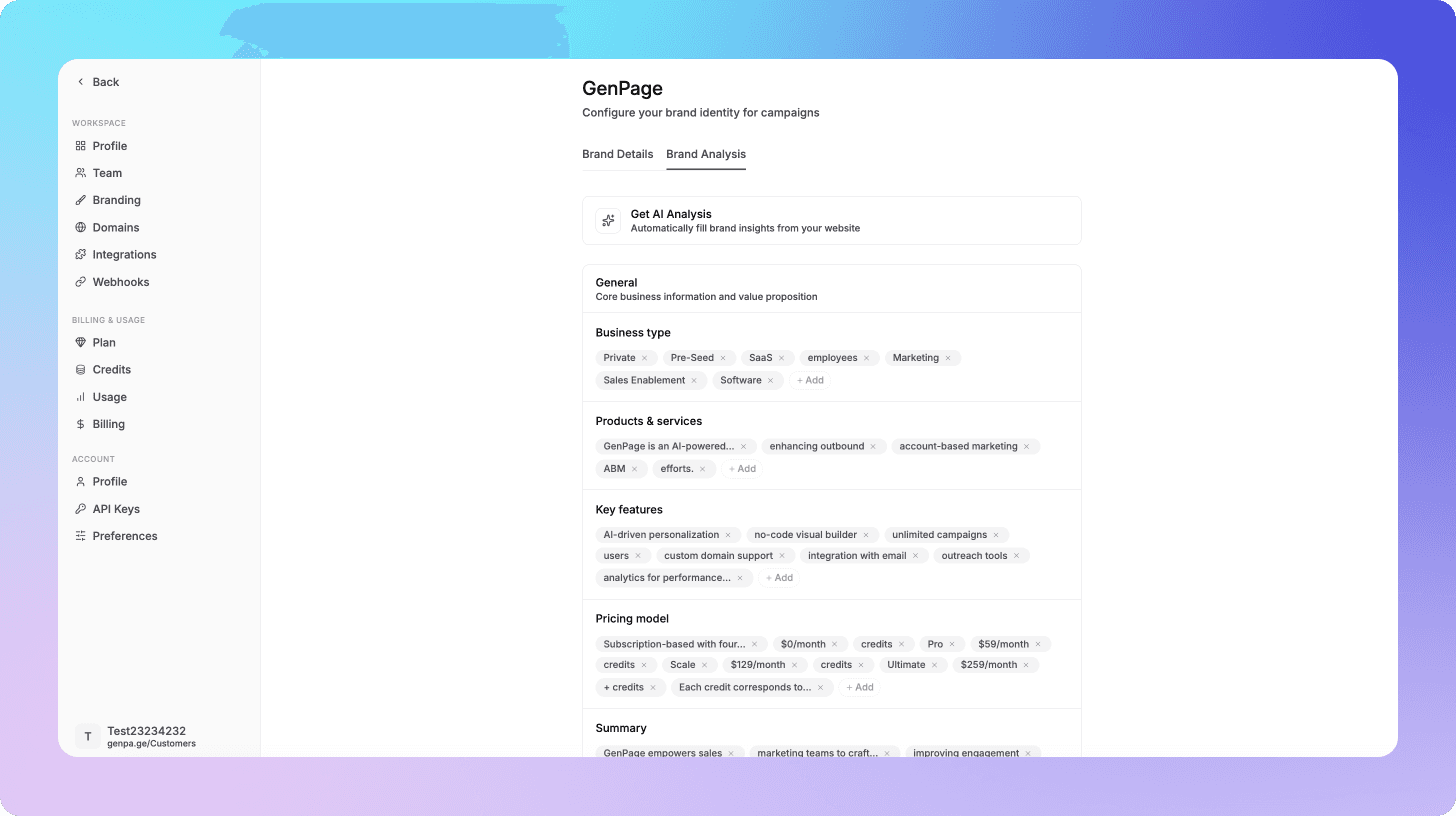
Brand profile setup (once): connect your domain and GenPage builds an internal profile of your positioning, tone of voice, products, and value propositions. This is the AI's context layer for every page it generates. You configure it once and add your own internal context as well; it informs every subsequent page.
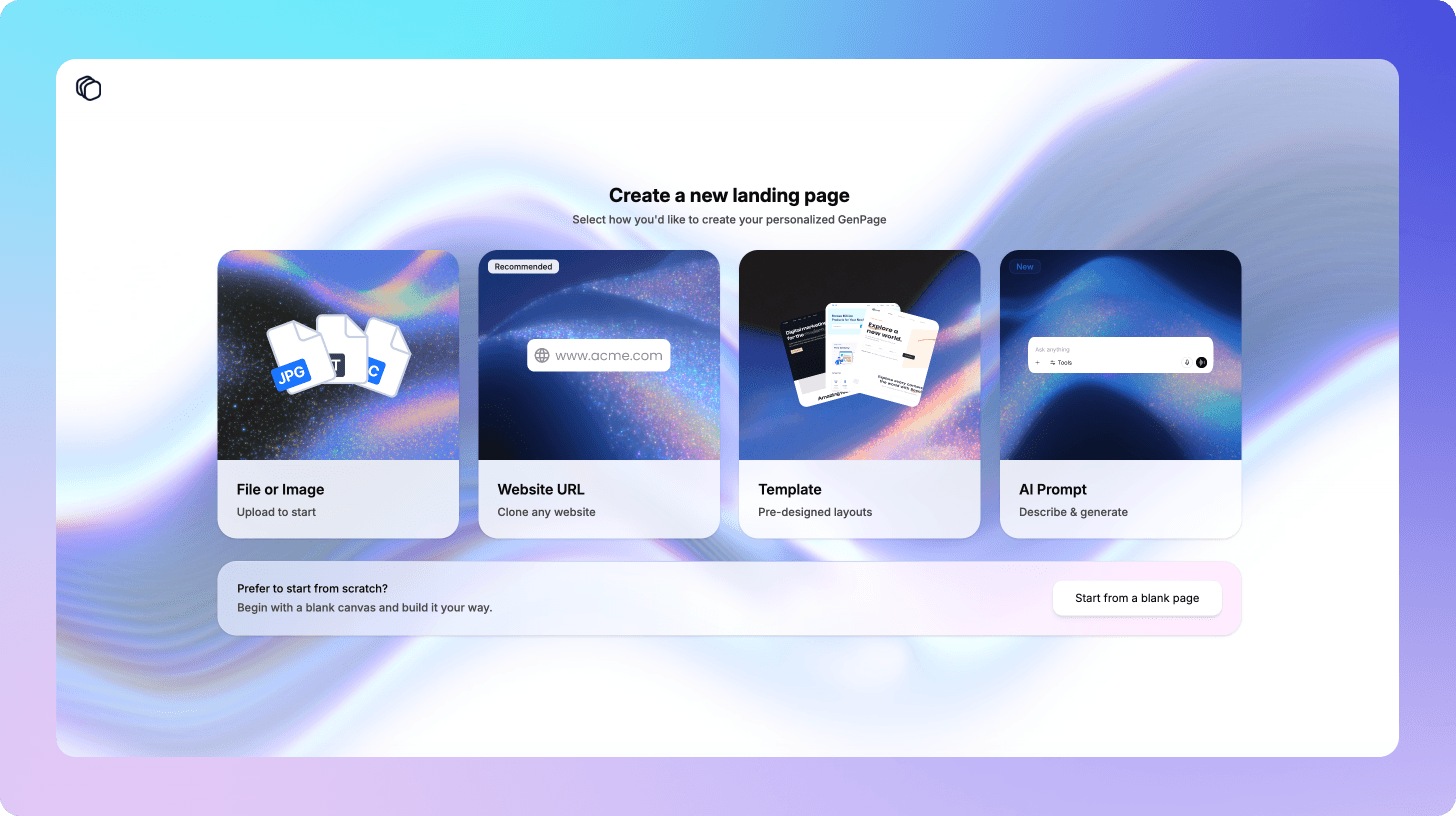
Base page creation: build your master landing page inside GenPage using a prompt, URL replication, file upload, or template. The brand profile ensures the output matches your design and voice from the first draft.
AI-assisted personalization audit: run GenPage's AI agent on the base page. It analyzes the structure and identifies the specific elements - headline, subheading, hero copy, social proof, CTA - with the highest personalization potential for your keyword segments.
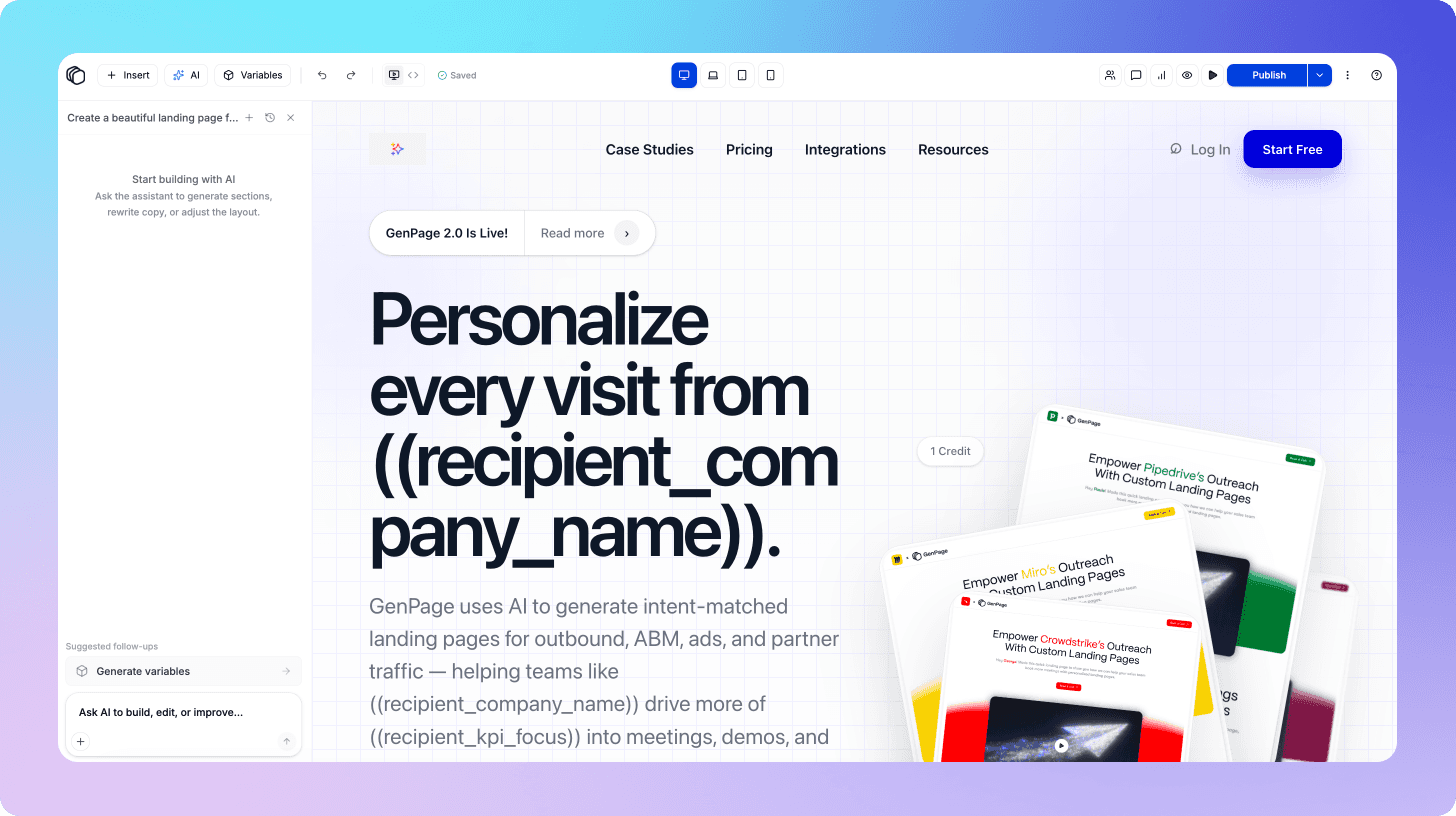
Segment configuration: map your keyword segments to content variants. For each segment, the dynamic content is automatically defined for each flagged element. GenPage's AI generates the copy drawing on three context layers simultaneously: your brand profile, the base page structure, and the segment-specific intent signal. The result reads as purpose-built for that visitor, not assembled from a template.
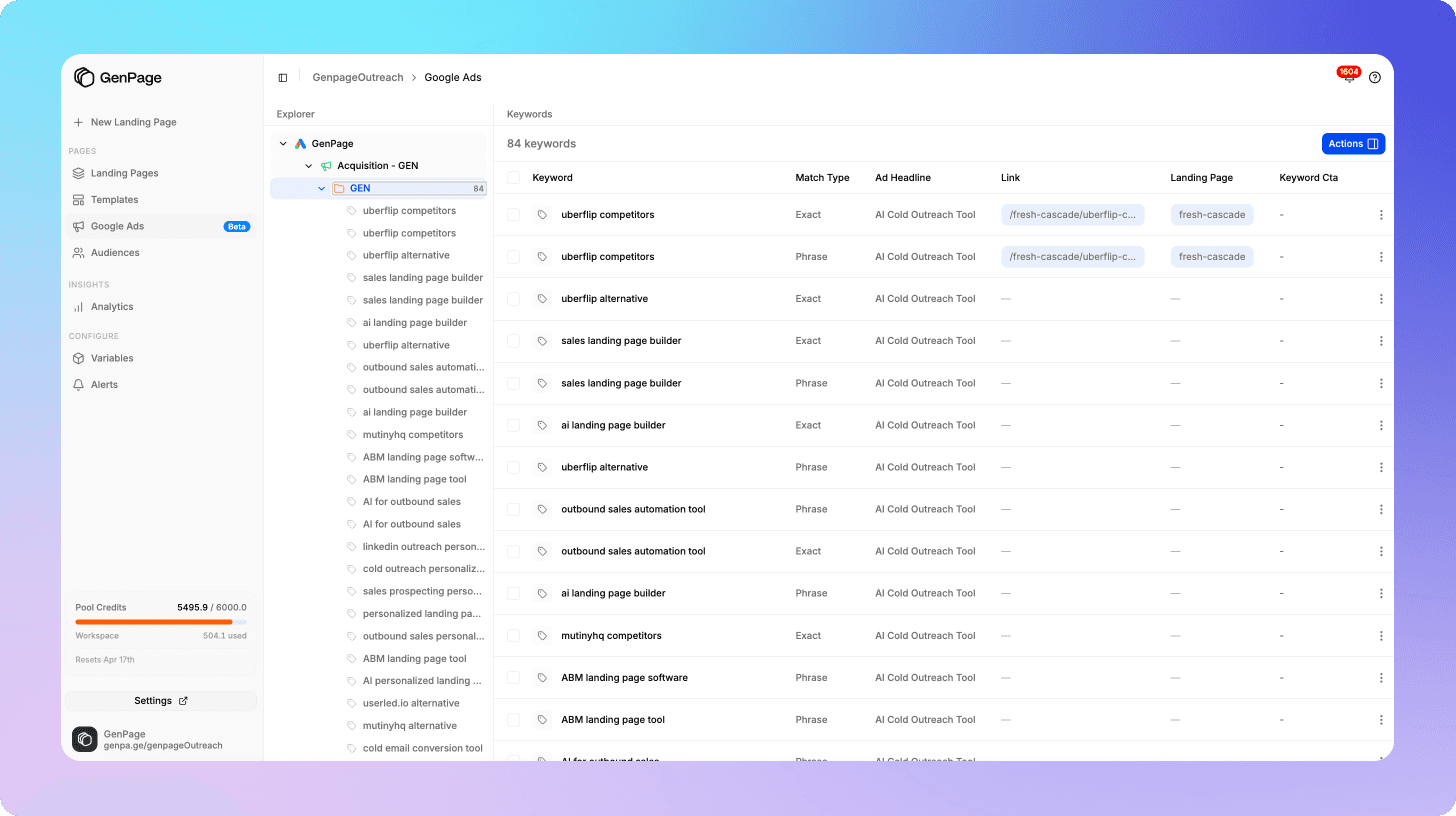
URL and campaign integration: GenPage deploys personalized pages to your domain - either as a subfolder via the SDK or a subdomain - and pushes updated destination URLs back to your Google Ads campaigns directly. No manual URL management in the Ads interface.
Analytics and iteration - built-in heatmaps, session replays, and engagement tracking at the segment level show you exactly which variants are performing and where each one is losing visitors. You iterate on the underperforming segments without touching the ones that are working.
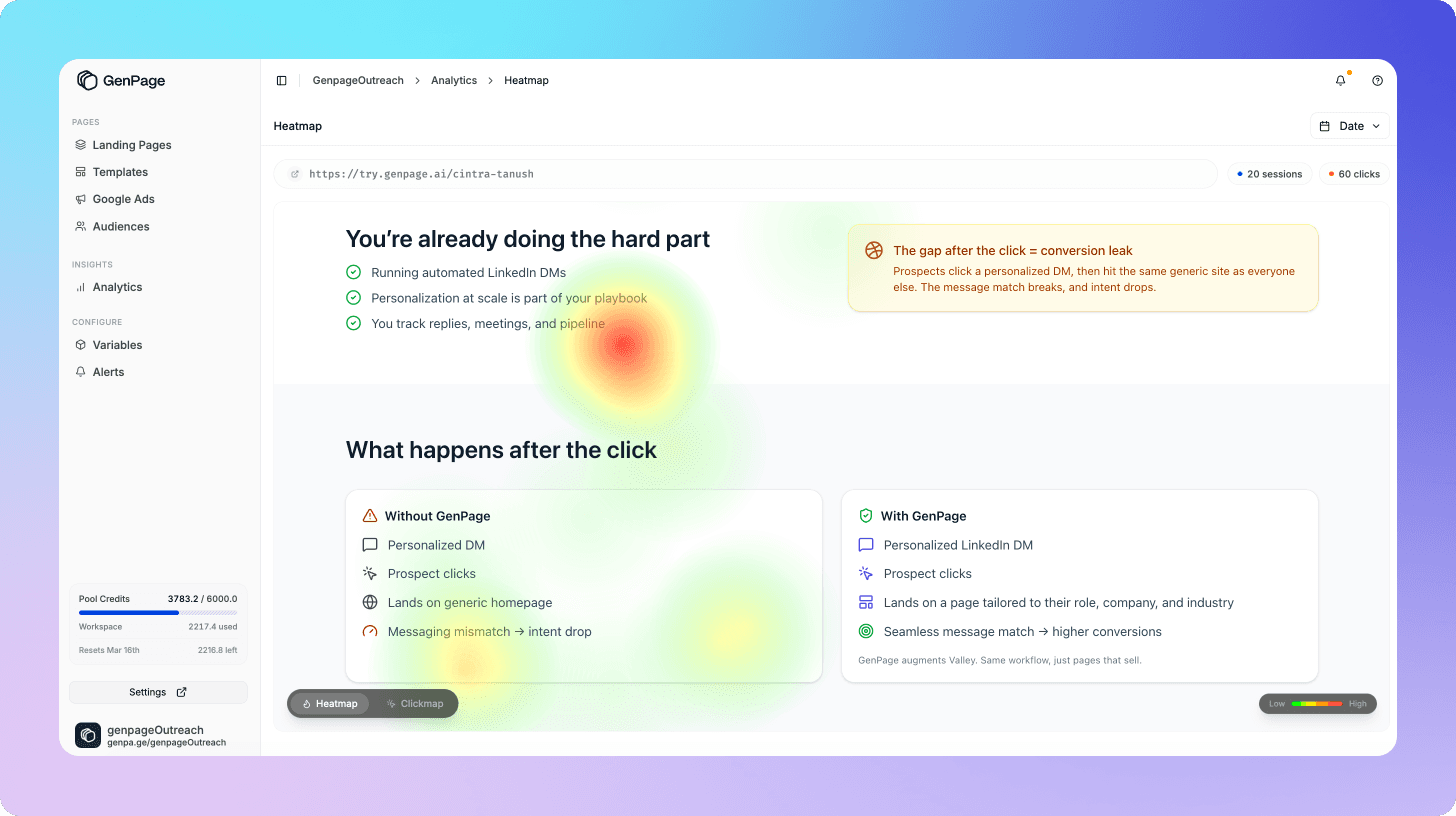
The production time for adding a new keyword segment after initial setup is minutes, not weeks. The iteration cycle that previously required a design-dev sprint runs entirely within the marketing team.
This is the infrastructure we built GenPage to provide in a cost-effective way - because I spent two years at my previous company trying to replicate it manually with custom scripts and a Webflow dev queue, and the gap between what we knew we should be doing and what we could actually execute was costing us in ROAS every month.
What the numbers look like when you close the gap
The data on intent-matched landing pages is consistent across implementations. Here's what the metrics look like when keyword-to-page mapping is properly executed.
Conversion rate by segment: when landing page content is matched to keyword intent at the segment level, conversion rates typically improve significantly. In our own experience, moving from a static generic headline to an intent-matched one produced double-digit conversion rate lifts. Independent case study data supports larger improvements when full-page personalization is applied across all intent-critical elements.
According to McKinsey, personalization typically drives a 5–15% revenue lift - and up to 25% with strong execution - while reducing customer acquisition costs by as much as 50% in best-in-class implementations.
Quality Score by keyword: improved landing page experience scores drive down CPC on the affected keywords. Most accounts see measurable Quality Score improvements within two to four weeks of deploying matched pages, as Google's crawlers and behavioral signals update. The CPC reductions compound across the account over time.
CAC from paid search: the combination of higher conversion rates and lower CPCs produces a meaningful reduction in CAC from the Google Ads channel. More conversions from the same traffic at lower cost per click is the compounding return that makes landing page investment one of the strongest ROI plays in performance marketing.
Check out our case studies as well for real-world examples of customers succeeding with landing page personalization.
The keyword segments worth prioritizing first
If you're starting from a position of zero page segmentation, the coverage priority should follow spend concentration and conversion impact, not keyword volume.
Start with your highest-spend ad groups with below-average Quality Scores. These are actively losing you money right now - the combination of high spend and a below-average landing page experience rating represents the largest immediate ROI opportunity. Pull your Quality Score data by keyword, cross-reference with spend, and build your first matched pages for the clusters at the top of that list.
Then address competitor keywords. Competitor keywords typically have high commercial intent and high CPCs - and most teams send competitor traffic to a generic product page rather than a dedicated comparison page that makes a direct case for switching. A competitor-specific page with a pointed, differentiated message consistently outperforms a generic destination for this audience.
Then build use case variants for your top ICP segments. Once your highest-spend and highest-intent keywords have matched pages, expand to your most important use case clusters - the keywords that reflect your primary ICP's specific job-to-be-done. These tend to have strong conversion potential that generic pages systematically underdeliver on.
Leave broad awareness keywords for last. High-volume, low-intent awareness keywords are important for brand building but typically convert at low rates regardless of page optimization. The conversion lift from personalization is real, but the absolute impact on pipeline is lower than higher-intent segments. Optimize these after the higher-leverage clusters are covered.
Common implementation mistakes to avoid
Building pages by topic rather than by intent. The instinct is to build one page per product area or feature - a "personalization" page, an "analytics" page, a "templates" page. This is topic segmentation, not intent segmentation. Two visitors searching "landing page personalization" and "how to improve Google Ads conversion rate" have completely different intent profiles even if they end up on the same product feature. Build pages around the visitor's job-to-be-done, not around your product taxonomy.
Personalizing the headline and ignoring everything else. Dynamic text replacement at the headline level is better than a static page, but it leaves significant conversion gains on the table. Google evaluates relevance across the full page - and so does the visitor. A matched headline above generic body copy, mismatched social proof, and an irrelevant CTA still signals that the page wasn't built for this person. Full-element personalization at the headline, subheading, social proof, and CTA level produces materially better results.
Building too many segments before validating the model. The temptation once you have a personalization tool is to segment everything immediately - one page per keyword, dozens of variants. Resist this. Start with three to five segments, measure the conversion lift, validate the model, and expand from there. Premature over-segmentation creates a maintenance burden before you understand which variants actually move the needle.
Ignoring mobile traffic. A significant portion of Google Ads clicks - often the majority in B2C categories and increasingly in B2B - comes from mobile devices. Personalized landing pages need to be fully optimized for mobile load speed and layout, or the conversion gains from intent-matching are offset by poor mobile experience.
Not updating the page mapping when campaigns change. A keyword-to-page mapping system requires maintenance. When you add new campaigns, pause underperforming keywords, or shift budget between ad groups, the page mapping should be reviewed and updated. A static mapping built six months ago may be directing traffic from new keyword clusters to mismatched pages without anyone noticing.
The operational model that makes this sustainable
The biggest risk with a keyword-to-page mapping system isn't building it - it's maintaining it. Most teams that invest in landing page segmentation see initial performance gains and then watch them erode as the account evolves and the page mapping falls out of sync.
The sustainable operational model has three components:
A living keyword-to-page mapping document - a shared document (or CMS field, or spreadsheet) that maps every active ad group to its destination page, with the segment definition and content brief for each. This document is reviewed and updated on the same cadence as campaign changes - not quarterly, not ad hoc, but as part of the regular campaign management workflow. If you're using GenPage, this is done automatically by the platform.
A personalization tool that makes updates fast - when the operational cost of updating a page variant is days, updates don't happen. When it's minutes, they do. The tooling choice directly determines whether the mapping system stays current or drifts. This is why a dedicated personalization layer - rather than a static page library in a CMS - is the correct architecture for anything beyond five or six segments.
Segment-level performance reporting - conversion rate, Quality Score, and CPC tracked at the segment level, not just the campaign level. This is what tells you which variants are working, which are drifting, and which new keyword clusters are growing in volume without a matched page. Without segment-level visibility, the mapping system degrades invisibly.
Conclusion
The segmentation logic that makes your Google Ads campaigns effective doesn't stop at the ad. It needs to carry through to the landing page - matching the intent, language, and conversion objective of each keyword cluster to the experience the visitor lands on.
Most accounts don't do this because the operational cost of maintaining a proper keyword-to-page mapping system has historically been prohibitive. Building and updating landing pages in a traditional CMS workflow doesn't scale to the number of intent segments a mature Google Ads account requires.
That constraint is no longer a given. The tooling now exists to build, deploy, and iterate on intent-matched pages at scale - without dev resources, without a production queue, and without a separate page for every keyword.
The accounts that close this gap - that apply the same precision to their landing pages that they already apply to their keywords - get more conversions from the same traffic, lower CPCs from better Quality Scores, and a lower CAC from the channel overall.
You've already done the hard work of building a well-segmented keyword strategy. The landing page side should reflect it.
Ready to build your first intent-matched landing page? Start free today and have keyword-segmented pages running across your Google Ads campaigns before your next billing cycle.
Frequently Asked Questions
How many landing page variants do I need for Google Ads?
You don't need one per keyword - you need one per distinct intent cluster. For most mid-market SaaS accounts, three to eight intent clusters covers the majority of ad spend. Within each cluster, dynamic content personalization handles keyword-level variation without requiring additional pages. Start with your highest-spend segments and expand from there once the model is validated.
What's the difference between dynamic text replacement and landing page personalization?
Dynamic text replacement (DTR) swaps a single text element - usually the headline - based on a keyword or UTM parameter. It's a useful starting point but a limited solution. Full landing page personalization adapts multiple elements simultaneously - headline, subheading, body copy, social proof, CTA - creating a coherent, intent-matched experience across the entire page rather than a matched headline above generic content. Google evaluates relevance across the full page, and so does the visitor.
How long does it take to see Quality Score improvements after matching landing pages to keywords?
Most accounts see measurable Quality Score improvements within two to four weeks of deploying intent-matched pages, as Google's crawlers re-evaluate landing page experience and behavioral signals update. CPC reductions tied to improved Quality Scores typically follow shortly after. The full compounding effect on CAC builds over one to three months as the improved scores accumulate across the account.
Should I build separate pages for competitor keywords?
Yes - competitor keywords warrant their own page strategy. Visitors searching for a competitor or a competitor comparison are further along in their buying process than general category searchers. They need a page that makes a direct, differentiated case for your product relative to the specific alternative they're evaluating - not a generic product overview. A dedicated comparison page consistently outperforms a generic destination for competitor keyword traffic.
Can I do this without a developer?
Yes. Modern landing page personalization tools like GenPage allow you to build, configure, and deploy intent-matched page variants entirely within a marketing workflow - no engineering involvement required. The setup involves connecting your domain, building a base page, defining your keyword-to-segment mapping, and configuring the dynamic content rules. New segments can be added and existing ones updated in minutes rather than the days or weeks of a traditional CMS dev cycle.
How do I know which keyword segments to prioritize first?
Start with the combination of highest spend and lowest Quality Score - these keywords are actively costing you the most right now and have the largest immediate ROI opportunity from page improvement. Then prioritize competitor keywords (high commercial intent, high CPC) and your most important ICP use case clusters. Leave broad awareness keywords for last - the conversion lift from personalization is real, but the absolute pipeline impact is lower than higher-intent segments.
Will personalized landing pages affect my Google Ads conversion tracking?
No - personalized pages deployed via GenPage support custom domains and custom script injection, so your Google Ads conversion tracking, GA4, and any other tracking tools work exactly as they do on standard pages. All conversion events fire normally and flow into your existing attribution model. Segment-level performance data is also available natively within GenPage's analytics dashboard.