

Introduction
You've built a Google Ads campaign. You've done the keyword research, written tightly themed ad groups, and set competitive bids. Your ads are getting clicks.
And then the traffic lands on the same generic homepage - or worse, one landing page that tries to speak to every keyword, every audience, and every intent at once.
This is one of the most common and most costly mistakes in paid search. And for most marketing teams, the instinct is to fix it by involving a developer: "We need to build separate landing pages for each campaign." The developer queue fills up. The project takes weeks. By the time the pages are live, the campaign data has moved on.
There's a better way.
In this guide, we'll walk through exactly how to create personalized landing pages for every Google Ads keyword and audience segment - without touching a line of code, without waiting on engineering, and without managing dozens of separate page variants manually.
Why Generic Landing Pages Are Killing Your Google Ads ROI
Before getting into the how, it's worth understanding the mechanism of the problem - because it affects your campaigns in two distinct and compounding ways.
1. Message Mismatch Destroys Conversion Rate
When someone clicks on an ad for "ABM landing page software for B2B SaaS," they have a very specific expectation of what they'll find on the next page. If they land on a page that talks generically about "marketing tools" or "grow your business," the psychological contract is broken. They don't see themselves in the page. They leave.
This is the message match problem. The more specific your ad copy - and in Google Ads, specificity is rewarded with clicks - the more specific your landing page needs to be to complete the conversion. A generic page will always underperform against a personalized one, regardless of how much you optimize headlines, button colors, or load times.
2. Poor Landing Page Experience Tanks Your Quality Score
Google doesn't just evaluate your bids when determining where your ads appear and what you pay per click. It evaluates your Quality Score - a composite metric that includes expected CTR, ad relevance, and critically, landing page experience.
Google explicitly assesses whether your landing page is relevant and useful to someone who clicks your ad. When every keyword sends traffic to the same generic page, landing page experience scores suffer across your entire account. This means:
Higher cost-per-click (CPC) on every keyword
Lower ad positions even at competitive bids
Reduced impression share against competitors with better-optimized pages
The inverse is also true: improving landing page relevance through personalization can reduce your CPC while simultaneously improving your position. It's one of the few levers in Google Ads that improves both cost efficiency and conversion rate at the same time.
The Traditional Solution - and Why It Doesn't Scale
The standard advice for solving this problem is to build dedicated landing pages for each ad group or keyword cluster. And that advice is correct in principle. Dedicated, intent-matched pages do convert better.
The problem is execution.
For a mid-sized Google Ads account with 10 campaigns, 40 ad groups, and keyword targeting across multiple industries and personas, building individual pages means:
Dozens of design and development requests
Weeks or months of production time
A maintenance burden every time your offer, pricing, or messaging changes
No ability to iterate or A/B test without more development work
Most marketing teams don't have the bandwidth or developer access to do this properly. So they compromise - running campaigns to one or two pages and accepting the conversion loss as a cost of doing business.
This is the gap that landing page personalization tools are designed to fill.
What Personalized Landing Pages for Google Ads Actually Means
Landing page personalization in the context of Google Ads means dynamically adjusting the content of a landing page based on signals from the incoming visitor - specifically, the keyword they searched, the ad they clicked, their industry, their company size, or any other parameter you pass through the URL.
Instead of building 40 separate pages, you build one smart page that adapts its headline, subheading, body copy, social proof, and CTA to match the intent of each visitor.
Done well, every visitor lands on a page that feels like it was written specifically for them - because, in effect, it was.
How to Set This Up: A Step-by-Step Guide
Here's a practical walkthrough of how to implement personalized landing pages for Google Ads without involving a developer.
Step 1: Audit Your Current Campaigns for Message Match Gaps
Start with an honest audit. Pull your top-spending ad groups and ask: where does each ad send traffic? What does that landing page say? Is the headline on the page a reasonable continuation of the ad copy?
For each ad group, score the message match on a simple scale:
Strong match: The page headline directly reflects the keyword and ad copy
Partial match: The page is roughly relevant but generic in language
Weak match: The page is about the product category but doesn't reflect the specific intent
Most accounts will find that the majority of their ad spend lands in "partial match" or "weak match" territory. This is your opportunity - these are the segments where personalization will have the most immediate impact on conversion rate and Quality Score.
Step 2: Define Your Personalization Variables
Before building anything, decide what signals you'll use to personalize pages. For Google Ads, the most common variables are:
Keyword-level personalization - the search term or keyword cluster that triggered the ad. This is the most granular and highest-converting form of personalization for search campaigns.
Ad group or campaign-level personalization - useful when you want to personalize by theme (e.g., "enterprise" vs. "SMB" campaigns) rather than individual keywords.
UTM parameters - you can pass campaign, ad group, or keyword data through UTM tags in your final URLs and use those to dynamically populate landing page content.
Audience segment - for display or remarketing campaigns, you may want to personalize based on audience list membership (e.g., visitors who previously viewed your pricing page).
Geographic data - useful for localized campaigns where the page should reference the visitor's city or region.
For most search campaigns, starting with keyword and ad group level personalization delivers the fastest results with the least complexity.
Step 3: Map Keywords to Page Variants
Create a simple mapping document. For each keyword cluster or ad group, define:
The primary search intent (what is this person trying to accomplish?)
The headline that best matches that intent
The subheading that elaborates on the value proposition for this specific visitor
The most relevant social proof (case study, logo, testimonial) for this audience
The CTA copy that matches where they are in the decision process
This doesn't need to be complex. A spreadsheet with four or five columns is enough. What matters is that you're being deliberate about what each audience segment should see - rather than letting everyone land on the same default.
For example, a SaaS company running ads on three keyword clusters might map it as follows:
Keyword Cluster | Intent | Headline | Social Proof |
|---|---|---|---|
"ABM landing pages" | ABM marketers wanting account-specific pages | "Personalized landing pages for every target account" | B2B SaaS case study |
"Google Ads landing page optimization" | PPC managers wanting better Quality Score | "Turn every keyword into a dedicated landing page" | Agency or ecommerce case study |
"increase landing page conversion rate" | Growth teams wanting more conversions from existing traffic | "3x your conversion rate without increasing ad spend" | Stat-led proof point |
This mapping becomes the blueprint for your personalization setup.
Step 4: Use a Personalization Tool to Build and Deploy
This is where the "without a developer" part becomes real. Rather than building separate pages for each variant, you use a landing page personalization platform to create one master page and define the dynamic rules.
With a tool like GenPage, the workflow looks like this:
Connect your domain and ad account. Start by connecting your domain - GenPage crawls your website to build an internal brand profile: your design guidelines, tone of voice, products, services, pricing structure, and value propositions. This becomes the persistent context layer the AI draws on every time it builds or personalizes a page. Then link your Google Ads account so the platform can read your keyword, campaign, and ad group structure directly - no manual UTM configuration required.
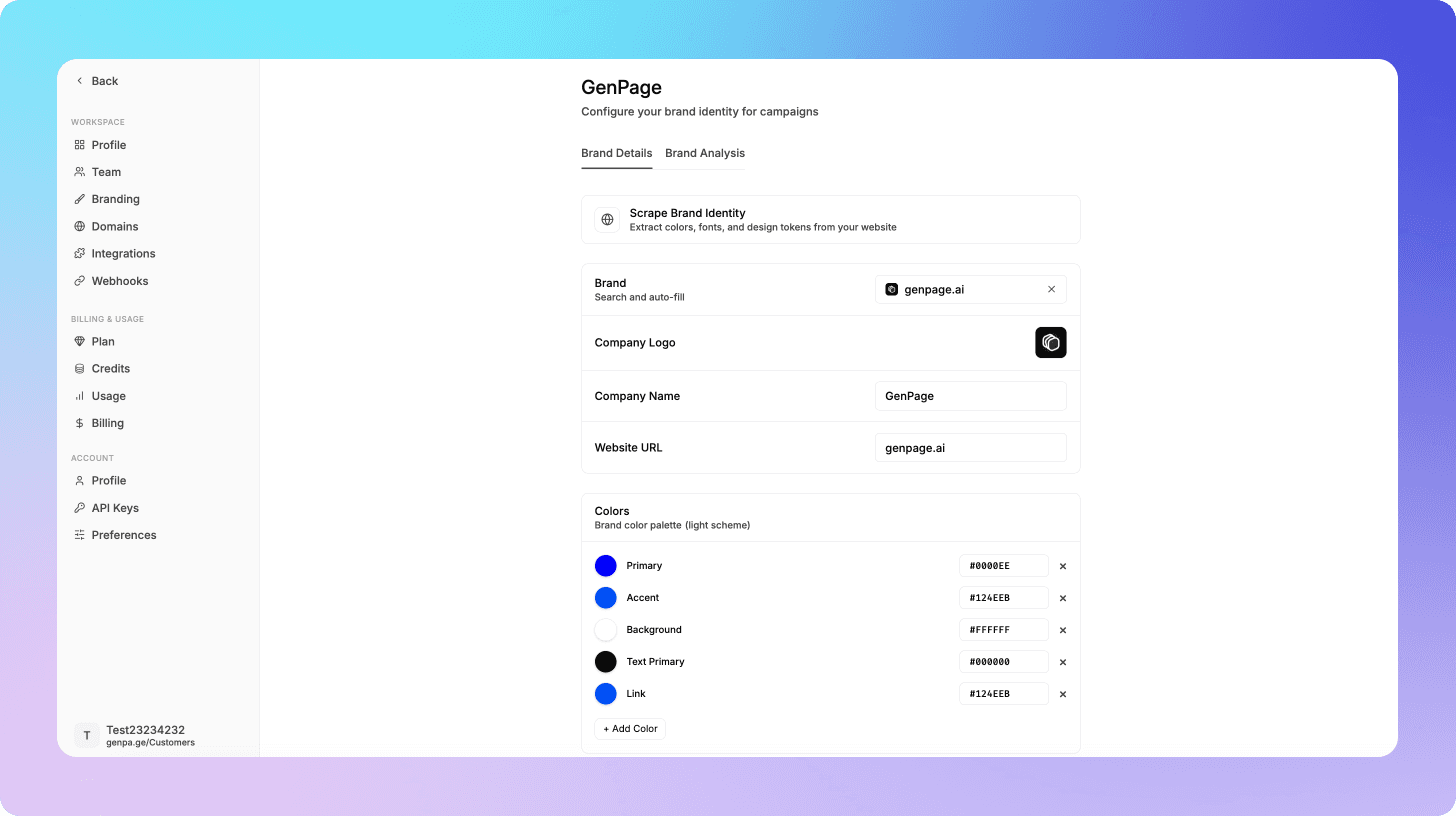
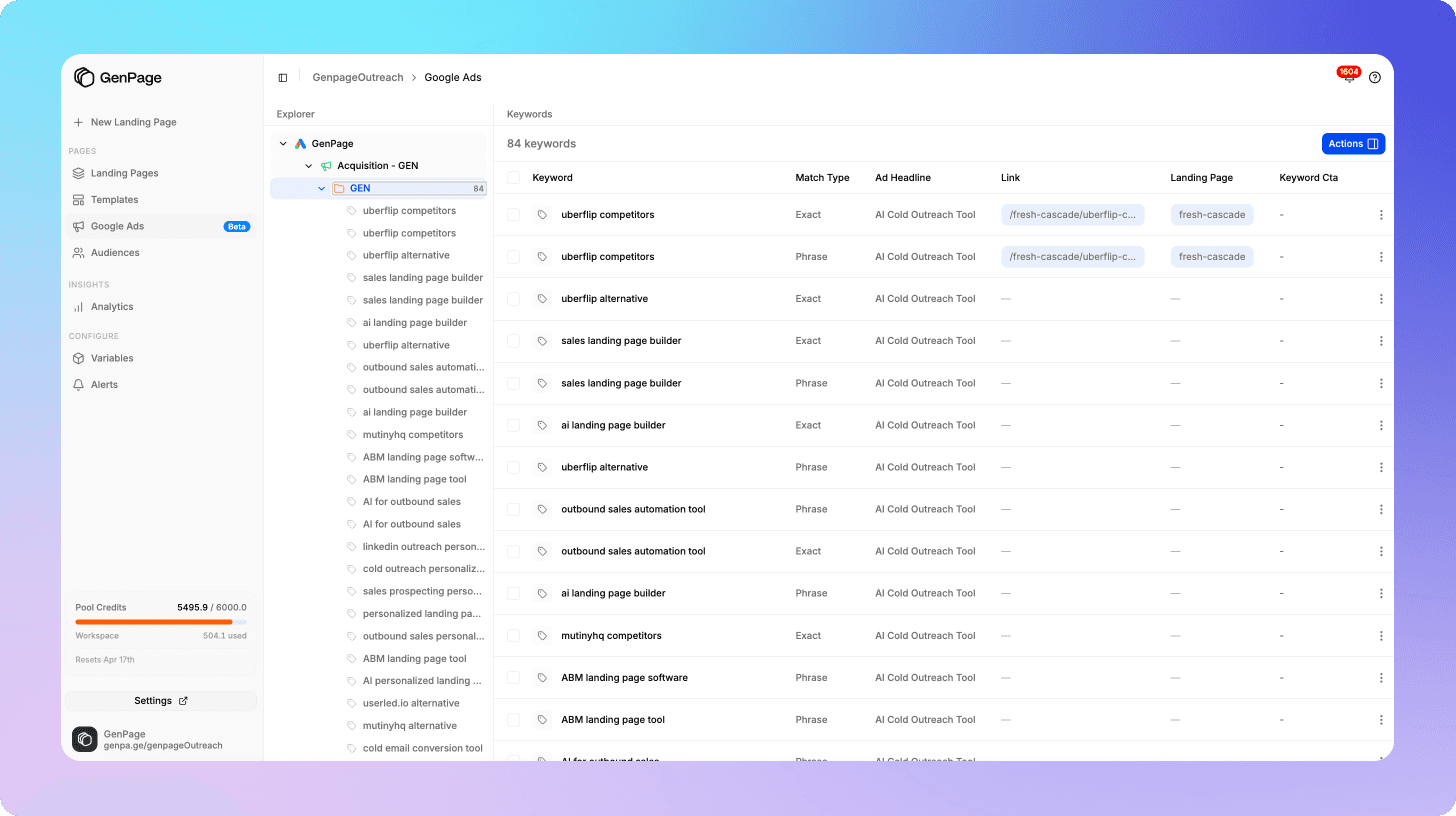
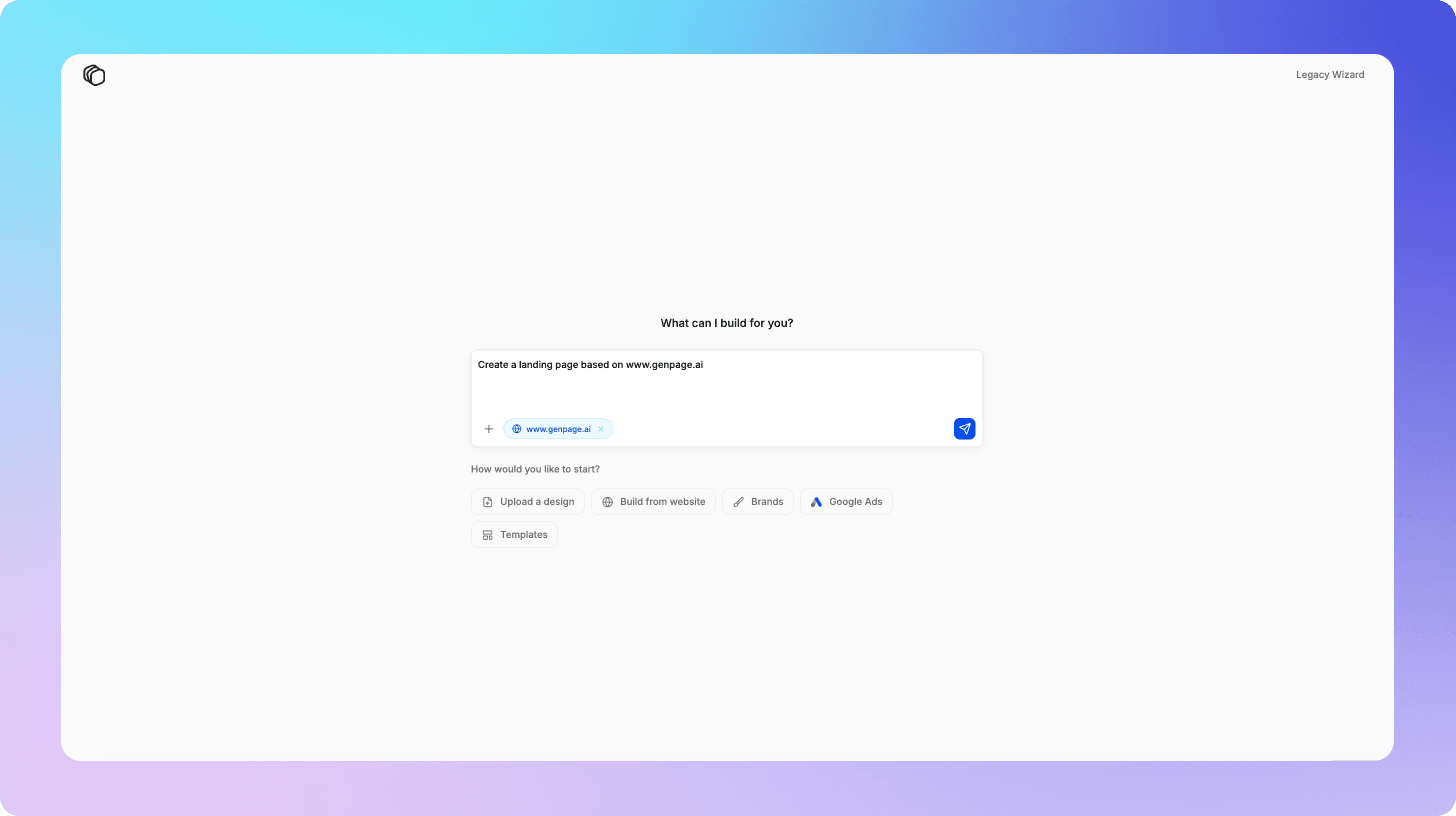
Build your base page. Create a landing page that represents your best generic version - strong headline, clear value proposition, relevant social proof, and a clear CTA. This is the foundation everything else is built on. You can build this directly inside GenPage in several ways: describe what you need and let the AI agent generate the page from a prompt, replicate an existing landing page from a URL, upload a design file, or start from one of GenPage's pre-built templates. Because the AI already has your brand profile loaded as context, whatever method you choose, the output reflects your actual brand - not a generic placeholder that needs to be redesigned from scratch.
Let the AI audit your page for personalization opportunities. Before touching a single element, run GenPage's AI agent on your page. It analyzes the full page structure and highlights the specific sections - headlines, subheadings, hero copy, case studies, CTAs - that are strong candidates for personalization. You don't need to guess what to change. The AI surfaces it for you.
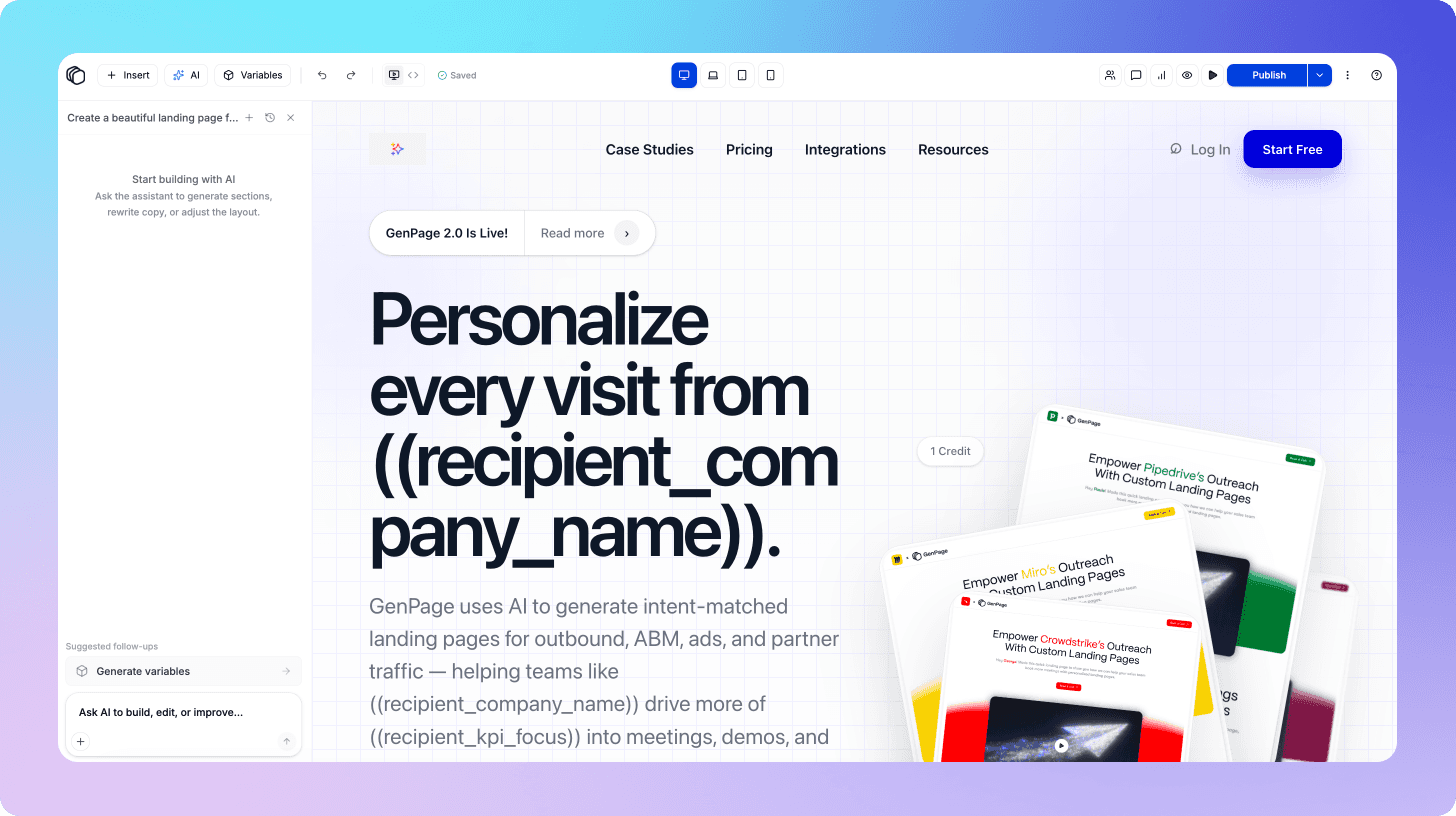
Define your AI variables. Once the AI has flagged the opportunities, mark the elements you want to make dynamic. These become smart fields - and here's where GenPage's context layer does the heavy lifting. When populating each field, the AI works with three sources of context simultaneously: your brand profile (what your business does, how you speak, what you sell), the page itself (the structure, the existing copy, the conversion goal), and the personalization source (the specific keywords, ad group, or audience segment driving that visitor). The result isn't generic substitution - it's copy that reads as if it was written from scratch for that exact visitor.
Publish to your domain - your way. You have two options for how personalized pages are hosted. You can deploy them as a subfolder on your existing domain using the GenPage SDK (e.g., yourdomain.com/lp/campaign-name), keeping everything under your root domain for maximum SEO continuity. Or you can connect a dedicated subdomain (e.g., go.yourdomain.com) if you prefer to keep campaign pages architecturally separate. Either way, pages match your brand design exactly and function as native pages from both Google's and the visitor's perspective. Once published, GenPage can push the updated destination URLs back to your Google Ads campaigns directly - no manual URL updates in the Ads interface required.
The entire setup process for a well-structured account typically takes a few hours, not weeks. And once the logic is in place, adding new keyword variants or audience segments is a matter of minutes.
Step 5: Set Up Conversion Tracking and Analytics
Personalized pages only deliver compounding ROI if you can measure what's working - and iterate on it. GenPage includes a built-in advanced analytics suite that goes well beyond standard page metrics.
Custom dashboards give you a real-time view of engagement and conversion performance across every variant. Session replays let you watch exactly how visitors interact with each personalized page. Heatmaps surface where attention is concentrated and where visitors are dropping off, so you can make targeted improvements without guesswork.
For teams that want to integrate their existing tracking stack, GenPage supports custom script injection - connect Google Analytics 4, Meta Pixel, or any other third-party tracking tool directly to your pages. This means your personalized landing page data flows into the same dashboards and attribution models you already use, with no data silos.
Before launching, confirm your setup covers:
Google Ads conversion actions firing correctly on your personalized pages
GA4 or your analytics platform receiving page_view and conversion events for each variant
Segment-level reporting configured so you can compare conversion rates by keyword cluster or audience, not just in aggregate
This granularity is what allows you to see that "visitors from keyword cluster A convert at 6.2% while keyword cluster B converts at 2.1%" - and act on it. The teams that get the most from personalization treat it as an ongoing optimization program, not a one-time setup. The combination of GenPage's native analytics and your existing tracking tools gives you everything you need to do that well.
Advanced Personalization Strategies for Google Ads
Once your foundational personalization setup is running, there are several higher-order strategies worth implementing.
Industry and Company-Level Personalization for B2B Campaigns
For B2B advertisers, keyword intent is only one dimension of relevance. A visitor searching "landing page personalization software" means something different if they're a solo consultant versus the VP of Marketing at a 500-person SaaS company.
With visitor deanonymization, you can personalize not just based on the keyword but based on visitors at the person-level - dynamically showing the industry-specific case study, the relevant pricing tier, or copy that speaks to their specific use case.
This takes personalization from "this page matches your search" to "this page was built for your exact situation" - a meaningfully higher bar for relevance.
Personalized Social Proof Matching
One of the highest-impact personalization opportunities that most teams underuse is dynamic social proof. Showing the right testimonial or case study to the right visitor is often more persuasive than any headline variation.
A few high-value applications:
Show ecommerce logos and case studies to visitors from ecommerce-focused ad groups
Show enterprise testimonials to visitors whose company data suggests they're at larger organizations
Show industry-specific proof points to visitors from vertically-targeted campaigns
The principle is simple: the most credible social proof is always the proof that's most similar to the visitor's own situation.
Post-Click Sequence Alignment
Personalization shouldn't stop at the landing page. If your conversion flow involves a multi-step process - a demo request form, an onboarding sequence, or a sales follow-up - the personalization signal you captured from the Google Ads click can and should carry through the entire journey.
Passing UTM data or GenPage URL links into your CRM or marketing automation platform means your sales team knows which keyword cluster converted, your email onboarding can reference the use case the user clicked on, and your retargeting campaigns can show creatives consistent with the original ad that brought them in.
This end-to-end coherence between ad click and post-conversion experience is what separates companies with 3–5% conversion rates from those operating at 8–12%.
What to Expect: Results and Timeline
The impact of landing page personalization on Google Ads performance is well-documented in conversion optimization research. The specific numbers vary by industry and starting point, but the directional outcomes are consistent:
Conversion rate improvement: marketers who implement intent-matched landing pages typically see significant lifts in conversion rate, often in the range of 2–3x, particularly when moving from a single generic page to properly segmented variants.
Quality Score improvement: improving landing page relevance directly improves Quality Score within two to four weeks of deployment, as Google's crawlers and user behavior signals update. This typically results in lower CPCs across the affected ad groups.
Cost per acquisition reduction: the combination of higher conversion rates and lower CPCs compounds quickly. More conversions from the same traffic at lower cost per click means a materially better CAC from the channel.
Timeline expectations: you should expect to see conversion rate improvements within the first two weeks of launching personalized pages, as there's no delay between deployment and performance impact. Quality Score improvements and CPC reductions follow on a slightly longer cycle as Google's systems update.
Common Mistakes to Avoid
Personalizing headlines only. Changing the H1 while leaving the rest of the page generic is better than nothing, but it's not true personalization. The most impactful implementations adjust the headline, subheading, body copy framing, and social proof simultaneously.
Over-segmenting before you have data. Start with three to five keyword clusters, not fifty. Get the conversion tracking in place, see what's performing, and expand from there. Premature over-segmentation creates a maintenance burden before you understand which variants actually matter.
Ignoring mobile. A significant portion of Google Ads clicks - sometimes the majority, depending on your industry - comes from mobile devices. Ensure your personalized pages are fully optimized for mobile, including load speed and form usability. GenPage handles this natively so no need to worry there.
Failing to align ad copy with page copy. Personalization works because it creates continuity between what was promised in the ad and what's delivered on the page. If your ad copy says one thing and your personalized page says something subtly different, you'll underperform. Review ad copy and page copy in tandem.
Not testing. Personalization is a hypothesis about what each audience wants to see. Test your variants against each other and against your control. The teams that get the most from personalization are those that treat it as an ongoing optimization program, not a one-time setup.
Conclusion
The gap between "we're running Google Ads" and "our Google Ads actually converts efficiently" is, in most cases, a message match problem. And the solution - personalized, intent-matched landing pages - has historically been gated behind development resources that most marketing teams don't have access to.
That's no longer a reasonable constraint. Modern landing page personalization platforms make it possible to build a fully segmented, keyword-responsive landing page system in hours, not weeks - without writing a line of code, without involving engineering, and without managing a sprawling library of static page variants.
The teams winning in paid search right now are the ones treating every ad click as an opportunity to deliver a 1:1 experience - matching the visitor's intent so precisely that conversion feels inevitable. That's not a stretch goal. With the right setup, it's the baseline.
Ready to see how GenPage handles this end-to-end? Start free today and have your first personalized landing page live before your next campaign goes live.
Frequently Asked Questions
Do I need a developer to create personalized landing pages for Google Ads?
No. GenPage is built entirely for marketers and growth teams. You can build, personalize, and publish landing pages without writing a single line of code - using AI prompts, URL replication, design file uploads, or pre-built templates. The entire workflow from brand setup to published page is designed to be handled by whoever owns the campaign.
Will personalized landing pages improve my Google Ads Quality Score?
Yes. Google evaluates landing page experience as a direct component of Quality Score. When your landing page content closely matches the keyword and ad that triggered the click, relevance scores improve - which typically results in lower CPCs and better ad positions. Most accounts see Quality Score improvements within two to four weeks of deploying properly matched pages.
How many landing page variants do I need for Google Ads?
You don't need a separate page for every keyword. Start by grouping your keywords into three to five intent clusters and build one personalized variant per cluster. GenPage's AI handles the dynamic content population within each variant based on the specific keyword or audience triggering the visit - so you're not building or managing dozens of static pages manually.
Can GenPage push updated landing page URLs back to Google Ads automatically?
Yes. Once your personalized pages are published, GenPage can send the updated destination URLs back to your Google Ads campaigns directly - no manual URL updates inside the Google Ads interface required.
Can I track conversions from personalized landing pages in Google Analytics or Google Ads?
Yes. GenPage supports custom script injection, so you can add your GA4 tag, Google Ads conversion tracking, Meta Pixel, or any other third-party tracking tool directly to your pages. All conversion events flow into your existing dashboards and attribution models exactly as they would from any other page on your site.
How long does it take to set up personalized landing pages for an existing Google Ads account?
For a well-structured account, the initial setup - connecting your domain, building your brand profile, creating your base page, and defining your personalization rules - typically takes a few hours. Adding new keyword variants or audience segments after that initial setup takes minutes. The time investment is front-loaded, and the system runs automatically from there.