

We Get 50%+ Reply Rates on LinkedIn. Most SDRs Get 1–10%. Here's the Difference.
The industry benchmark for LinkedIn cold outreach sits somewhere between 1% and 10% reply rate. Most teams operate closer to the bottom of that range.
Our sequences at GenPage consistently convert at over 50%.
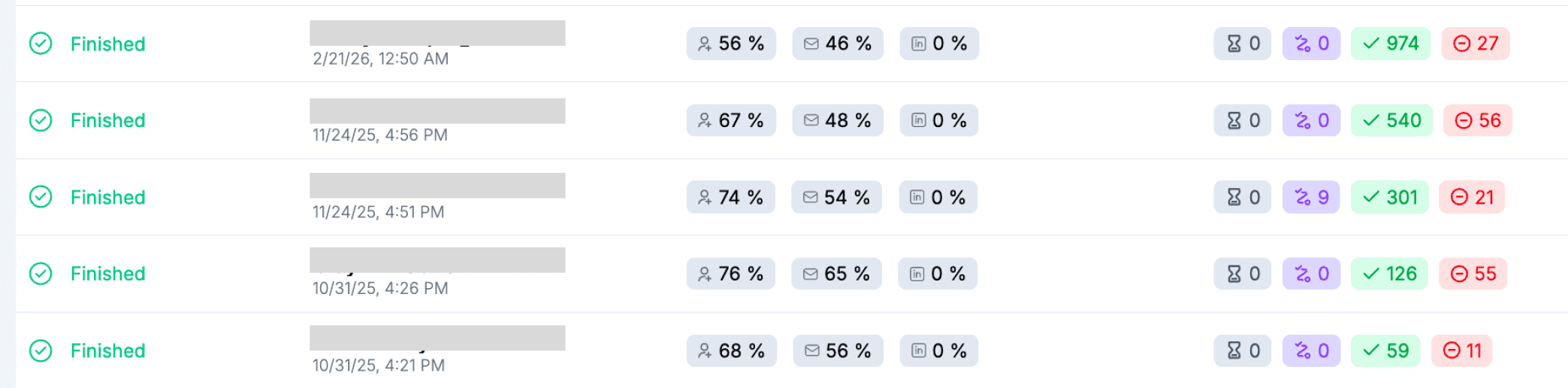
That gap isn't explained by better copywriting, more send volume, or a bigger team. It comes down to two structural decisions that most outreach programs get completely wrong - and once you see them, you can't unsee them.
This post breaks down exactly what those two things are, why the traditional approach fails, what a properly built outreach system looks like from the ground up, and how you can replicate it regardless of what you sell. Our customers are using the same system and seeing comparable results.
The Two Reasons Most LinkedIn Outreach Fails
Before getting into the fix, it's worth being direct about the problem. Most SDR outreach underperforms for two specific reasons, and they compound each other.
Problem 1: The Prospect List Is Built on ICP Fit, Not Intent
The standard approach to prospecting goes something like this: define your Ideal Customer Profile - industry, company size, job title, region - build a list of everyone who fits those criteria, and work the list.
This approach has a fundamental flaw. Being a good fit for your product is not the same as being ready to buy it.
Most people who match your ICP aren't at the awareness stage. They're not thinking about your category. They haven't identified the problem you solve as a priority this quarter. They are not in market. And no amount of clever messaging changes that fact - you're reaching someone who has no immediate context for why they should care.
This is why most outreach lists convert poorly even when the ICP definition is accurate. You're playing a numbers game against bad odds, and the solution most teams default to - more volume, more automation, more sequences - just makes the problem noisier and more expensive.
The alternative is intent-based prospecting. Instead of asking "who fits our ICP?", you ask "who in our ICP is showing signs that they're actively thinking about this problem right now?" That produces a fundamentally different list - smaller, more targeted, and dramatically higher-converting.
Problem 2: The Outreach Itself Is Generic
Even when SDRs reach the right person at the right time, the message usually lets them down.
The modern outreach playbook has converged on a predictable format: a brief opener that name-drops the company or congratulates them on something generic, a one-sentence description of what the sender does, a claim about results, and a CTA to book a call. Sometimes it references "I saw your profile." Sometimes it's partially AI-generated and doesn't even pretend to be specific.
The prospect reads three words, recognizes the format, and moves on. Not because they're too busy - though they are - but because the message clearly wasn't written for them. It was written for anyone who matches a filter.
The other persistent format problem: a wall of text. Paragraphs of copy that the prospect has to work through to locate the part that might be relevant to them. In a LinkedIn inbox - a medium built for short, conversational exchanges - this is the equivalent of walking up to someone at a conference and reading them a brochure.
The result is that even a perfectly timed message, sent to a genuinely in-market prospect, gets ignored. Because the format signals immediately that this is an outbound pitch, and the content confirms it.
The Fix: Two Changes That Compound Each Other
The system that drives our 50%+ reply rates fixes both problems simultaneously. It isn't a new framework or a clever messaging hack. It's two specific structural changes.
Fix 1: Prospect on Intent Signals, Not Just ICP
Instead of building static lists of profile-matching contacts, monitor LinkedIn for signals that indicate a prospect is actively thinking about your category right now.
Competitor mentions: someone posting about a tool in your category, asking for alternatives, or expressing frustration with their current solution. This prospect is already in-market. The category is already on their radar. They don't need to be convinced that the problem is worth solving - they already know. Your job is just to show up as the better answer.
Category conversations: posts about a problem your product solves, even if specific tools aren't mentioned. For us, that means posts about landing page conversion rates, ABM personalization, GTM workflow inefficiency, or outbound reply rates. These prospects are actively thinking about the problem space. That's a warm entry point, not a cold one.
Trigger events: funding rounds, new executive hires in relevant roles, rapid headcount growth in sales or marketing, product launches, or job postings that signal a team scaling in a direction where your product becomes essential. These are moments when a company is in motion and structurally more receptive to new solutions.
Recent LinkedIn activity on relevant content: prospects who have commented on, liked, or reshared content related to your category in the last week or two are showing passive intent. They're engaged with the problem space even if they haven't posted about it themselves.
The critical shift is that prospecting becomes a monitoring activity rather than a list-building activity. You're not reaching out to everyone who fits a profile - you're reaching out to the people who've already given you a reason to, in the last couple of weeks.
When you reach a prospect with a relevant, timely signal in hand, the entire dynamic changes. You're not interrupting them with something random. You're responding to something they already publicly engaged with. That framing - "I saw what you were thinking about, and I have something specific for you" - is categorically different from cold outreach, even if the mechanics look similar.
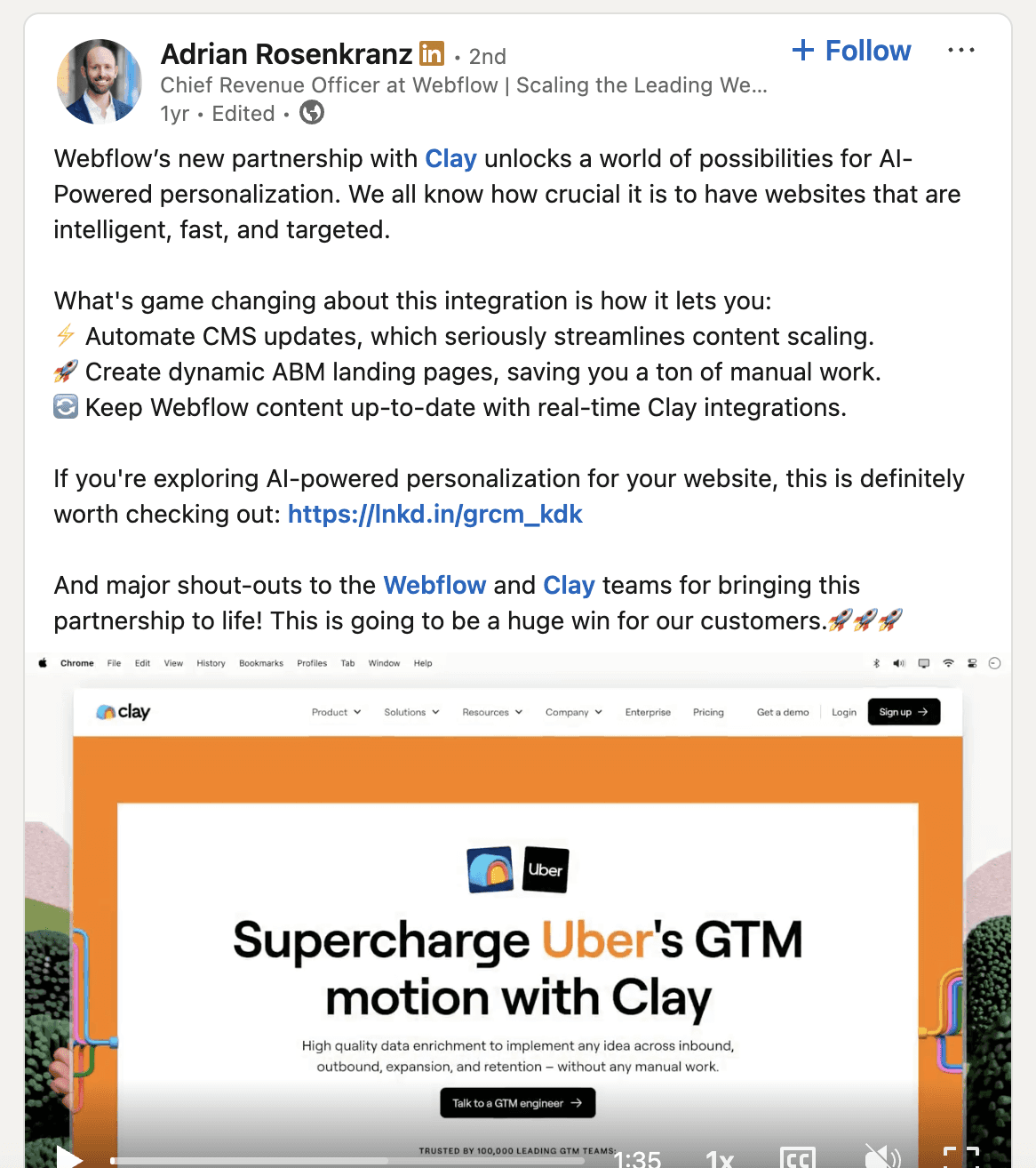
Example of a LinkedIn intent signal - a prospect post about personalized landing pages, a competitor mention, or a GTM workflow discussion - that triggers the outreach sequence.
In this case, we're targeting users of the Webflow + Clay integration. Many prospects like the idea of producing personalized landing pages at scale, however are not hosted on Webflow, or don't have the time or resources (it's an extensive setup) to set the integration up.
Fix 2: Replace the Generic Message With a Personalized Landing Page
This is the change most people haven't encountered yet - and it's the bigger unlock of the two.
Once you have the intent signal, you don't respond with a block of text. You build a landing page specifically for that prospect and send them the link.
This works on two levels that a message alone fundamentally cannot reach.
Level 1: The link itself is a pattern interrupt.
A prospect scrolling their LinkedIn inbox is thoroughly conditioned to outreach messages. They recognize the format in the first line. The moment they identify it as a pitch, the cognitive door closes - even if the content is actually relevant to them.
A link changes the dynamic entirely. Specifically, a link that arrives with a custom animated GIF preview showing the prospect's company name, a personalized title, and a preview image designed for them - visible directly in their LinkedIn inbox before they've clicked anything.
This looks and feels completely different from every other message in their inbox. The reaction isn't "another pitch." It's "what's this?" That moment of genuine curiosity is the gap that converts. And it's a gap that a generic block of text, no matter how well-crafted, structurally cannot create.
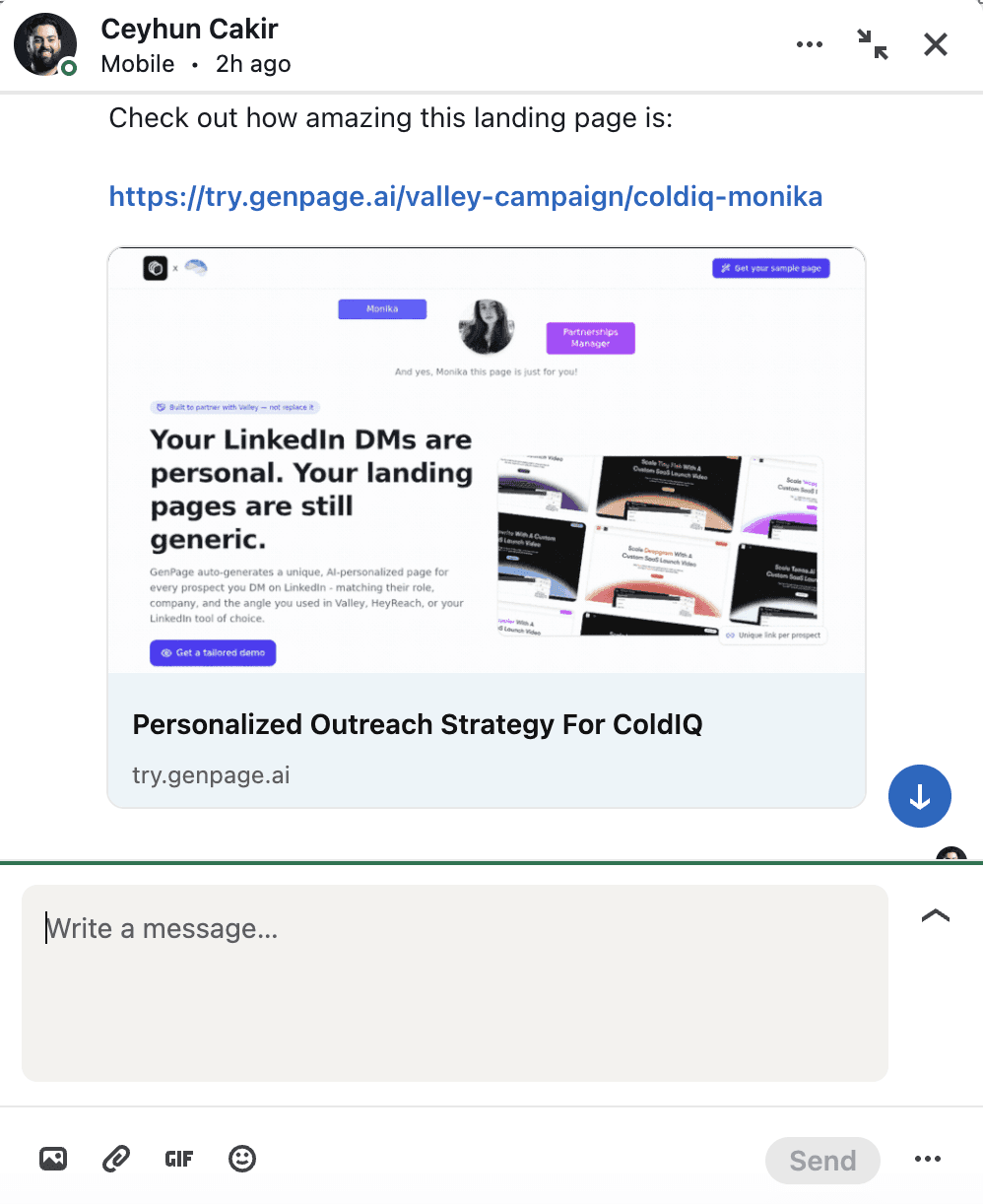
LinkedIn inbox showing the custom animated GIF link preview - with the prospect's company name and a personalized title visible directly in the message thread, before they've even clicked.
Level 2: The page itself closes the loop.
When the prospect clicks through, they don't land on a homepage or a generic product page. They land on a page that was built for them - that references the intent signal that prompted the outreach, speaks directly to their role and company stage, addresses the pain points most relevant to their situation, and presents your solution in the context of their specific world.
The page is doing what a message cannot: covering every element a prospect needs to make a decision, at whatever depth they want to go, without requiring them to do the work of translating a generic pitch into something relevant to their situation.
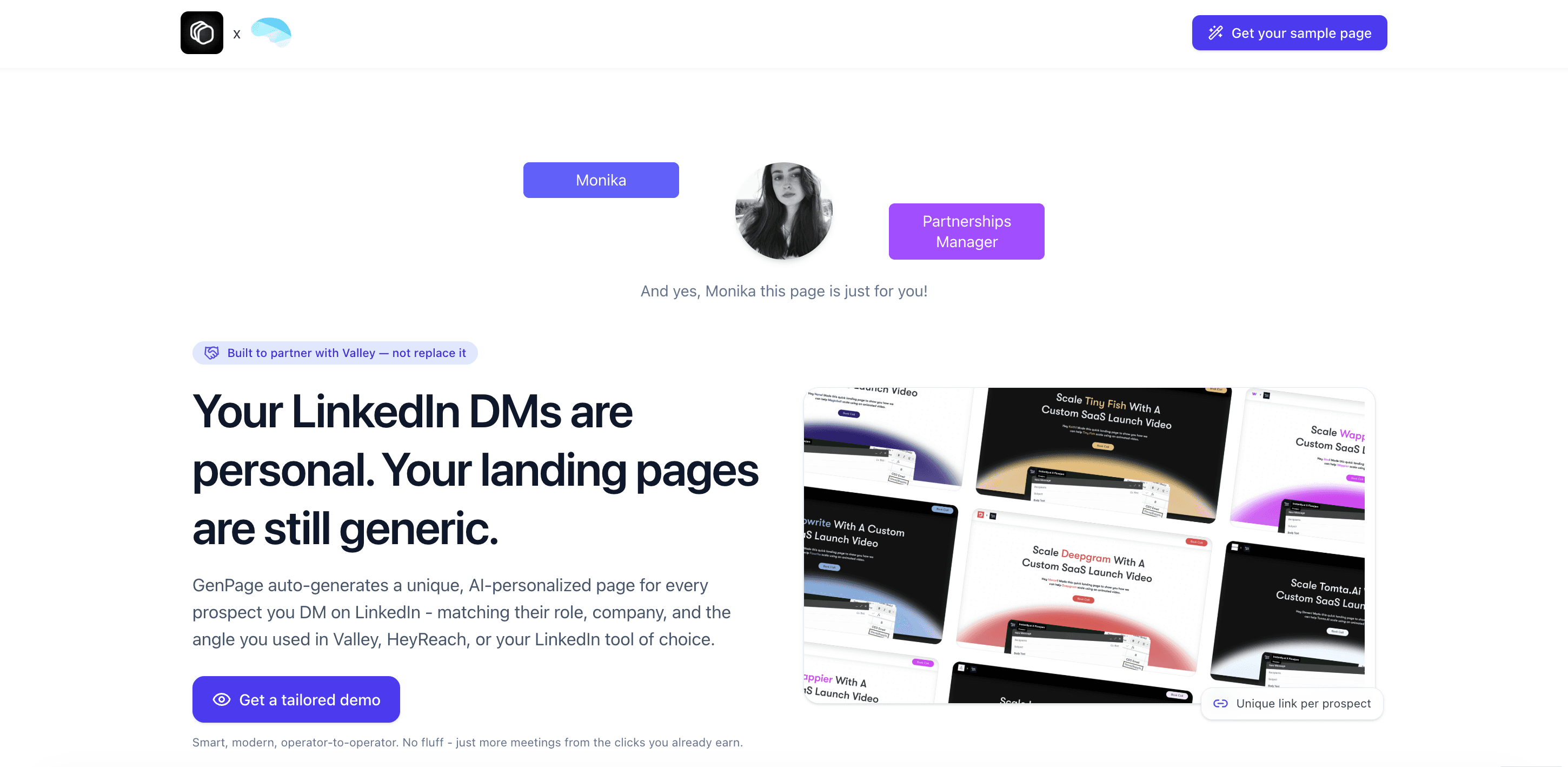
A personalized GenPage landing page built for a specific prospect - showing the dynamic headline referencing their company or intent signal, personalized body copy, and relevant social proof.
In this case, we're targeting ColdIQ - A leading GTM agency - based on their usage of various LinkedIn outreach tools and interest in personalization.
What a 1:1 Personalized Landing Page Actually Contains
A prospect-specific landing page isn't a long-form document. It's a focused, conversion-optimized page where every element has been adapted for the specific person viewing it. Here's what each section is doing and why it works.
The Headline
The most important real estate on the page. A generic headline - "Convert more leads with AI" - makes the prospect do mental work to figure out whether it applies to them. A personalized headline - "How [Company Name] can close more pipeline without increasing headcount" - requires no translation. The relevance is immediate.
The headline should speak to the specific problem or opportunity most relevant to this prospect's role and company context, not to an average buyer who doesn't exist.
The Subheading
One layer deeper than the headline. This is where you connect the specific signal - the intent trigger that prompted the outreach - to your solution. If the prospect posted about struggling with low ad conversion rates, the subheading might read: "Most teams drive traffic to one generic page. GenPage builds a unique page for every keyword, ad, and visitor - so every click lands somewhere that actually converts."
The prospect should finish the subheading thinking "yes, exactly" - not "I guess that applies to me."
The Hero Section
The hero should feel like it was designed for this person's world specifically. That might mean a product screenshot showing a use case most relevant to their industry, a headline stat drawn from a company at their growth stage, or a short video from the SDR that directly references their situation. The goal is to make the prospect feel, within the first ten seconds, that this page was built by someone who actually understands their context. Including company logos and LinkedIn profile pictures here works a charm as well!
Social Proof - Filtered and Specific
Generic logo walls don't convert. What converts is proof that companies in situations genuinely similar to the prospect's have solved the exact problem being addressed.
A Series B SaaS company should see case studies and testimonials from other Series B SaaS companies. An agency SDR should see agency results. A VP of Sales should see proof centered on pipeline metrics, not brand awareness.
Showing the wrong social proof isn't neutral - it actively undermines credibility by signaling that you don't know who you're talking to.
The Body Copy
This is where you can go deeper on the problem and the solution, using the language of this prospect's role rather than generic product marketing copy. A VP of Sales and a Head of Growth are both potential buyers, but the framing that resonates with each is completely different. The body copy is where personalization at the role and industry level does its most important work.
The CTA
Specific beats generic every time. "Book a 20-minute call to see how this works for [Company Name]" outperforms "Book a Demo" - not because it's longer, but because it reduces uncertainty about what the next step actually involves. The prospect knows exactly what they're committing to and that it's been framed specifically for them. You can even embed your calendar directly on your GenPage landing page for immediate, friction-less conversions.
A Personal Note
Optional, but highly effective for high-priority accounts. A short paragraph - or a 60-second video - from the SDR that directly references the prospect's context adds a human layer that no automated system can replicate at scale. Used selectively, it's the element that takes a very good page and makes it feel genuinely 1:1. Use tools like Sendspark or Loom to automate this at scale.
How the Outreach Sequence Actually Runs
With the intent signal and the personalized page in place, the sequence itself is straightforward. Here are the three formats that work best.
Sequence 1: LinkedIn Connection Request + Follow-Up DM
This is our primary sequence and the one that produces our 50%+ reply rates. The structure is deliberate at every step - each touch is designed to lower the barrier to a "yes" rather than push for a commitment the prospect isn't ready to make.
Step 1: Connection request: A short note that references the intent signal directly. Two sentences maximum. No pitch, no product mention. Just a genuine reason to connect based on something they publicly engaged with. The goal is to feel like a person responding to something real - not a sequence firing on a trigger.
"Saw your post about [specific topic] — we've been thinking about the same problem from a different angle. Would love to connect."
Step 2: The curiosity spike (foot in the door): Once connected, we don't send the page immediately. Instead, we send a short message that explains the intent signal - why we reached out, what we noticed - and offers to send the personalized landing page rather than dropping the link cold.
This is a deliberate foot-in-the-door move. A prospect who says "yes, send it" has already made a micro-commitment. They're psychologically more invested in what arrives than a prospect who received an unsolicited link. The curiosity of "what did they actually build for me?" does significant work before they've seen a single word of the page.
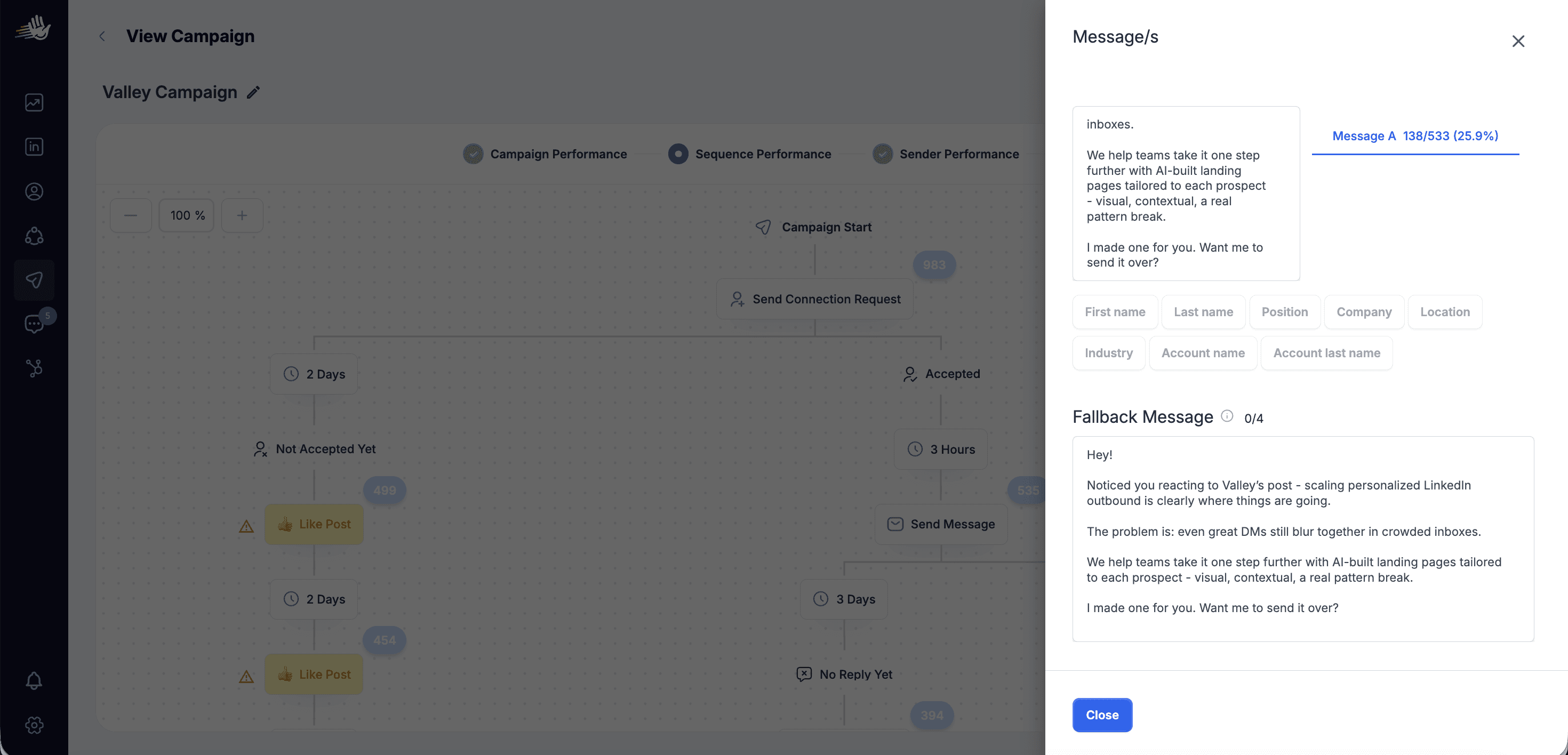
"Noticed you mentioned [topic / competitor / pain point] - it's actually exactly what we built GenPage to fix. I put together a page specifically for [Company Name] that walks through how we'd approach it. Want me to send it over?"
Step 3: Case study follow-up (if no response): If the prospect doesn't reply to Step 2, we don't repeat the same ask. Instead, we shift to proof. We send a short message referencing a concrete result - for us, that includes our workflow with HeyReach - that demonstrates the system working in practice, with real numbers. This adds a layer of authority and social proof without re-pitching the product directly.
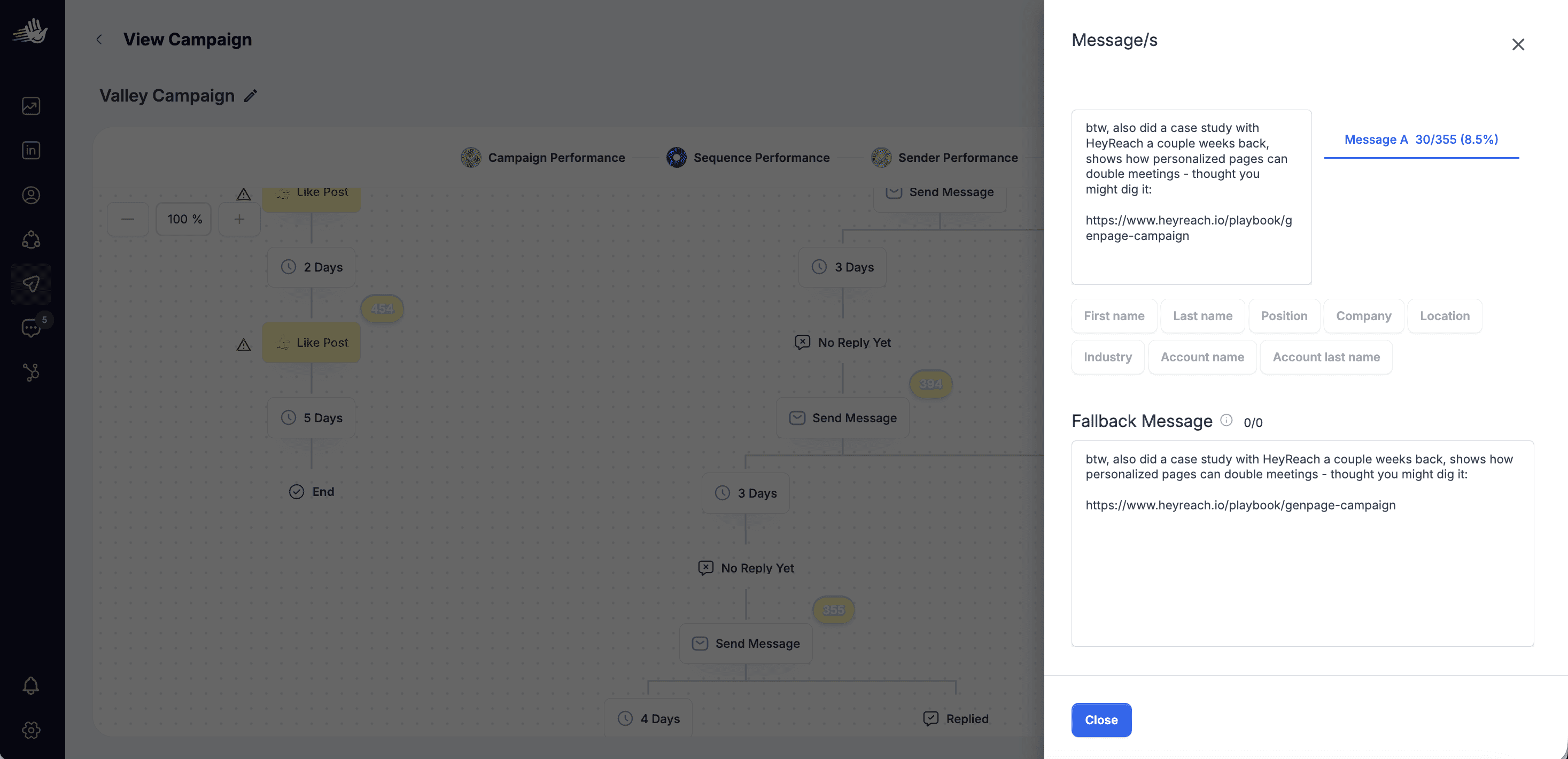
"In case it's useful context — here's how we use this workflow ourselves alongside HeyReach to run personalized outreach at scale. [result / case study link]. Happy to share more if relevant."
Step 4: Breakup message (if still no response): The final touch removes all friction and reframes the ask as a no-risk offer. We're not asking for a commitment or even a reply - we're offering something useful for free, with zero downside for the prospect.
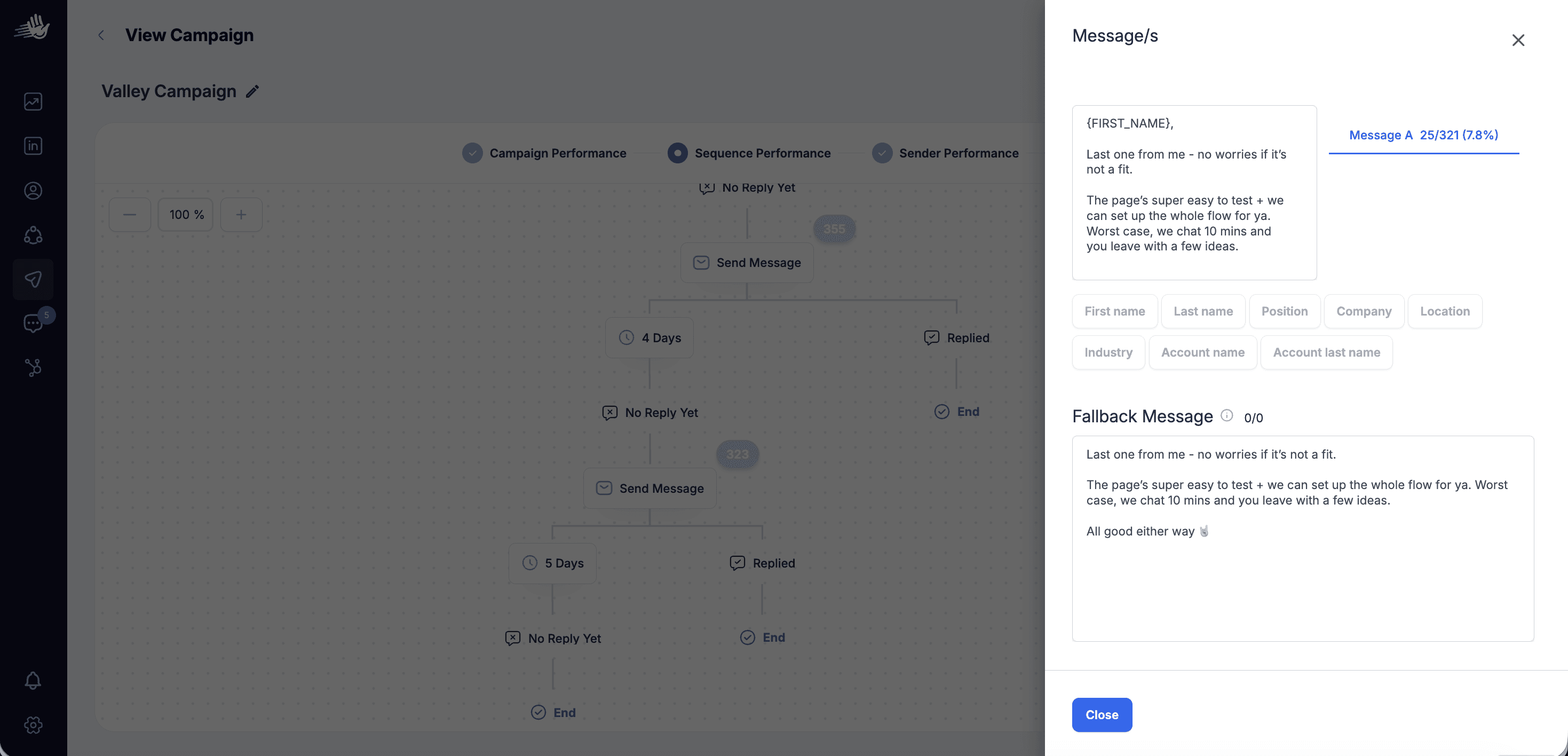
"Last one from me - if nothing else, happy to walk you through our full outreach workflows at no cost. Worst case you walk away with some new ideas. Worth 20 minutes?"
This message consistently outperforms a standard breakup because it gives a genuinely skeptical prospect a reason to engage that doesn't require them to believe in the product yet. They just have to be curious enough to take a free look.
We've written a deeper breakdown of this entire outreach strategy - including the intent signal monitoring process, how we build the pages, and the exact copy frameworks for each step - in a dedicated post.
Sequence 2: Cold LinkedIn DM with Personalized Page
For prospects you're not yet connected with - using InMail or open profile messaging.
Day 1: Cold DM: The message has to work harder here since there's no prior connection. Lead with the intent signal — their post, their company news, a challenge common to their role and stage. One sentence on the problem. One sentence on what you've built for them. Link. Something like: "Saw you posted about [topic] last week — built a quick page on how we approach this for teams at [Company Name]'s stage. [link] Worth a look if timing is right."
Day 5: Follow-up: A different angle. A relevant stat, a short case study reference, or a low-friction question that invites a response without requiring a commitment.
Sequence 3: Cold Email + LinkedIn Reinforcement
Email and LinkedIn work better in combination than either does alone, particularly for senior buyers who are more active in one channel than the other.
Day 1: Cold email: Open with a reference to their LinkedIn profile, their recent post, or a trigger event at their company. Present the problem in their language. Include the personalized page link as the primary CTA - or tease the page without sharing the link yet if you're concerned about deliverability (see the note on this below).
Day 3: LinkedIn connection request: A brief note referencing the email: "Sent you a note about [topic] yesterday - thought it'd be worth connecting here too."
Day 6: LinkedIn follow-up DM: Once connected, reference both the email and the page: "Wanted to make sure the page I put together for [Company Name] landed - [link]. Happy to connect if the timing is right."
Day 10: Final email: Short, direct, no hard pitch. A single question related to their situation that invites a low-friction reply. This is the exit touch - if there's no response here, you park the prospect until a new intent signal surfaces.
A Note on Email Deliverability and Including Links
A common question from SDRs running cold email alongside LinkedIn: does including a personalized landing page link affect email deliverability?
Not directly - GenPage is simply the landing page destination. Deliverability is primarily determined by your sending domain reputation, send volume, list quality, and email format - not the URL you're linking to.
That said, for cold outreach at scale, we generally recommend teasing the personalized page in the first email rather than including the link directly. Reference that you've built something specific for them - "I put together a page on how this would work specifically for [Company Name]" - and offer to share it once they reply. This keeps the first touch reading as a genuine 1:1 message rather than a sequence, and can meaningfully reduce spam classification risk at high volumes.
If you're running smaller, targeted campaigns - around 100 to 150 emails per domain per week - with warmed domains, clean lists, and good sending hygiene, including the link upfront is perfectly fine. Many GenPage users do this consistently without any negative deliverability impact. If you'd like guidance tailored to your specific volume and setup, our team is happy to share deliverability best practices that match your situation.
The Personalization Signals That Make Pages Convert
Not all personalization is equal. The pages that produce the best results draw on specific signal types - and the depth of personalization directly correlates with conversion rate. Here's what to use and how.
Company Name, Role, and Industry
The baseline. Even surface-level personalization - a headline that names the company, body copy that speaks to their specific role, case studies from their industry - shifts the psychological experience from "I'm looking at a product" to "this was made with my situation in mind." It's table stakes, but most outreach doesn't even clear this bar.
Pain Points Inferred from Job Title and Company Stage
Job titles tell you what someone owns, and ownership tells you what they worry about. A VP of Sales at a 150-person B2B SaaS company is worried about pipeline coverage, rep ramp time, and forecast accuracy. A Head of Growth at an early-stage startup is thinking about CAC efficiency and channel diversification. These are different people with different problems, and a page that leads with the right pain for each will dramatically outperform one that tries to speak to both.
Company stage adds another dimension. A Series A company scaling its GTM for the first time is in a different mode from a Series C company optimizing an established motion. The right personalization uses both signals together.
Recent LinkedIn Activity and Posts
When a prospect has publicly engaged with content related to your category - published a post, commented on a thread, shared a piece of research - you have explicit context for what they're currently thinking about. A page that opens with framing directly connected to that content isn't just personalized. It demonstrates real attention, which is the most credible signal you can send to a senior buyer who receives dozens of generic pitches per week.
Trigger Events and Company Context
Funding rounds, new hires in relevant roles, product launches, rapid headcount growth, and press coverage are all moments when a company is in active motion. A personalized page that acknowledges the specific context - "Congratulations on the Series B - here's how teams at your stage typically use GenPage to scale outbound without scaling headcount" - is engaging with what the prospect is actually focused on right now, not a static profile that may be months out of date.
Building This at Scale: How GenPage Makes It Practical
The obvious question at this point is time. Building a custom page for every prospect sounds like a significant manual effort. The reason the system is actually scalable - rather than being something reserved for enterprise ABM teams with dedicated ops resources - is that GenPage handles the production.
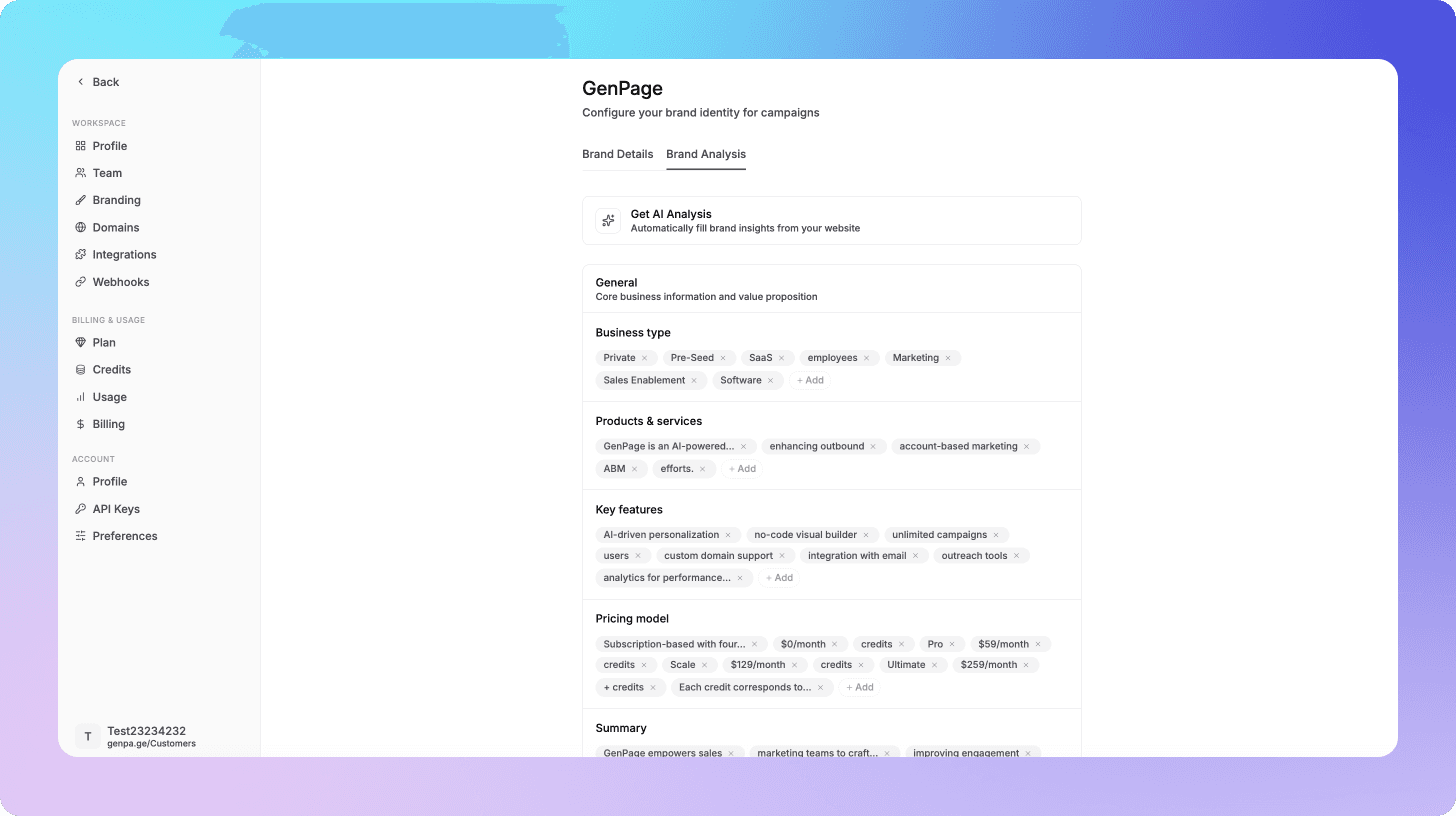
Your brand profile is built once. Connect your domain and GenPage crawls your website to construct an internal profile of your positioning, tone of voice, products, pricing, and key value propositions. This is the AI's permanent context layer. Every page it generates draws from this - you never re-explain your brand for each new prospect.
Your base page is built once. Create a master landing page representing your strongest generic version. Build it with AI from a prompt, replicate an existing page from a URL, upload a design file, or start from a template. Because the brand profile is already loaded, the output matches your brand design and voice from the first draft.
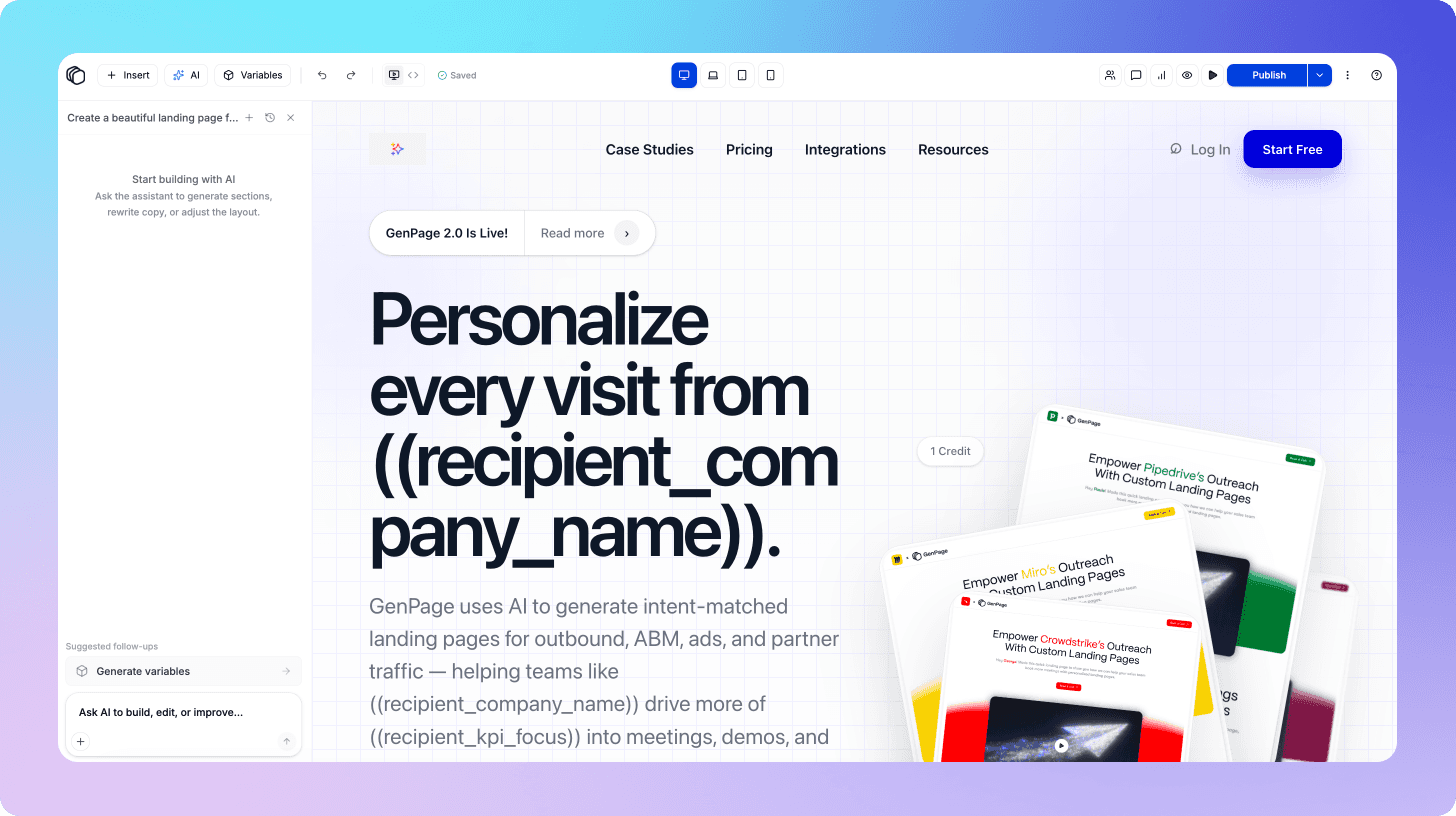
The AI identifies what to personalize. Run GenPage's AI agent on the base page. It analyzes the structure and surfaces the specific elements - headline, subheading, hero copy, case study, CTA - with the highest personalization potential. You don't decide what to change. The AI flags it.
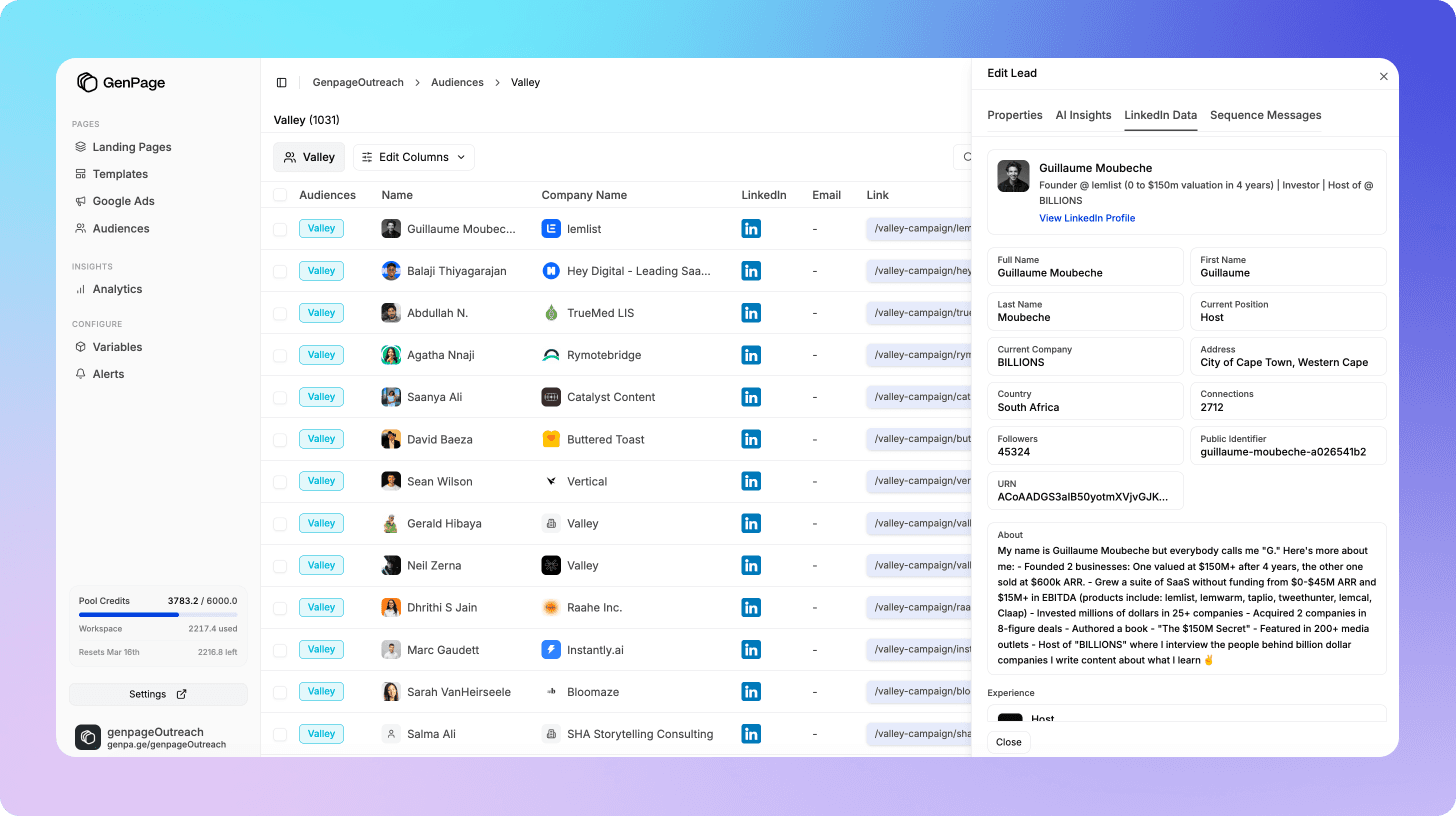
Prospect pages are generated in bulk. Feed prospect data into GenPage from a CSV, a CRM export, or directly from integrations with Clay, HubSpot, or LinkedIn. GenPage generates a unique page for each prospect, drawing simultaneously on your brand profile, the base page structure, and the prospect-specific data you provide. The result reads as if it was researched and written individually. For a list of 100 prospects, this takes minutes.
The animated GIF link previews - the ones that display the prospect's company name and a personalized title directly in their LinkedIn inbox before they click - are generated automatically alongside each page. No additional design work.
Pages are hosted on your domain. Deploy as a subfolder using the GenPage SDK (e.g., yourdomain.com/lp/prospect-name) or connect a dedicated subdomain (e.g., go.yourdomain.com). Pages match your brand design and function as native pages from the prospect's perspective.
Integrations That Fit Your Existing Stack
GenPage connects with the tools your team is already using, so the personalized page workflow slots into your existing process rather than creating a parallel one.
Clay - push enriched prospect data directly into GenPage at the list-building stage. By the time a prospect enters your sequence, their page is already live. No manual handoff between research and outreach.
HubSpot - sync contacts so personalized pages are generated automatically when a contact reaches a specific lifecycle stage or enters a sequence. Page engagement data - visits, time on page, CTA clicks - flows back into HubSpot as contact activity, giving your team real-time intent signals without leaving their CRM.
LinkedIn Sales Navigator - use Sales Navigator's advanced filters to build targeted lists, export them, and feed them into GenPage for page generation. The combination of Sales Navigator's data depth and GenPage's personalization engine means every prospect gets a page built around their specific context.
HeyReach & Instantly - embed personalized page URLs directly into sequence templates using dynamic variables. When the sequence fires for a specific prospect, the link in the message automatically points to their unique page.
Tracking Performance: The Data That Tells You When and How to Follow Up
One of the most underused advantages of sending a landing page rather than a generic message is the behavioral data it generates. Every prospect who clicks becomes visible in a way that a message reply never provides.
GenPage's built-in analytics give you a complete picture of how each prospect engaged with their page:
Real-time visit alerts: know the moment a prospect lands on their page. This is what enables same-day follow-up timed to genuine engagement rather than an arbitrary sequence timer.
Time on page: a prospect who spends four minutes reading is materially different from one who bounced in fifteen seconds. Prioritize follow-up depth and urgency accordingly.
Heatmaps: see exactly which sections of the page attracted attention and which were skipped. If every prospect reads the headline but drops off before the case study, that's a clear signal to restructure the page - not to send more messages.
Session replays: watch exactly how individual prospects moved through the page. Where did they hesitate? What did they read twice? Did they start filling in the form and then stop? This level of behavioral detail transforms how you approach the follow-up conversation.
CTA clicks: the clearest intent signal short of a booked meeting. A prospect who clicked "Book a call for [Company Name]" but didn't complete the booking is one well-timed follow-up from a conversion.
For teams running attribution through GA4, HubSpot, or another platform, GenPage supports custom script injection. Add your tracking code directly to your prospect pages - every visit and conversion event flows into your existing dashboards, keeping attribution consolidated and reporting clean.
The difference between following up with this data and following up on a fixed drip schedule is the difference between a relevant, timely conversation and an automated sequence the prospect can feel isn't actually responding to them.
The Results: What This System Produces
Our own sequences - built on intent signals, personalized pages, and engagement-timed follow-up - consistently hit 50%+ reply rates on LinkedIn.
That's not a single campaign result. It's the consistent output of the system applied repeatedly across different prospect segments.
Our customers are producing comparable results. Teams using GenPage for 1:1 outreach pages report reply rates and meeting booking rates well above their previous benchmarks - across B2B SaaS, agencies, and professional services - because the underlying mechanism is the same regardless of product: you're reaching people who are already thinking about your category, with something that looks completely different from every other message in their inbox, that speaks directly to their situation when they click through.
Check out our case studies for full breakdowns of customer workflows, best practices, tips, and more.
Common Mistakes to Avoid
Building your outreach list on profile fit alone. The quality of your outreach is ultimately determined by the quality of your segmentation. Personalized landing pages lift conversion rates across all types of outreach - cold lists, warm leads, re-engagement campaigns - but the biggest returns come when the list itself is built on the strongest possible signal that a prospect is ready to hear from you. A well-built ICP is a starting point, not a targeting strategy. The teams seeing the best results are layering intent signals on top of ICP fit - using competitor mentions, category conversations, and trigger events to identify who in their target market is actively thinking about the problem right now. A personalized page sent to a high-intent prospect is an exceptionally strong combination. The page amplifies the signal; the signal makes the page land at the right moment.
Personalizing on surface details only. A company name in the headline is the floor, not the ceiling. The pages that convert go significantly deeper - addressing the specific pain most relevant to this role and stage, with proof from companies in genuinely similar situations. Surface personalization signals effort. Deep personalization signals understanding. In GenPage, you can use AI variables that leverage both your brand context and your prospect's context to surface deeply personalized messaging within your pages.
Not tracking page engagement. The visit data is often the most valuable output of the entire sequence. A prospect who spends three minutes on the page and clicks the CTA without booking is telling you something very specific about where they are in their decision process. If you're not tracking, you're missing the most actionable signal in the workflow.
Treating the page as a substitute for follow-up. The page starts the conversation. The follow-up - specifically timed to the page visit - is where the meeting gets booked. Build the follow-up logic before you launch the pages. Some of our users leverage our Zapier integration, webhooks, or Slack alerts to stay on top of engaged leads.
Using one base page for every persona. A VP of Sales and a Head of Marketing may both be in your ICP but respond to completely different framings. Build segment-specific base pages for your most important personas. The AI handles the prospect-level customization; the base page determines the strategic direction.
Conclusion
Most LinkedIn outreach fails for two reasons that have nothing to do with the quality of the product being sold: the prospect list is built on profile fit rather than active intent, and the message is a generic pitch that was written for everyone, which means it resonates with no one.
The fix is structural, not cosmetic. Prospect on signals that indicate someone is actively thinking about your category right now. And when you reach out, don't send a block of text - send a page that was built specifically for them, that looks different from everything else in their inbox, that speaks directly to their situation when they arrive, and that gives you the behavioral data to follow up at exactly the right moment.
That's the system behind our 50%+ reply rates. It's the system our customers are replicating across industries and ICP profiles. Once you've identified the right people to reach out to, GenPage does the rest - AI-generated 1:1 pages for every prospect, animated GIF previews that make your link stand out in the inbox, and real-time engagement tracking that tells you exactly when and how to follow up. The whole production side of personalized outreach, handled automatically.
Ready to build your first prospect page? Start free today and have personalized landing pages running in your next LinkedIn sequence before the week is out.
Frequently Asked Questions
Do I need to build a new landing page for every prospect I reach out to?
No. You build one base page, and GenPage's AI generates personalized variants for each prospect by drawing on three layers of context simultaneously: your brand profile, the base page structure, and the prospect data you provide. You're not building or managing individual pages manually - the system handles production at scale. For a list of 100 prospects, page generation takes minutes.
Will including a landing page link hurt my LinkedIn outreach reply rate?
The opposite, in our experience. A personalized page link - particularly one with a custom animated GIF preview showing the prospect's company name directly in their LinkedIn inbox - acts as a pattern interrupt rather than another pitch. It looks and feels completely different from every other message in their inbox. Our sequences using this approach consistently achieve 50%+ reply rates on LinkedIn.
Does GenPage affect email deliverability?
Not directly - GenPage is simply the landing page destination. Deliverability is determined by your sending domain reputation, send volume, list quality, and email practices rather than the URL you're linking to. For cold outreach at scale, we recommend teasing the personalized page in the first email and sharing the link once the prospect replies. For smaller targeted campaigns of around 100 to 150 emails per domain per week with good sending hygiene, including the link upfront works fine - many GenPage users do this without any deliverability impact. If you'd like guidance tailored to your specific setup, our team is happy to share best practices.
Can I track whether a prospect has visited their personalized page?
Yes. GenPage provides real-time visit alerts, time-on-page data, heatmaps, and session replays for every prospect page. You can see exactly when a prospect visits, how long they stayed, which sections they engaged with, and whether they clicked the CTA - giving you the behavioral data to follow up at exactly the right moment rather than on an arbitrary sequence timer.
What personalization signals work best for LinkedIn outreach pages?
The four signals that produce the strongest results are: company name, role, and industry (the baseline layer); pain points inferred from job title and company stage; recent LinkedIn activity and posts the prospect has publicly engaged with; and trigger events like funding rounds, new hires, or product launches. The deeper you go beyond the company name, the more the page reads as genuinely built for that specific person rather than assembled from a template.
Does this work if I'm not using intent signals - just a standard ICP list?
Yes. Personalized landing pages lift conversion rates across all types of outreach, including standard cold lists. The intent signal isn't a requirement - it's an amplifier. A personalized page sent to a well-segmented ICP list will outperform a generic message to the same list. A personalized page sent to a prospect who's already shown active intent in your category will outperform both.