

The instinct every CMO has - and why it backfires
When Google Ads performance plateaus, the default move is to spend more. More budget means more impressions, more clicks, more pipeline. It feels like a direct relationship: spend up, revenue up.
It isn't.
What actually happens when you scale spend on underoptimized campaigns is that your cost-per-click rises, your Quality Scores stay flat or deteriorate, your CAC climbs, and your CFO starts asking uncomfortable questions about ROAS. You're not buying more results - you're paying more for the same ones.
I've been on both sides of this. At my previous company, a mid-market B2B SaaS startup, we ran this exact playbook and paid for it. When we finally understood what was actually driving our Quality Scores down - and fixed it - we got double-digit conversion rate lifts without increasing spend by a single dollar.
The fix wasn't the bidding strategy. It wasn't the ad copy. It was the landing page.
Specifically, it was the fact that our landing pages weren't matching the intent of the people clicking our ads. And Google, which has a very strong financial incentive to send its users to pages that actually answer their query, was penalizing us for it - invisibly, expensively, at scale.
This post is about why that happens, how to diagnose it, and how to fix it in a way that doesn't require a six-month dev project.
What is Google Ads Quality Score, and why does it actually matter?
Quality Score is Google's 1–10 rating of the relevance and quality of your keywords, ads, and landing pages. It's calculated per keyword and based on three components:
Expected click-through rate (CTR) - how likely your ad is to get clicked relative to other ads showing for that keyword
Ad relevance - how closely your ad matches the intent behind the search query
Landing page experience - how relevant, useful, and trustworthy your landing page is to someone who clicked that ad
Most performance marketers have a surface-level understanding of Quality Score. What they underestimate is the compounding financial impact of a low score - and more importantly, what's actually driving the landing page experience component down.
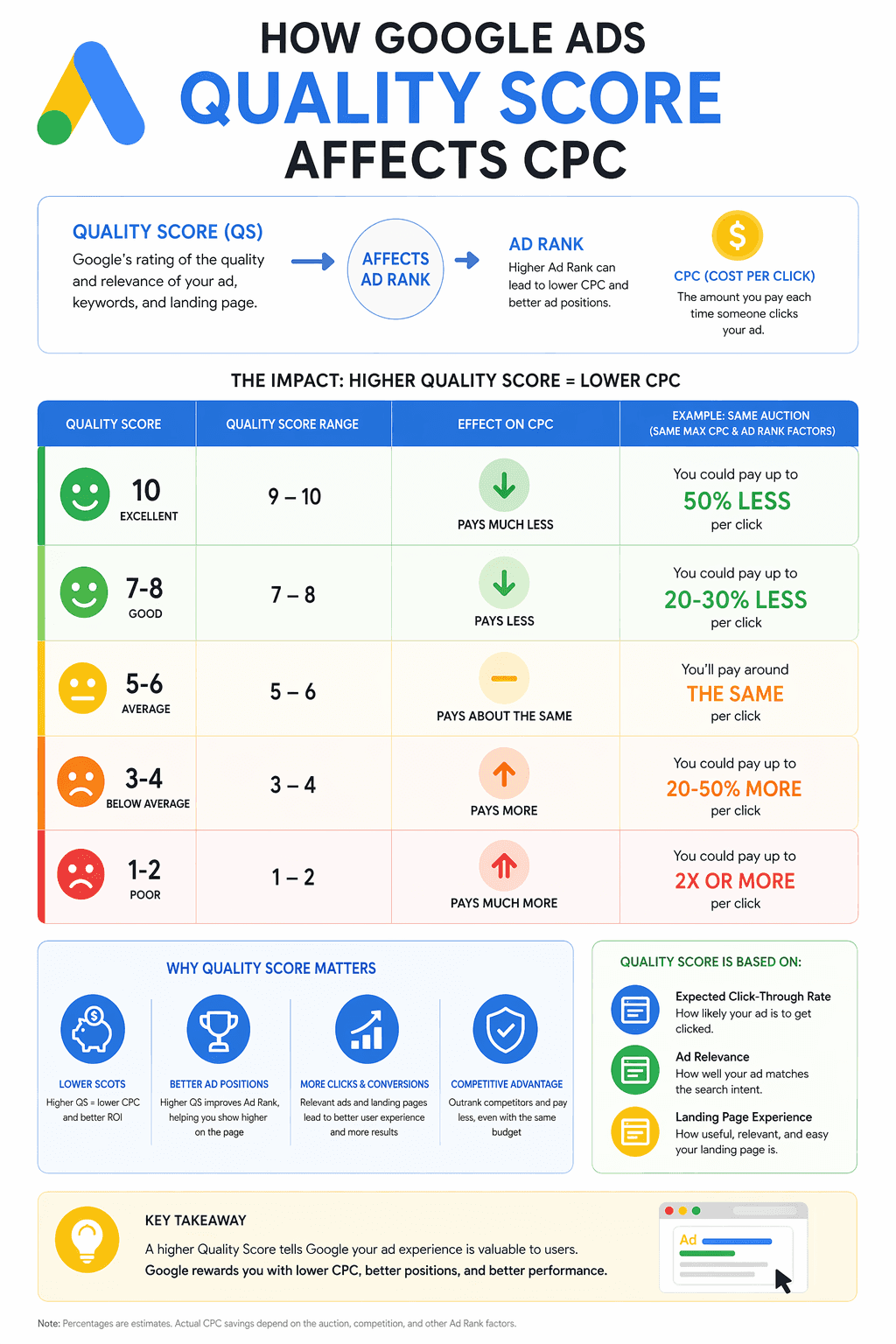
Google's own data shows that a Quality Score of 6 vs. 4 on the same keyword can mean a CPC difference of 16–25%. At $40K/month in spend, that's $6,400–$10,000 in unnecessary cost per month.
The mechanism works like this: Google's ad auction isn't purely a bidding war. Your Ad Rank - which determines where your ad appears - is calculated as your bid multiplied by your Quality Score, plus the expected impact of ad extensions. This means a higher Quality Score directly offsets the need to bid higher. You can outrank a better-funded competitor by being more relevant.
The inverse is also true. A low Quality Score means you're paying a premium - above your bid - just to maintain your position. Every dollar of wasted spend on underperforming keywords is partially a Quality Score tax.
Why is landing page experience the hardest component to fix?
Quality Score has three components, but they're not equally addressable. Expected CTR and ad relevance are relatively straightforward to improve - tighten your ad copy, improve your headline, match your keywords more precisely to your ad groups. Most performance teams have a reasonable workflow for this.
Landing page experience is different. It requires changes to a page that typically lives outside the performance marketer's direct control - in a CMS that requires design and development resources to modify. And Google evaluates it not just on page speed and mobile-friendliness, but on content relevance: does the page actually address what the person who clicked this ad was looking for?
This is the part that breaks down at scale.
When you're bidding on 10 keywords, building reasonably matched landing pages is feasible. When you're bidding on hundreds of keywords across dozens of ad groups targeting different industries, use cases, and funnel stages, the math stops working. You can't build a dedicated, intent-matched page for every keyword cluster - not with a normal dev workflow.
So most teams compromise. They build five or ten pages for their highest-volume keywords and send everything else to the homepage or a generic product page. The result is that the majority of their ad spend - often 60–70% of budget - is driving traffic to pages with a landing page experience score of "Below Average."
Google sees this. Google charges you for it. And your conversion rate on that traffic reflects it too.
What I got wrong scaling Google Ads at my last company
When we started running Google Ads at my previous company, we did exactly what most early-stage SaaS teams do: we sent all traffic to the homepage. We didn't have the resources to build dedicated landing pages. Our stack was Webflow, which meant every new page required a wireframe, a designer, and a developer - a two to three week cycle minimum, for a single page.
The homepage conversions from paid traffic were mediocre, predictably. But we didn't have a great alternative.
After our Series B, we had more budget and more runway to invest in the website. We built out a proper content architecture - use case pages, competitor comparison pages, a template directory - and started routing paid traffic to these more targeted pages. Quality Score improved. Conversion rates improved. CAC came down.
But we were still compromising. We were bidding on hundreds of keywords, and we had maybe ten pages that were reasonably matched to specific intent clusters. Everything else still landed on a generic page. The headline, the value proposition, the social proof - all of it stayed the same regardless of what the person had searched.
The fix that actually moved the needle was a custom script that read our UTM parameters and dynamically updated the hero headline based on the keyword and search intent. Basic dynamic text replacement, implemented by an engineer. The change from a static generic headline to an intent-matched one produced double-digit conversion rate lifts across the campaigns where we deployed it.
Same traffic. Same spend. Materially more pipeline.
The problem: it was fragile, hard to maintain, covered only the headline, and required ongoing engineering support to extend to new keywords. We could do it for our top ten. The other ninety percent of our keyword portfolio was still leaking.
What I wish had existed then - and what we built GenPage to solve - is a system that does this automatically, for every keyword, without an engineer in the loop.
How does Google actually evaluate landing page experience?
Google doesn't publish the full algorithm, but from their documentation and observed behavior, landing page experience is assessed on several dimensions:
Relevance of content to the ad and keyword: the most important factor. Does the page content directly address what the user searched? Is the keyword or a close variant present in the headline, subheading, and body copy? Does the page deliver on the specific promise made in the ad?
Transparency and trustworthiness: does the page clearly explain what the business does? Is there a privacy policy? Are contact details accessible? Google penalizes pages that feel evasive or misleading.
Navigation and user experience: is the page easy to use on mobile? Does it load quickly? Is the primary CTA clear and accessible without excessive scrolling?
Engagement signals: Google infers landing page experience partly from behavioral data: bounce rate, time on page, and whether users return to the SERP immediately after clicking (a strong negative signal). A page that consistently fails to hold attention damages its own Quality Score over time.
The critical insight here is that relevance is not just about keyword matching - it's about intent matching. A page that contains the keyword "project management software for agencies" but leads with a generic enterprise pitch is still a relevance mismatch, because the intent behind that search is specific and the page doesn't address it specifically.
This is why dynamic text replacement alone - while better than nothing - isn't a complete solution. Swapping the headline keyword without changing the rest of the page still leaves a relevance gap between what the person searched and what the page is actually about.
If you want a step-by-step breakdown of how to set this up without a developer, we cover the full workflow in this guide.
What does "below average" landing page experience actually cost you?
Let's make this concrete, because this is where most CMOs don't have clear visibility.
Google scores landing page experience as Above Average, Average, or Below Average per keyword. The financial impact of Below Average scores compounds across your account in three ways:
Higher CPC at every auction. Your Ad Rank is partially determined by Quality Score. A Below Average landing page experience pulls your Quality Score down, which means you're effectively paying a premium on every click just to maintain your position against competitors with better-optimized pages.
Lower impression share. Google is less likely to show your ad - even with a competitive bid - if it consistently sees poor engagement signals from your landing page. You're not just paying more per click; you're getting fewer of them.
Lower conversion rate from the traffic you do get. A page that doesn't match the intent of the visitor converts poorly regardless of how good the ad was. The click was earned by the ad; the conversion is lost by the page. You're paying for a click that was never going to convert because the destination wasn't set up to receive that specific visitor.
These three effects compound each other. More spend on a low-Quality-Score account doesn't fix the problem - it scales it. You buy more expensive clicks that convert at a lower rate, which further signals to Google that the experience is poor, which pushes Quality Scores lower still.
This is the trap. And the exit isn't a higher bid. It's a better page.
Why one landing page for all keywords is the core of the problem
Here's the uncomfortable math that most Google Ads accounts are sitting on.
A typical mid-market SaaS company running Google Ads might have 15–30 active campaigns, 60–120 ad groups, and several hundred keywords. Those keywords span different intent stages (awareness, comparison, decision), different use cases (by industry, team size, function), and different competitive contexts (branded, category, competitor).
Every one of those intent types warrants a different page - or at minimum, a different version of the page. A person searching "project management software for construction companies" is in a completely different mindset from someone searching "Asana alternative for small teams." The same landing page cannot serve both of them well. By definition.
But building 200 pages in a traditional CMS workflow is not a realistic option for any team operating at a normal velocity. So teams build ten pages and send 90% of their traffic to a generic destination. The Quality Score reflects this. The ROAS reflects this. And the CFO asks why the channel isn't performing.
The solution isn't more pages in the traditional sense. It's one intelligent page system that adapts its content - headline, subheading, value proposition, social proof, CTA - to match the intent of each incoming visitor based on the keyword or ad group that drove the click.
What intent-matched landing pages actually do to Quality Score and conversion rate
The data on this is consistent across implementations. When landing page content is matched to search intent at the keyword or ad group level, three things happen:
Quality Score improves within two to four weeks. Google's crawlers re-evaluate landing page experience on a rolling basis, and behavioral signals update faster. As bounce rates drop and engagement rises on more relevant pages, Quality Score responds. Most accounts see measurable score improvements within a month of deploying properly matched pages.
CPC drops as Quality Score rises. Because Ad Rank is Quality Score × bid, a higher Quality Score means you can maintain or improve your position at a lower bid. Teams that have moved from generic to personalized landing pages consistently report CPC reductions of 15–30% on their most competitive keywords - without changing their bidding strategy.
Conversion rate increases significantly. This is the most direct effect. When the page a visitor lands on matches what they were looking for, they stay longer, engage more, and convert at a higher rate. In our own experience, moving from a static generic headline to dynamic intent-matched content produced double-digit conversion rate lifts. Independent data supports this at scale.
A US-based medical services company running regional personalization across 5 targeted areas saw the following results over 10 months (Feb–Nov):
Form submit rate: 1.09% → 1.80% (+65% uplift)
Total form submissions: 588 → 1,098 (+510 additional leads)
User engagement: 34.71% → 48.57% (~40% uplift)
User scroll rate: 15.26% → 26.09% (~71% uplift) Same traffic. Same spend. The only variable was landing page relevance.
How to audit your current Quality Score for landing page issues
Before fixing anything, you need to know where the problem is. Here's how to diagnose landing page experience issues in your Google Ads account in under 30 minutes.
Step 1 - Pull your Quality Score data by keyword
In Google Ads, navigate to Keywords → Columns → Modify Columns → Quality Score. Add Quality Score, Landing Page Experience, Ad Relevance, and Expected CTR as visible columns. Export to a spreadsheet.
Step 2 - Filter for Below Average landing page experience
Sort by Landing Page Experience and isolate every keyword with a Below Average rating. Cross-reference with spend. The keywords with Below Average landing page experience and high spend are your highest-priority fixes - they're costing you the most right now.
Step 3 - Map each keyword to its destination URL
For each flagged keyword, check the final URL it's sending traffic to. In most accounts with this problem, you'll find that multiple keywords with different intents are all pointing to the same two or three pages.
Step 4 - Evaluate the intent gap
For each keyword, ask: does the destination page specifically address the intent of this search? Does the headline match? Does the body copy address the specific use case? Is the social proof relevant to this audience? Score each on a simple 1–3 scale. Everything at 1 or 2 is a personalization opportunity.
Step 5 - Calculate the cost of inaction
Take the monthly spend on keywords with Below Average or Average landing page experience. This is the budget that's working harder than it should to deliver results that are worse than they could be. This number is the business case for investment in landing page personalization.
How to fix it: the personalization approach that scales
The traditional fix for Quality Score is "build better landing pages." The advice is correct. The implementation guidance is usually useless, because it assumes unlimited dev bandwidth and a workflow that doesn't exist at most companies.
The approach that actually works at scale has three components.
1. Segment your keywords by intent, not just by topic
Before building any new pages, group your keywords by the specific intent they represent - not just by product area or theme. A keyword cluster should contain searches where the underlying question, the desired outcome, and the likely objector profile are all similar.
For a SaaS company, this might look like:
Keywords from users evaluating your category for the first time (awareness intent)
Keywords from users comparing you to a specific competitor (decision intent)
Keywords from users looking for a solution to a specific use case (solution intent)
Keywords from users in a specific industry or role (persona intent)
Each cluster warrants a different page framing. This segmentation is the foundation of everything else.
2. Build one base page per intent cluster, personalized at the element level
Rather than building entirely separate pages for every keyword, build one strong base page per intent cluster and make the high-leverage elements - headline, subheading, hero copy, social proof, CTA - dynamic based on the specific keyword or UTM parameter driving the visit.
This is the architecture that gets you 80% of the benefit of full page-level personalization at a fraction of the production cost. The page structure stays consistent. The intent-critical elements adapt.
3. Use a personalization tool to eliminate the dev dependency
The reason most teams don't do this - despite knowing they should - is the engineering bottleneck. Every new page variant or content update requires a design-dev cycle that adds weeks of latency to your experimentation.
Tools like GenPage are built to remove that bottleneck entirely. Connect your domain, build your brand profile once, and the AI generates intent-matched page variants for each keyword cluster - drawing on your positioning, your use cases, your social proof - without engineering involvement. When you add a new campaign or keyword group, the corresponding page is live in minutes, not weeks.
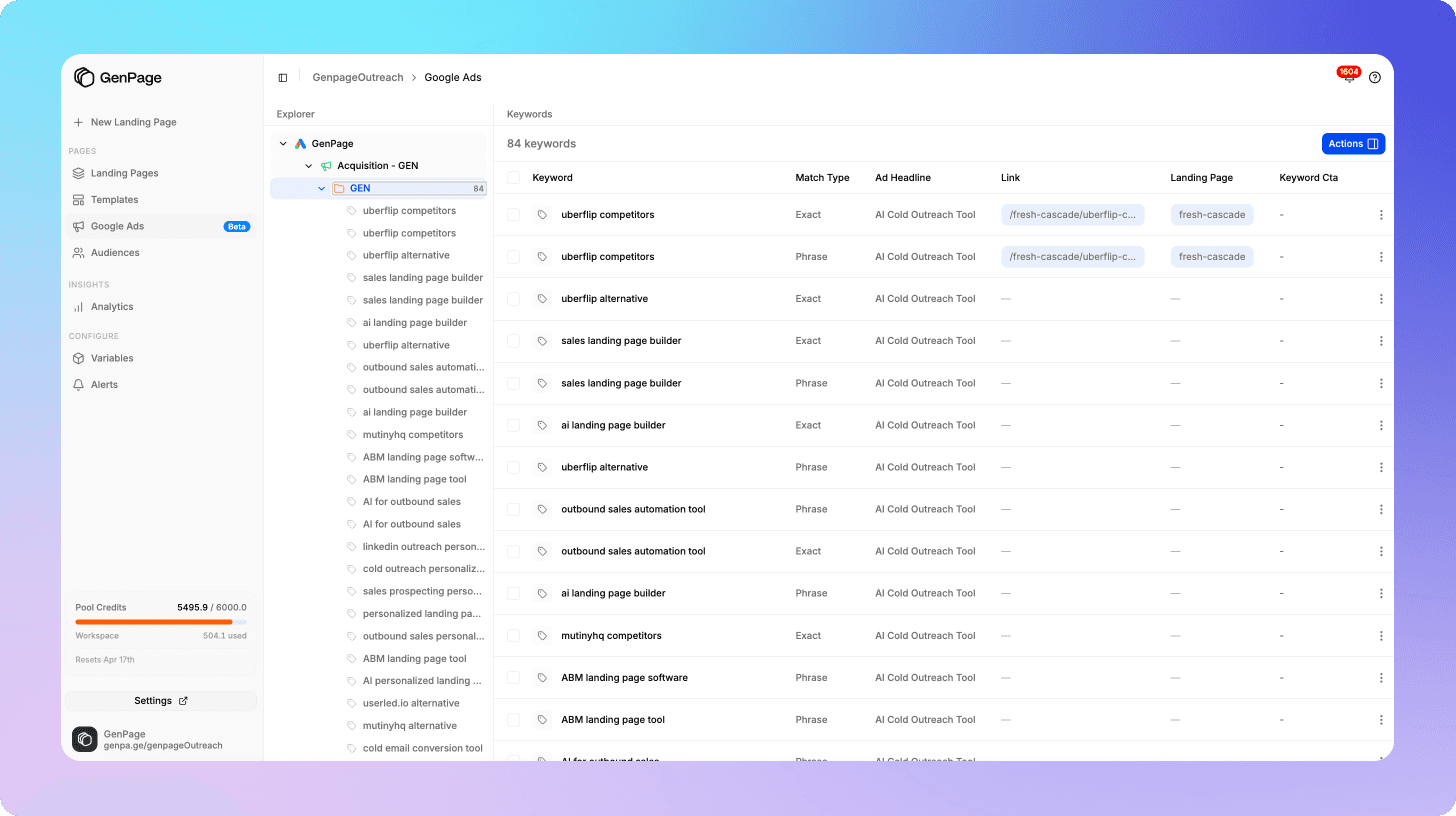
The personalization runs at the element level across headline, subheading, body copy, case study selection, and CTA - not just the headline. Which means the relevance signal Google is evaluating is coherent across the entire page, not just the first line.
This is the workflow I wish I'd had at my previous company. We were spending $40K/month on ads and manually managing ten landing pages with a custom UTM script. The coverage gap was costing us in Quality Score penalties and conversion rate on everything outside our top keywords.
The compounding return of fixing this before scaling spend
Here's the counterintuitive case for prioritizing landing page relevance over budget increases - and it's a case that should resonate with any CMO looking at ROAS targets.
When you fix landing page experience first:
Quality Score rises → CPC falls → the same budget buys more clicks
Conversion rate rises → more of those clicks become leads or trials
CAC falls → the channel becomes more defensible and scalable
Google's algorithm rewards the improved engagement → impression share grows
When you scale spend first without fixing it:
You buy more clicks at the same high CPC
Those clicks convert at the same low rate
CAC stays elevated or rises
Google sees no improvement in engagement signals
Quality Score stays low, keeping CPC high
The math strongly favors fixing the page before increasing the budget. Not because budget doesn't matter - it does - but because every dollar of budget efficiency you unlock through better Quality Score compounds across your entire account, on every keyword, indefinitely.
Spend more by all means. But fix this first. Your ROAS will thank you.
Ready to stop paying the Quality Score tax? Start free today and have intent-matched landing pages running across your Google Ads campaigns before your next billing cycle.
Frequently Asked Questions
What is a good Quality Score for Google Ads?
A score of 7 or above is generally considered good and indicates your keyword, ad, and landing page are well-aligned. Scores of 8–10 typically result in a CPC discount relative to your maximum bid. Scores below 5 - particularly combined with a Below Average landing page experience rating - represent a meaningful cost premium and should be prioritized for optimization.
How long does it take for Quality Score to improve after fixing landing pages?
Google re-evaluates landing page experience on a rolling basis. Most accounts see measurable Quality Score improvements within two to four weeks of deploying better-matched landing pages, as both Google's crawlers and behavioral signals update. CPC reductions tied to the improved score typically follow shortly after.
Does changing the landing page headline alone improve Quality Score?
It helps, but it's not sufficient on its own. Google evaluates relevance across the full page - headline, body content, metadata, and behavioral signals like bounce rate and time on page. Dynamic text replacement in the headline without matching the rest of the page content leaves a relevance gap that limits the Quality Score improvement you can achieve.
How many landing page variants do I actually need?
You don't need a custom template for every keyword - you need one per distinct intent cluster. Group your keywords by the underlying question, desired outcome, and buyer profile they represent. For most mid-market SaaS accounts running broad campaigns, three to eight intent clusters covers the majority of spend. Within each cluster, dynamic content personalization handles keyword-level variation without requiring additional page templates.
Will a higher Quality Score automatically improve my conversion rate?
Quality Score improvement and conversion rate improvement are correlated but distinct. A higher Quality Score means Google considers your page more relevant to the searcher - and a more relevant page will generally convert at a higher rate. But Quality Score is a Google-side signal; your conversion rate is determined by what the visitor actually experiences on the page. The fix that addresses both simultaneously is intent-matched landing page content.
Can I improve Quality Score without building new pages?
Partially. You can improve Expected CTR and Ad Relevance through ad copy optimization without touching landing pages. But if your landing page experience is rated Below Average, you cannot meaningfully improve your overall Quality Score without addressing the page. The landing page experience component is not fixable from the ad side.
Does page speed affect Quality Score?
Yes, indirectly. Page speed is a factor in landing page experience - slow pages produce poor engagement signals (high bounce rates, low time on page) that feed negatively into Google's assessment. Core Web Vitals performance is worth auditing alongside content relevance when diagnosing a low Quality Score.