

You paid for the click. Then you sent them to your homepage.
Someone types a specific problem into Google. They read your ad, decide it might be the answer, and click. You are charged somewhere between three and fifteen dollars for that moment.
Thirty seconds of intent, bought and paid for.
And then they land on a page with fifteen navigation links, a hero banner about your company, three different audiences being addressed at once, and no direct answer to the thing they just searched for.
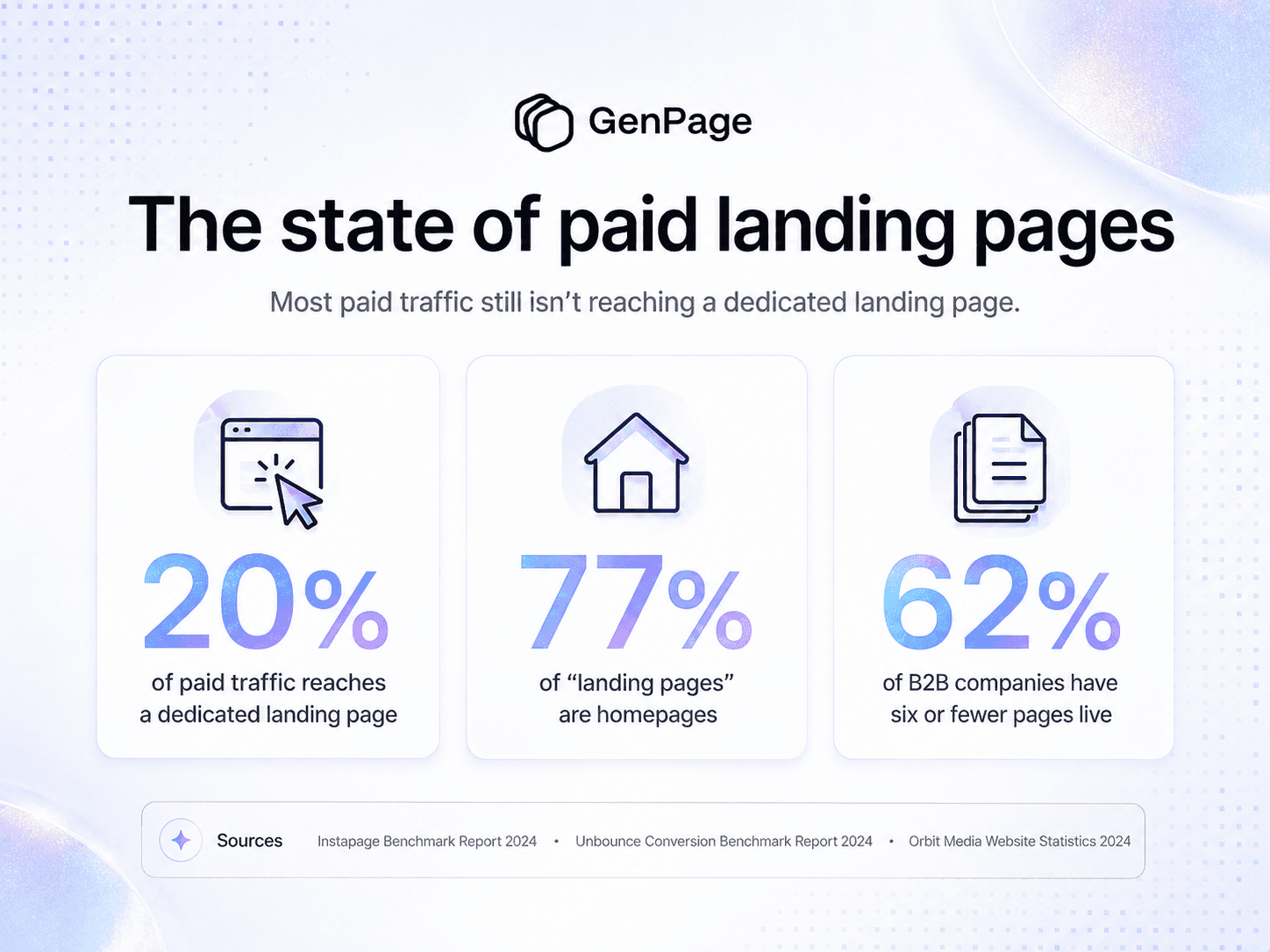
This is not an edge case. Only about 20% of paid traffic is sent to a landing page built for the campaign that produced it. The other 80% arrives somewhere generic.
The supporting numbers are worse than most people expect. 77% of pages that get counted as "landing pages" are actually home pages. 44% of B2B companies send paid traffic to their homepage. Among B2B companies that use landing pages at all, 62% have six or fewer live in total.
Six pages. For a paid program that might span dozens of ad groups and hundreds of keywords.
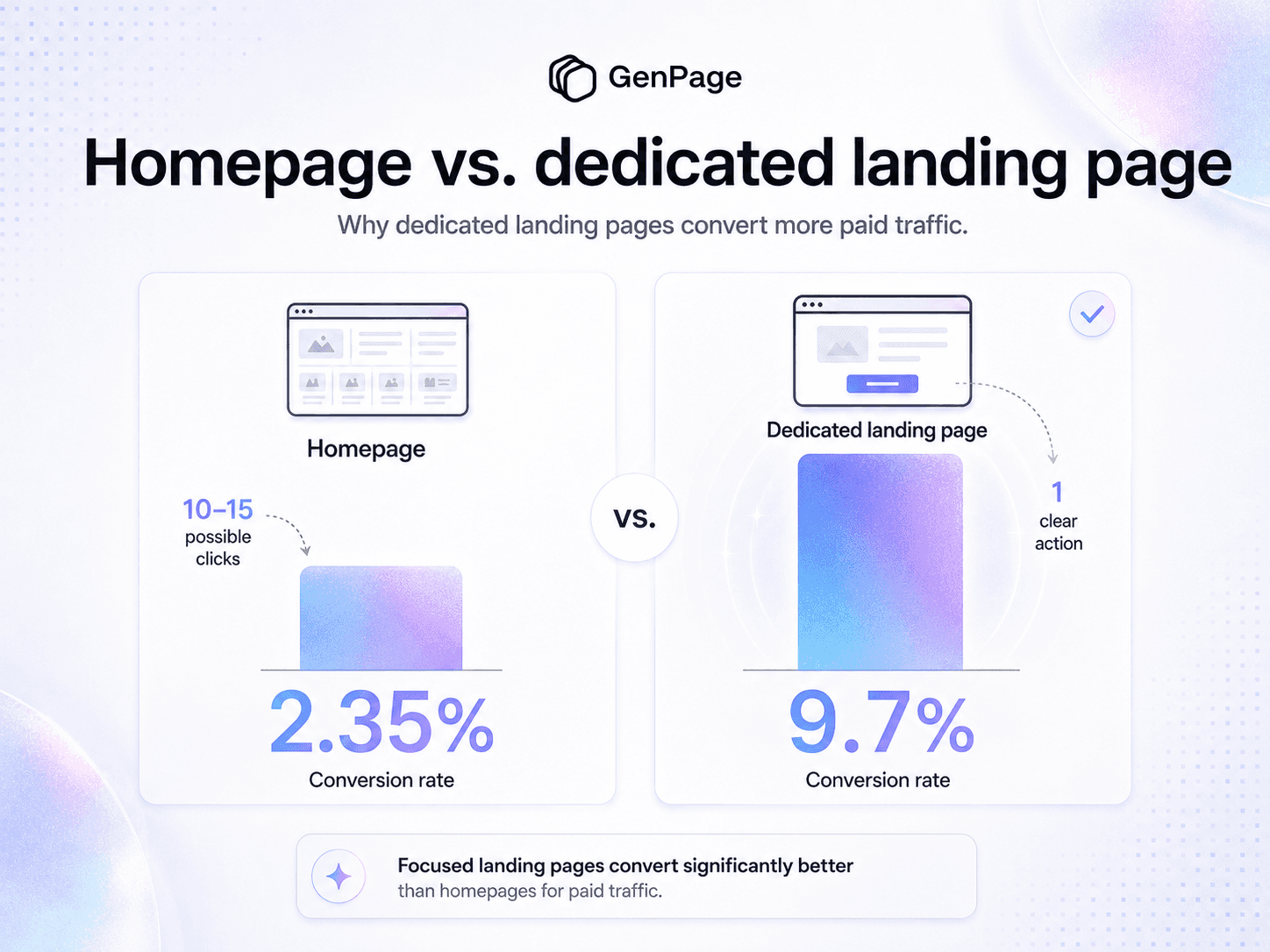
What that costs is not subtle. Dedicated landing pages convert at 9.7% on average. Homepages convert at 2.35%. Same traffic, same spend, roughly a quarter of the output.
So when the conversation turns to dynamic text replacement and keyword-level personalization, it's worth noting those are already advanced techniques by market standards. Only about 27% of marketing decision-makers use any automation for building or personalizing landing pages at all. Most of the market hasn't reached the starting line, let alone the finish.
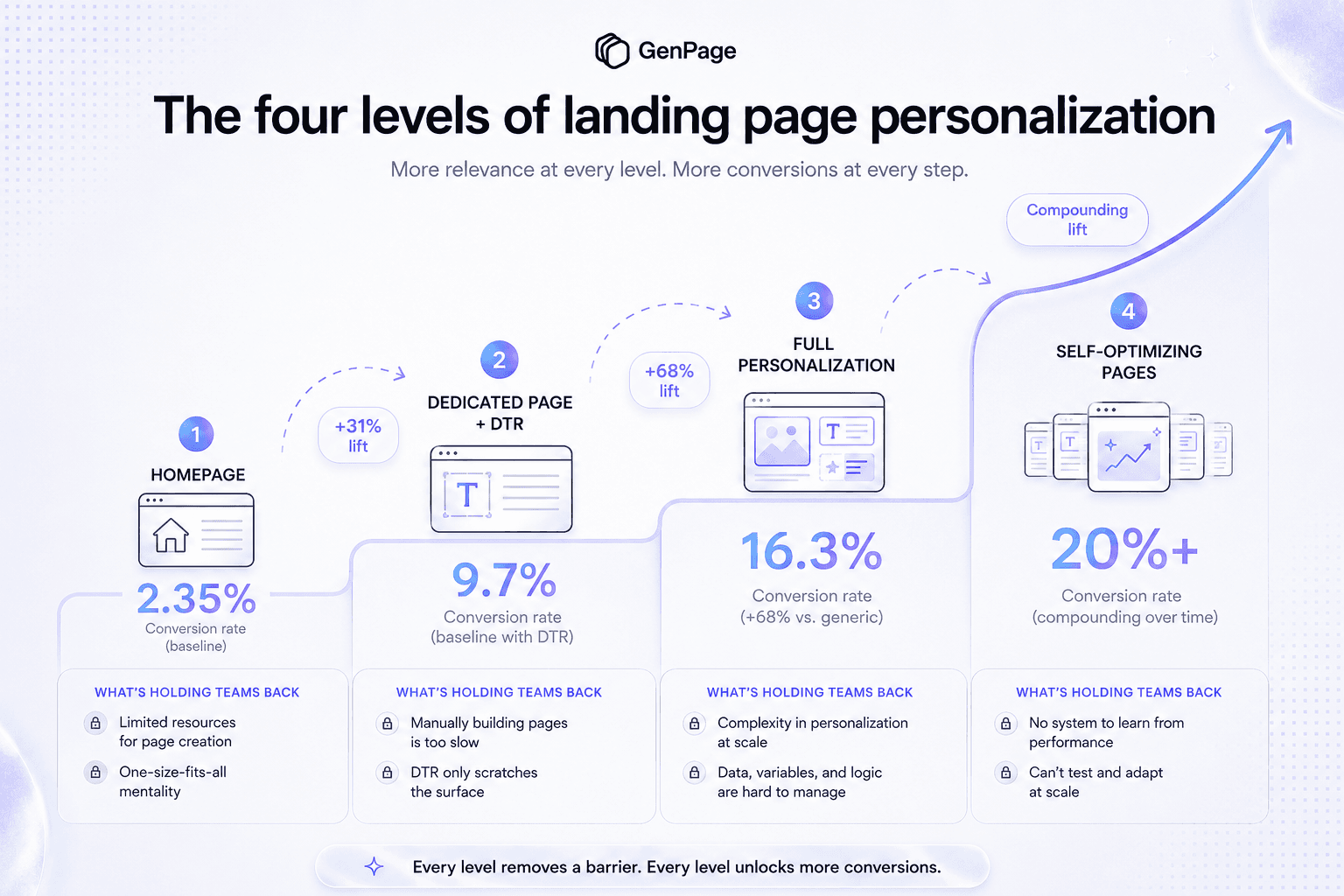
There are four levels to this. Each is worth a meaningfully different amount, each is blocked by a different problem, and knowing which one you're on is the most useful thing you can establish about your paid program this quarter.
Level 1: No personalization - the homepage problem
This is where most accounts sit, and it is by far the most expensive place to be.
A homepage is designed to serve everyone: investors, job candidates, existing customers, journalists, and prospective buyers at every stage. It introduces the brand broadly and offers navigation so people can find their own way.
That's the correct design for organic traffic. It's close to the worst possible design for a paid click, where someone arrived with one specific need and you paid several dollars for the privilege.
The conversion math is unambiguous. Dedicated landing pages convert at 9.7% on average versus 2.35% for homepages. Unbounce's research puts the gap as high as 300%. Agency data commonly cites 2x to 5x higher conversion on dedicated pages for paid traffic.
One documented example from a local services campaign: traffic sent to a dedicated landing page converted at 28.94% over 120 days at $28 per lead, while a comparable campaign sending traffic to a homepage converted at 7.16% over the same period.
The mechanism is simple. A homepage presents ten to fifteen possible next clicks. A landing page presents one. When people face too many options, they tend to freeze and choose nothing - so the visitor you just paid for leaves without converting, and Google reads the fast exit as a negative engagement signal that feeds back into your Quality Score.
Why teams stay here: building dedicated pages requires design and development resources, and there's always something more urgent. The homepage already exists and technically works. So the campaign launches pointing at it, and the "we'll build proper landing pages next quarter" plan quietly never happens.
If you're at Level 1, everything else in this post is secondary. Moving to a dedicated page is a roughly 4x conversion improvement. Nothing else on this ladder comes close to that.
Level 2: Dynamic text replacement - better, and still only halfway
Level 2 is where the more sophisticated accounts operate. You have dedicated pages, and you've added dynamic text replacement so the page reflects the search that produced the click.
Two terms worth separating, because they get used interchangeably:
Dynamic Keyword Insertion (DKI) is a Google Ads feature that inserts the triggering keyword into your ad copy. It affects the ad, not the page.
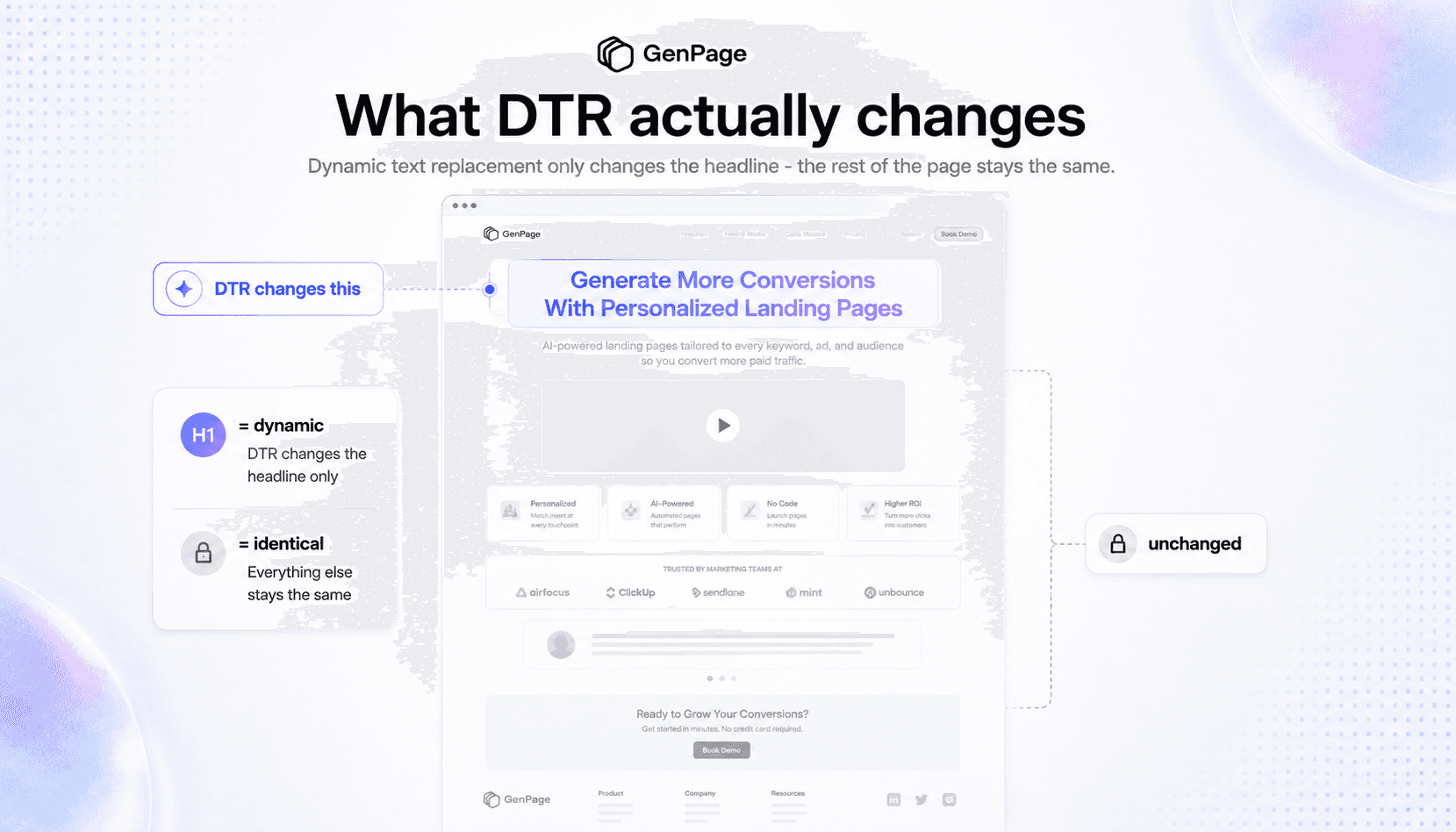
Dynamic Text Replacement (DTR) happens after the click. It reads URL parameters and swaps corresponding text on your landing page - usually the headline, sometimes the subheading or CTA.
Used together, they create continuity from search to ad to page. And it genuinely works.
ConversionLab ran a test for Campaign Monitor where the only change was matching a single verb in the headline to the searcher's query — showing "design" instead of "build" when someone searched "design on-brand emails." The result was a 31.4% increase in signups, validated at 100% significance.
Broader industry data puts dynamic personalization lift in the 10–25% range on average, based on Apexure's work across 3,000+ pages and 300+ clients.
Reaching Level 2 is a real achievement, and if you're here you're ahead of most of the market.
But it's a ceiling, not a destination - and the ceiling is lower than it appears.
Level 3: Full personalization - roughly double the lift
Here's the number that reframes Level 2.
KlientBoost built fully customized landing pages for their B2B client Docket and saw a 68% increase in conversions versus the generic pages the client had been running.
Same category of problem as the Campaign Monitor test. Roughly double the lift.
The gap between 31% and 68% is the gap between swapping a word and building a page that actually answers the search.
Why DTR captures only half: a string is not an intent
DTR treats the keyword as a string to display. It takes the words someone typed and puts them somewhere on your page. What it cannot do is understand what those words mean about the person who typed them.
Consider three searches that might reasonably sit in the same ad group:
"landing page builder"
"Unbounce alternative"
"landing page personalization for Google Ads"
DTR handles all three identically: it drops the phrase into your H1 and leaves everything else untouched. Each visitor sees their own search term at the top of a page that is otherwise the same page everyone else gets.
But these are three completely different people.
The first is early: defining the category, figuring out what tools exist. They need education and a low-commitment next step.
The second has already decided the category is worth buying into and has a specific incumbent in mind. They need direct comparison, differentiation, and a reason to switch. Serving them a "what is a landing page builder" explainer is actively wrong.
The third knows exactly what they want and has a specific application in mind. They need that use case addressed directly, with proof from teams doing the same thing.
Three intents. Three genuinely different pages. One string swap doesn't cover it.
This is what the 31% versus 68% gap represents. DTR captures the relevance that comes from recognition - the visitor sees their own words and friction drops. Full personalization captures the relevance that comes from comprehension - the page understands why they searched and answers it.
It's worth noting that Instapage, a DTR vendor, made this same argument years ago. Their framing: using DTR means you don't create separate personalized pages for each audience segment - you make one page cover multiple keywords instead. An accurate description of the trade-off, from a company that sells the feature.
Level 4: Self-optimizing pages - the only level that doesn't decay
Levels 1 through 3 all describe the same kind of thing: how relevant your page is on the day you build it.
That's worth noticing, because it means every one of them is a static end state. You do the research, make your best judgments about messaging and proof and offer, ship the page - and then it's frozen. Whatever you believed about your buyer on the day you built it is what that page will keep saying for as long as it's live.
Every page you ship is a hypothesis. Levels 1 to 3 never test it.
This is also the mechanism behind the decay problem covered in the next section. A page doesn't rot because it was built badly. It rots because it was built once.
Level 4 is the page that keeps improving after launch without anyone opening a ticket.
Reaching Level 3 is what breaks manual A/B testing
Here's the part that most CRO advice misses, and it's the reason Level 4 isn't optional once you've reached Level 3.
Classic A/B testing needs statistical significance, and statistical significance needs volume. A test on a single high-traffic page can accumulate enough conversions to call a winner in a reasonable timeframe.
But Level 3 deliberately fragments your traffic. That's the entire point: you've split visitors across segments and keyword variants so each person sees something built for them. Which means the traffic that used to concentrate on one page is now distributed across dozens, and no individual variant accumulates enough volume to reach significance in any useful timeframe.
Personalization and experimentation, under the traditional model, are in direct tension. The more precisely you personalize, the less able you are to test what you've built.
Most teams resolve this tension by quietly abandoning testing. They reach Level 3, ship their variants, and stop running experiments because the numbers never reach significance. The pages are more relevant than they've ever been and nobody has any idea which version of each one is best.
What self-optimization does instead
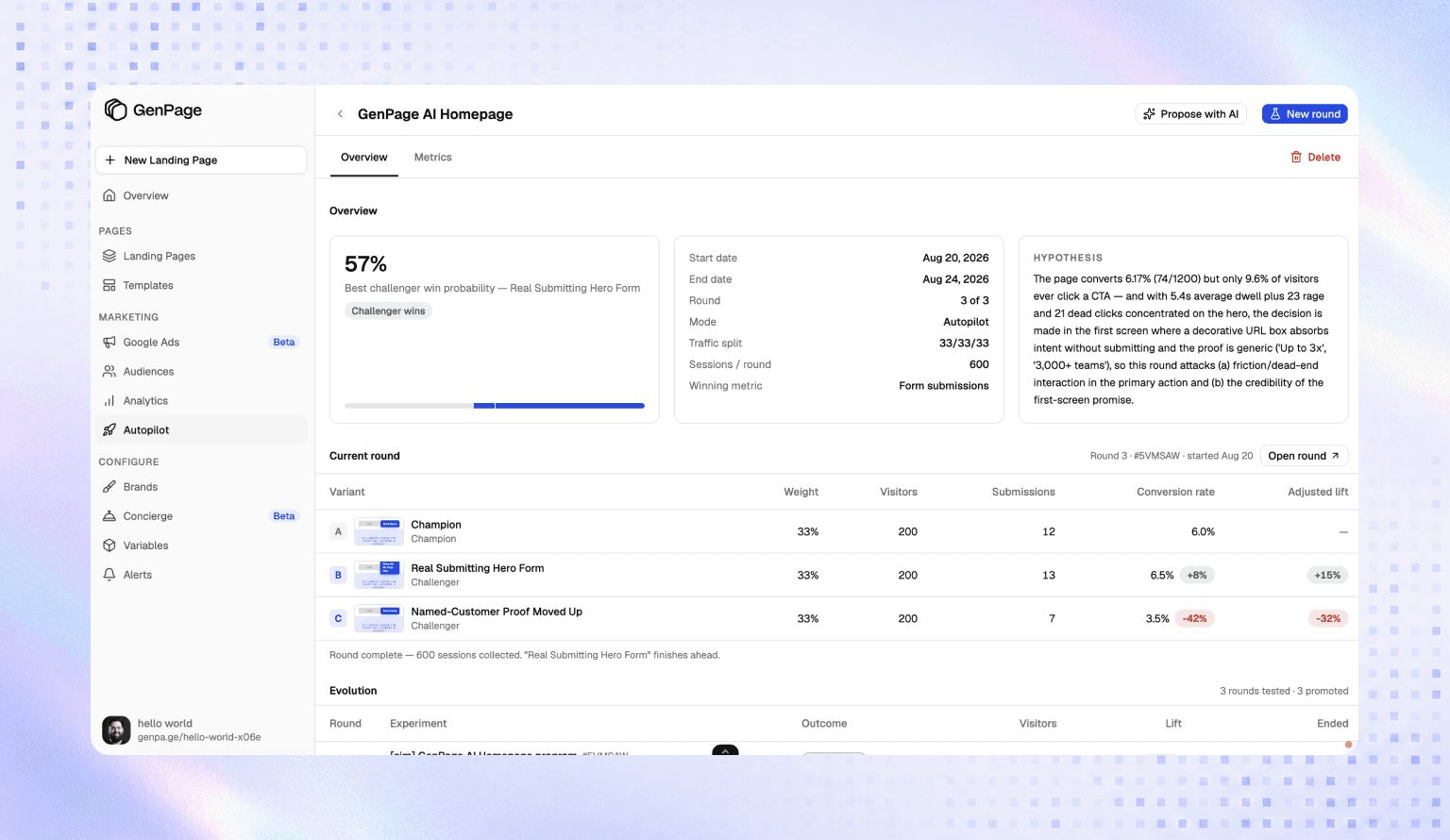
GenPage Autopilot handles this as a continuous process rather than a series of discrete experiments.
The AI generates new variants of a page, splits sessions across them automatically, measures conversion performance, and progressively concentrates traffic on what's working - converging on a winning variant over a defined number of rounds rather than requiring you to design a test, wait for significance, read the results, and manually implement the change.
Nobody has to decide what to test. Nobody has to build the variant. Nobody has to check whether the result reached significance. The loop runs whether or not anyone on your team has bandwidth this month, which is the entire point, because bandwidth is the thing that was never available.
The practical difference: at Levels 1 to 3, your conversion rate is set on launch day and drifts downward as the page ages against a changing market. At Level 4, launch day is the worst that page will ever perform.
That's why it's better understood as a slope than a step. Moving from a homepage to a dedicated page is a one-time roughly 4x. Adding DTR is a one-time ~31%. Full personalization is a one-time ~68%. Self-optimization isn't a bigger one-time number - it's the only level that keeps paying after the month you implemented it.
The real reason teams get stuck: pages rot
Every level of this ladder is blocked by the same thing, and it isn't strategy. Nobody is confused about whether a dedicated page beats a homepage.
The blocker is that landing pages are expensive to build and, more importantly, expensive to own.
I've watched this pattern repeatedly with mid-market and upmarket customers - companies managing pages in Webflow or WordPress, running meaningful paid budgets, with capable marketing and engineering teams.
They build out a few dozen keyword variants. It takes weeks of planning and building per page, but they get there. Pages go live. Performance improves.
And then nothing happens to them for a very long time.
Not because anything broke. Because updating them is nobody's favorite task and everyone is busy. Marketing has campaigns to run. Devs have a product roadmap. Every content change means opening a ticket, waiting in a queue, and then repeating the same edit across dozens of pages by hand.
So when the company launches a new product, the variants don't reflect it. When pricing changes, half the pages are wrong. When positioning shifts, the paid pages still carry last year's message. When a page underperforms, the optimization that would fix it competes with everything else in the queue and loses.
The pages don't fail. They go stale. And nobody notices for months, because there's no alert for "this page is now subtly out of date."
Meanwhile the ad spend keeps flowing. Thousands of dollars a month routed to pages built for a version of the business that no longer exists.
That's the actual cost. Not the build time - the slow leak from pages that should be optimized constantly and instead sit untouched because touching them is painful.
The cost of landing page variants was never the build. It was the ownership. Any approach to climbing this ladder that doesn't solve for ongoing maintenance produces the same outcome: an impressive launch followed by two years of quiet decay.
Which is why Level 4 matters more than its position on the ladder suggests. It isn't a bonus tier for teams who've mastered the first three - it's the only one that addresses why the first three erode. Everything below it depends on someone finding time to maintain and optimize it. Level 4 doesn't.

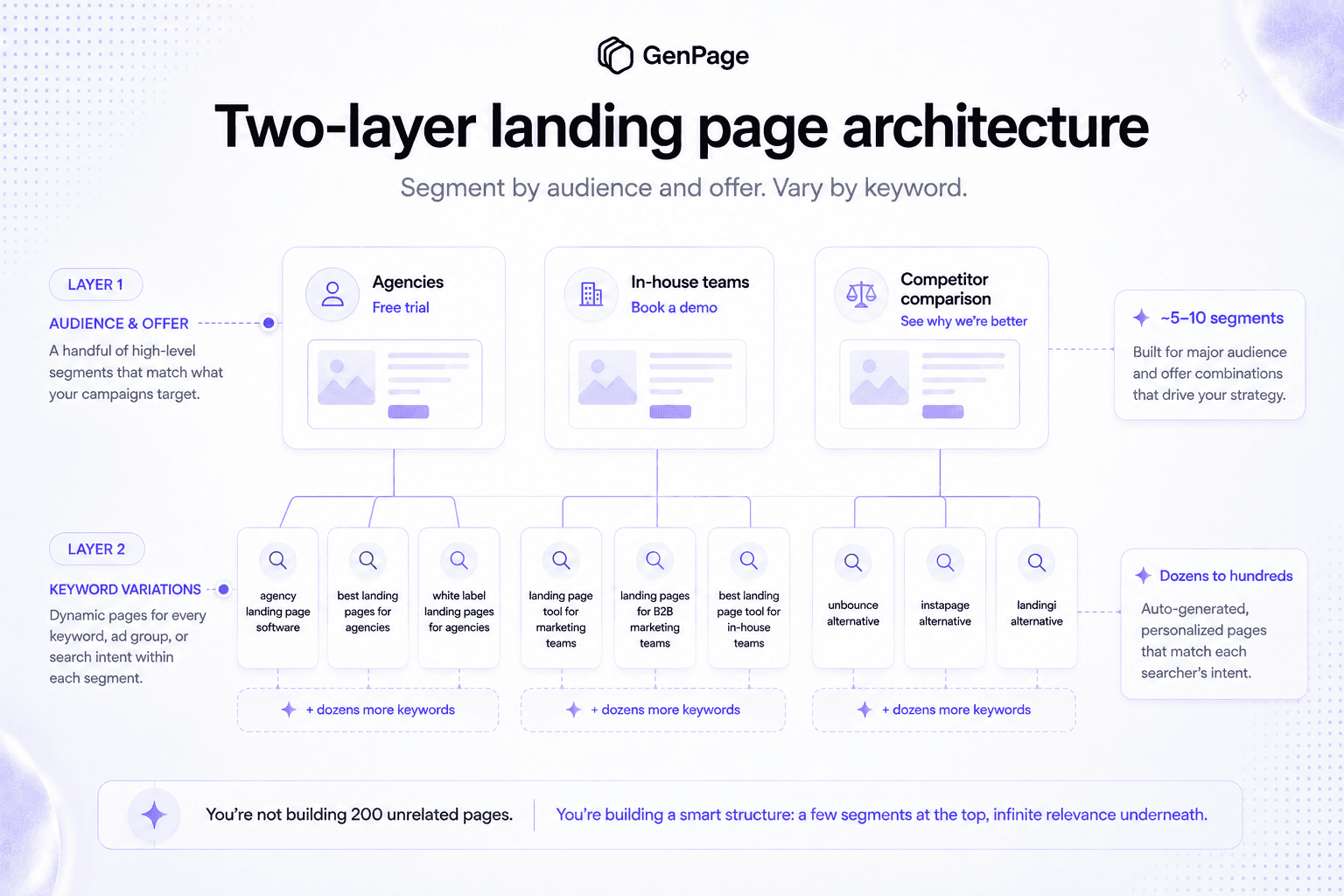
The architecture for Level 3: two layers
The conventional advice - including advice we've given previously - is to group ad groups or keywords into three to five intent clusters and build one page per cluster.
That advice was a concession to production cost. When each page took weeks, the right number of pages was however few you could get away with.
Generation cost is now effectively zero, which means the constraint that produced that advice no longer applies. The better architecture has two layers.
Layer 1: Segment by audience or offer
This is the structural layer. Each segment gets a genuinely different page: different framing, different proof, different conversion path - because the underlying buyer or offer is different.
Segment by whichever dimension actually changes what the page needs to say:
By audience: industry, company size, role, or use case. A page for agencies and a page for in-house teams should not be the same page with different words. They have different economics, different objections, and different definitions of success.
By offer: free trial, demo, audit, resource download. The offer determines the page's entire structure and conversion logic. A demo page and a free-trial page have different friction profiles and need different reassurance.
By funnel stage: awareness, comparison, decision. A competitor comparison page and a category education page are different documents, not variants of one document.
This is where the real conversion lift lives. It's the difference between a page that recognizes your search and a page that understands your situation.
Layer 2: Vary per keyword within each segment
Inside each segment, generate individual variations for each keyword so the page speaks the same language as the search term that produced the click.
This is where DTR-style matching still matters - but applied inside a page that is already structurally correct for the visitor, rather than as a substitute for one. The headline, subheading, and body copy adopt the searcher's exact vocabulary, on a page whose framing, proof, and offer were already built for their segment.
The two layers compound. Layer 1 makes the page relevant to who they are. Layer 2 makes it feel written for the exact thing they typed.
The blueprint: getting to Level 3 with AI
Step 1: Audit where your spend is actually landing
Two things to pull.
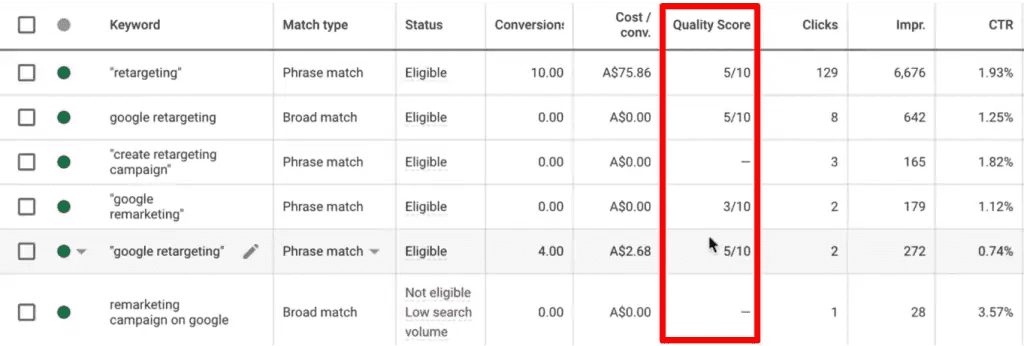
First, in Google Ads, add Quality Score, Landing Page Experience, Ad Relevance, and Expected CTR as visible columns on your keyword view. Export and sort by Landing Page Experience. Every keyword rated Below Average is Google telling you directly that the destination doesn't match the query.
Second - and this is the one most teams skip - pull your final URLs by ad group and count the distinct destinations. If a hundred ad groups point at four pages, and one of those pages is your homepage, you now know exactly which level you're operating at.
Cross-reference both against spend. High spend plus Below Average landing page experience is where you start.
Step 2: Define your segments before building anything
Using the two-layer model: what are your actual audience or offer segments? For most B2B accounts this lands between four and ten - not three, and not fifty.
For each segment, write down the primary message, the most relevant proof, the offer, and the objection to preempt. This is a spreadsheet exercise, not a design exercise, and it takes an afternoon.
Then map every ad group to a segment. Ad groups that don't map cleanly usually indicate the ad group itself is too broad - worth fixing regardless.
Step 3: Connect your brand so pages don't look generated
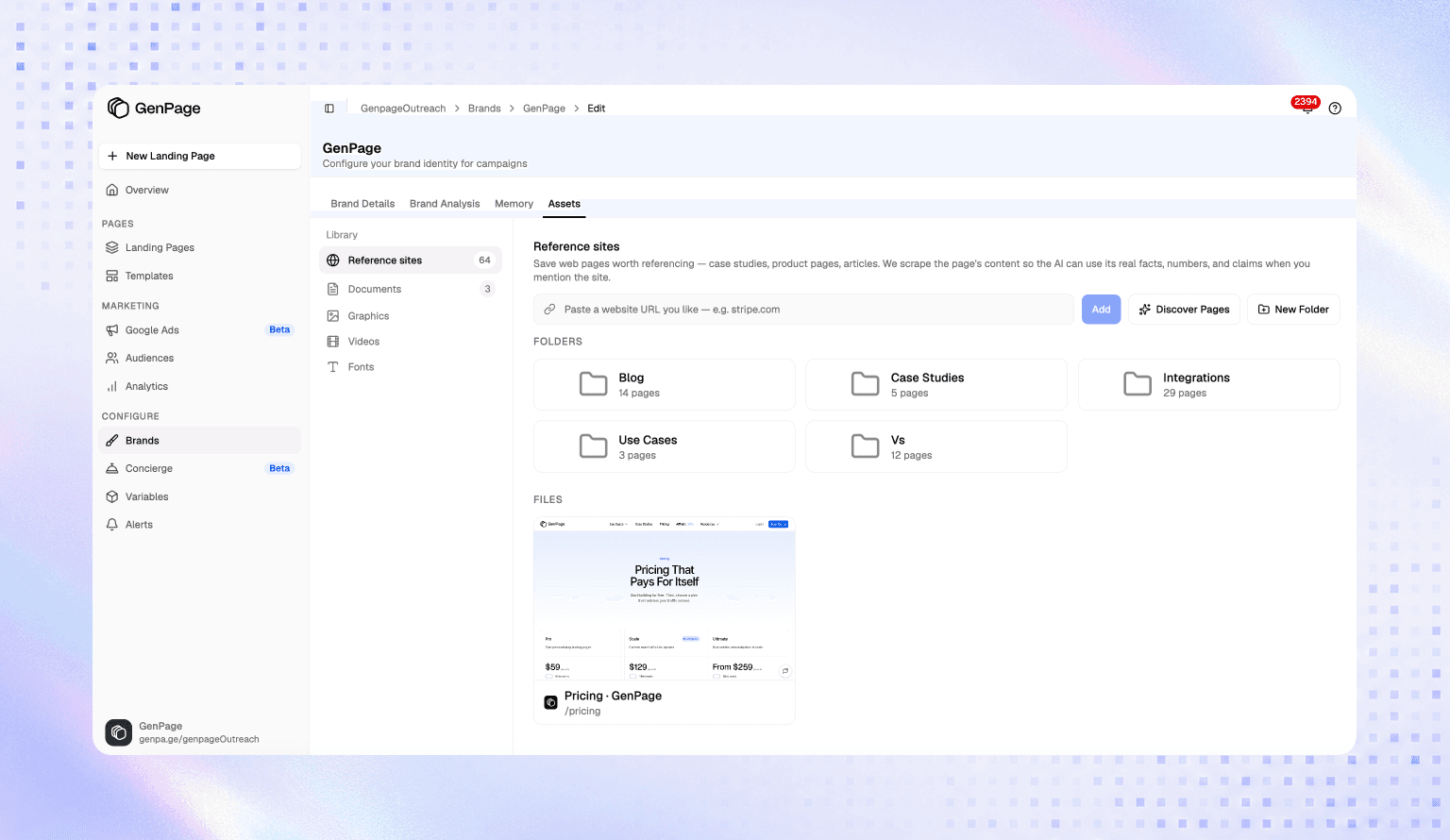
Connect your domain to GenPage. It crawls your site and builds a brand profile - positioning, tone of voice, products, pricing, value propositions, plus your colors, typography, and visual language.
There's also a knowledge base where you can upload internal material: sales decks, battlecards, objection-handling docs, product documentation. The language your sales team uses in live deals is usually sharper than what's on your website, and feeding the AI that material makes generated pages read like your best rep wrote them rather than like a summary of your homepage.
Step 4: Build one base page per segment
For each segment from Step 2, build a base page. In GenPage you can generate it from a prompt, replicate an existing high-performing page from a URL, upload a design file, or start from a template.
Spend real time here. Every keyword variant inherits its base page's structure and design quality — get one base page genuinely right and every variant beneath it clears that bar. Ship a mediocre base page and you've mass-produced mediocrity.
Replicating one of your existing best-converting pages from a URL is usually the fastest route to a base page that already looks unmistakably like you.
Step 5: Connect Google Ads and map keywords to variants
Link your Google Ads account so GenPage can read your campaign, ad group, and keyword structure directly. This removes the need to hand-configure UTM parameters for every ad group.
Then map keywords to segments and let the AI generate the keyword-level variation within each. The generated copy draws on three context layers simultaneously: your brand profile and knowledge base, the base page for that segment, and the specific keyword and intent driving the click.
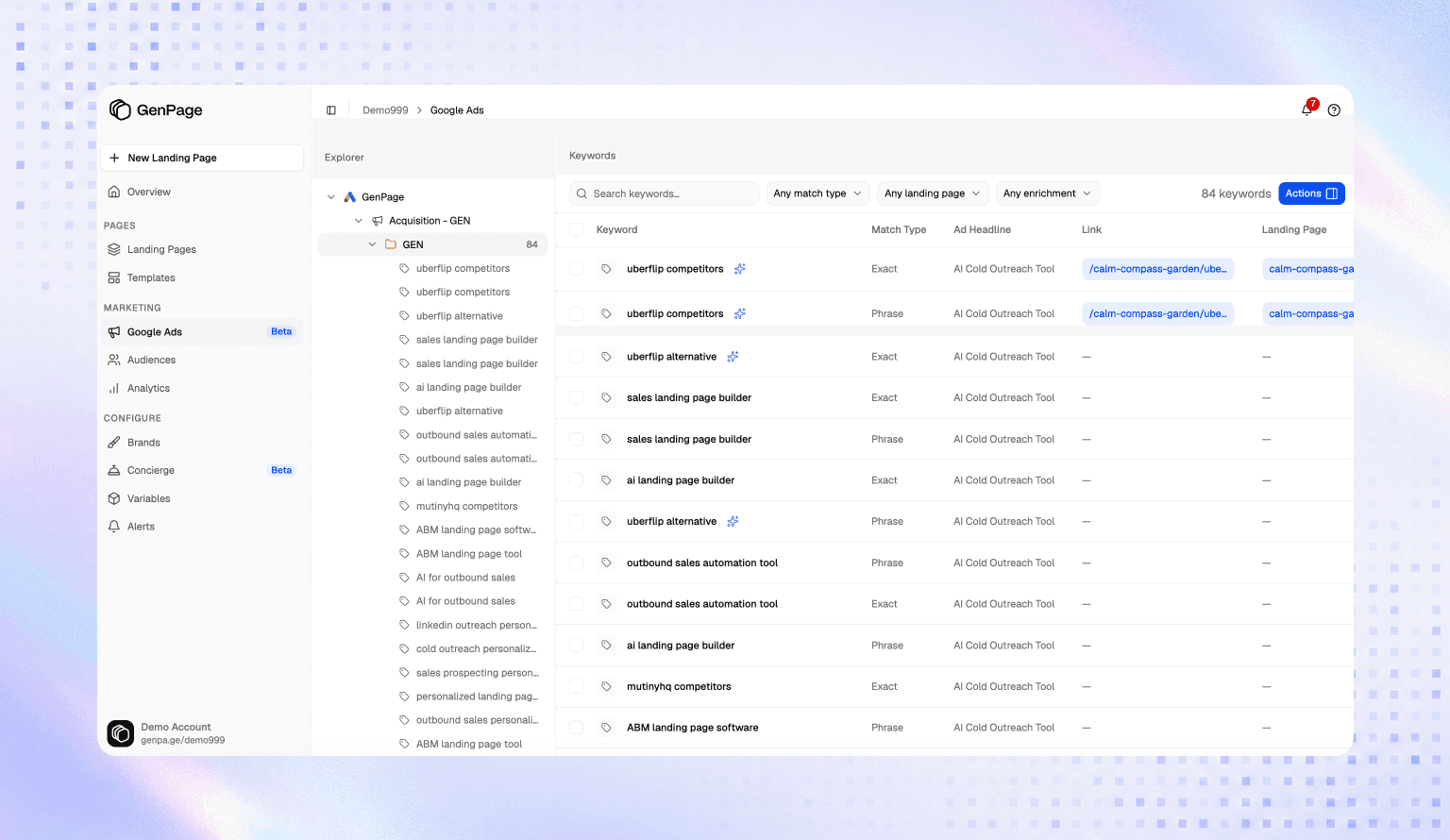
Step 6: Publish and push URLs back to Google Ads
Deploy as a subfolder on your existing domain via the GenPage SDK (yourdomain.com/lp/keyword-segment) or a dedicated subdomain. Pages render as native pages on your site, which matters for brand continuity and for how Google assesses them.
GenPage pushes the updated destination URLs back to your Google Ads campaigns directly - no manual URL management in the Ads interface.
Step 7: Solve for maintenance from day one
This is the step that determines whether you're still getting value in twelve months.
Because pages are generated from a shared base and a shared brand profile rather than hand-built as independent artifacts, updating them is a different kind of operation. Change the base page or update the brand profile and the change propagates. A new product, a pricing change, a positioning shift - one edit rather than forty.
Set a recurring review, monthly is reasonable, where you check that base pages still reflect the current offer and that underperforming segments get iterated on. The whole reason this is feasible is that acting on the review no longer requires a dev ticket.
That covers accuracy - keeping pages true to the current business. It doesn't cover performance, which is the other half of what goes stale. For that, turn on Autopilot and let the optimization run continuously rather than depending on someone having a spare afternoon. A page that's accurate but never tested is still a hypothesis nobody checked.
Step 8: Track by segment, not just in aggregate
GenPage's analytics give you conversion rate, engagement, heatmaps, and session replays per page - so you can compare across segments and keyword variants rather than looking at one blended number.
Keep your existing stack connected too. GenPage supports custom script injection, so Google Ads conversion tracking, GA4, and other tools fire normally and flow into your existing dashboards.
The reporting question that matters: which segments convert best, and which keyword variants within them are underperforming? That's what tells you where to iterate next.

Make sure they don't look generated
One failure mode worth calling out, because it's the objection I hear most from performance marketers who are otherwise sold on the approach.
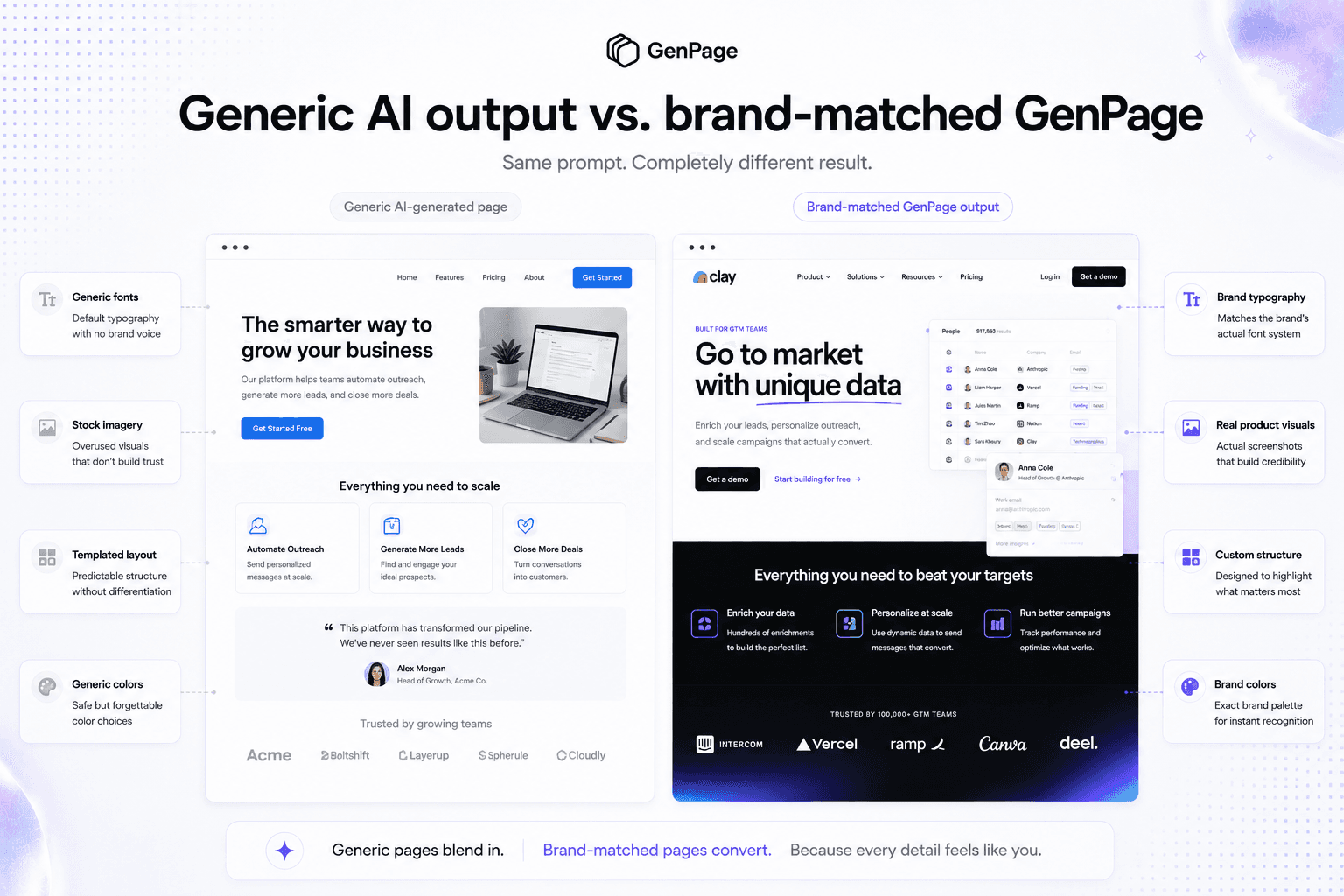
Most AI-generated pages look like AI-generated pages. Generic layout, default typography, stock imagery, spacing that matches nothing else you've published. Technically fine, immediately forgettable.
In paid search this costs you twice. It costs conversions, because a page that looks templated reads as low-effort and undermines trust. And it costs Quality Score indirectly, because landing page experience is a direct input into Quality Score and poor engagement signals - fast bounces, short sessions - feed back into it.
The bar to clear: open your homepage and a generated variant side by side. If they look like they came from different companies, the brand layer isn't doing its job. A visitor should have no reason to suspect the page was generated at all.
Three things that get you there: load your brand profile properly before generating anything, invest real effort in each base page since every variant inherits it, and use your own product screenshots and imagery rather than stock assets.
What each level does to Quality Score and CPC
Worth being explicit about the economics, because this is the argument that gets budget approved.
Quality Score is calculated per keyword and includes landing page experience as one of three components. A poor landing page experience score drags down overall Quality Score even when click-through rate and ad relevance are strong — and higher Quality Scores mean lower CPCs for equivalent ad positions.
The compounding runs in both directions. A homepage destination produces fast bounces, which Google reads as a negative engagement signal, which suppresses landing page experience, which raises CPC, which makes every subsequent click more expensive. Matched pages reverse the cycle.
Most accounts see measurable Quality Score movement within two to four weeks of deploying better-matched pages, as crawlers re-evaluate and behavioral signals update. The CPC reduction follows shortly after and applies to every click on the affected keywords indefinitely.
Common mistakes to avoid
Optimizing ad copy while ignoring the destination. Most teams spend disproportionate effort on ads and almost none on where the click lands. If 80% of your traffic goes to a page that wasn't built for it, ad optimization is polishing the wrong surface.
Treating DTR as the finish line. The 31% lift is real and worth capturing. It's also roughly half of what's available. If your post-click strategy is a DTR script on the H1, you've done the easy half and stopped.
Building segments around product taxonomy instead of buyer intent. A page per feature is topic segmentation. A page per audience-and-offer combination is intent segmentation. Two people searching for the same feature can be in completely different buying situations.
Launching variants without a maintenance plan. The one that kills programs quietly. If updating a page requires a dev ticket, your variants will be out of date within two quarters and nobody will notice.
Generating pages that look generated. A page that reads as templated undermines the relevance work you just did.
Over-segmenting before validating. Four to ten segments covers most B2B accounts. Start there, measure which convert, expand into the ones that earn it.
Treating launch day as the finish line. Whatever you shipped is your best guess, not a validated answer - and once traffic is fragmented across segments and variants, manual testing rarely reaches significance. If nothing is optimizing your pages continuously, their performance is set on day one and declines from there.
Conclusion
There are four levels, and the honest assessment for most accounts is that they're on the first one.
Level 1 is a homepage or a page built for something else, converting around 2.35% where a dedicated page would convert near 9.7%. Level 2 is a dedicated page with dynamic text replacement, worth roughly 31% on top. Level 3 is genuine intent-matched personalization, worth roughly 68% against generic - about double what DTR delivers. Level 4 is the page that keeps improving after you've stopped looking at it.
The first three are one-time gains. The fourth is the only one that compounds, and the only one that solves why the others decay.
The reason so few teams climb has never been that the strategy is unclear. It's that every level historically required more pages, more build time, and more ongoing attention than anyone had capacity for. So accounts launched at Level 1, occasionally reached Level 2, and whatever did get built slowly went stale while spend kept flowing to it.
That constraint is what changed. The architecture is a decision - segment by audience and offer, vary by keyword within each, let the pages optimize themselves from there - and the production cost that used to make it impractical is largely gone.
Find out which level you're on first. For most accounts, that's the most valuable thing they'll learn about their paid program this quarter.
Ready to move up a level? Book a meeting with us and have intent-matched pages running across your Google Ads campaigns before your next billing cycle.
Frequently Asked Questions
Should I send Google Ads traffic to my homepage?
Almost never. Dedicated landing pages convert at 9.7% on average versus 2.35% for homepages, and Unbounce's research puts the gap as high as 300%. A homepage offers ten to fifteen possible next actions and is designed to serve every audience at once; a landing page offers one action matched to the ad that produced the click. Despite this, 44% of B2B companies still send paid traffic to their homepage.
What is the difference between dynamic keyword insertion and dynamic text replacement?
Dynamic Keyword Insertion (DKI) is a Google Ads feature that inserts the triggering keyword into your ad copy - it affects the ad, not the page. Dynamic Text Replacement (DTR) happens after the click, reading URL parameters and swapping corresponding text on your landing page. DKI makes the ad feel relevant to the search; DTR keeps the page aligned after the click. Neither changes the underlying page structure, messaging, proof, or offer.
Does dynamic text replacement actually improve conversion rates?
Yes. ConversionLab's test for Campaign Monitor showed a 31.4% increase in signups from matching a single verb in the headline to the searcher's query, at 100% significance. Broader industry data puts dynamic personalization lift in the 10–25% range on average. The limitation isn't that DTR doesn't work - it's that full page personalization captures roughly double, with one documented case showing 68%.
How many landing page variants do I need for Google Ads?
Think in two layers rather than a single number. Segment first by audience or offer - for most B2B accounts this produces four to ten structurally distinct pages, each with different framing, proof, and conversion path. Then generate keyword-level variations within each segment so copy matches the exact search term. You're not building 200 unrelated pages; you're building a handful of well-designed segments with automatic variation inside each.
Why do teams stop maintaining their Google Ads landing pages?
Because maintenance is nobody's favorite task and everyone is busy. Marketing has campaigns to run, developers have a product roadmap, and every content change means a ticket, a queue, and repeating the same edit across dozens of pages manually. The pages don't break - they quietly go stale while ad spend keeps flowing to them. New products don't get reflected, pricing changes leave pages inaccurate, and underperforming pages never get optimized. Solving for ongoing ownership matters more than solving for the initial build.
Can I create keyword-specific landing pages without a developer?
Yes. AI-native platforms like GenPage let marketers build base pages from a prompt, URL replication, file upload, or template, connect their Google Ads account to read campaign and keyword structure, and generate keyword-matched variants automatically. Pages publish to your own domain and updated destination URLs push back to Google Ads directly. No engineering involvement for the initial build or ongoing updates.
Do keyword-matched landing pages improve Quality Score?
Yes. Landing page experience is a direct input into Quality Score, evaluated per keyword alongside expected CTR and ad relevance. When page content matches the keyword and ad that produced the click, relevance improves - which typically lowers CPC for equivalent ad positions. Most accounts see measurable movement within two to four weeks of deploying better-matched pages.
Why is A/B testing harder once you personalize landing pages?
Because personalization fragments your traffic by design. Classic A/B testing requires statistical significance, which requires volume per variant - but splitting visitors across segments and keyword variants means no single page accumulates enough conversions to call a winner in a useful timeframe. Personalization and traditional experimentation are in direct tension. Continuous AI-driven optimization resolves it by generating variants, splitting sessions automatically, and converging on winners over rounds rather than waiting for significance on each manual test.
What are self-optimizing landing pages?
Self-optimizing pages continuously test their own variants without manual setup. GenPage Autopilot generates new versions of a page, splits sessions across them, measures conversion performance, and progressively concentrates traffic on what performs best - converging on a winning variant over a defined number of rounds. The practical difference is that a conventional page performs at its launch-day level and declines as the market shifts, while a self-optimizing page treats launch day as its worst performance.
How do I stop AI-generated landing pages from looking generic?
Load your brand before generating anything - GenPage extracts your colors, typography, and visual language from your domain so pages inherit your actual design system rather than a default template. Beyond that: invest real effort in each base page, since every variant inherits its quality; use your own product screenshots rather than stock imagery; and compare a generated page against your homepage side by side. If they look like they came from different companies, the brand layer isn't configured properly.